Command window closes automatically
-
Hi, I’m having a problem using Freefem++ in Notepad++. The problem is that when I run my code, the command window opens and executes the code, but then closes automatically. If there’s an error or I want to see the result of a simple code, it won’t let me see it unless it has graphical output. I’ve been searching for a solution but haven’t found anything. Does anyone know a solution? I’m using the latest version of both Freefem++ and Notepad++.
-
@Fernando-Fernandez-Escalante ,
When you use the Run > Run…, it opens that command in a
cmd.exewindow.cmd.exe’s default is to close the window when it’s done executing. if you want it to stay, you could change Run =REAL_COMMANDtocmd /k REAL_COMMAND(whereREAL_COMMANDis the full content of your original Run) – but you’d have to manually close that window yourself. Or you could do something likecmd /c REAL_COMMAND && pause, so it will runREAL_COMMANDand then pause with “Press any key to continue…” – and so you can look at the output before continuing.Example:
cmd /c echo hi && pause
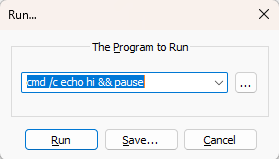
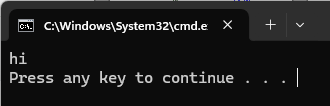
Alternatively, instead of running from the Run > Run, you could use a plugin like NppExec to run the program, which would put the results in its console window embedded in Notepad++, rather than in an external
cmd.exeterminal -
@PeterJones Using cmd /k REAL_COMMAND was able to fix it. I also tried cmd /c REAL_COMMAND && pause, but it didn’t work; I’m not entirely sure why. But I can now see the command window and close it manually. Thank you very much for everything.
-
Okay, I just saw that the problem with cmd /c REAL_COMMAND && pause is that if the code has an error, it doesn’t reach the pause point and therefore closes automatically. I don’t know if there’s a solution, but I’m leaving it out in case anyone knows or has the same question.
-
@Fernando-Fernandez-Escalante said in Command window closes automatically:
I don’t know if there’s a solution
Sorry, if you use a single
&instead of a double&&, it should do the pause no matter what – I should have checked which was which before I gave the answer. -
@PeterJones I just tried it and it works perfectly. Thanks again so much for the help.


Hello! It looks like you're interested in this conversation, but you don't have an account yet.
Getting fed up of having to scroll through the same posts each visit? When you register for an account, you'll always come back to exactly where you were before, and choose to be notified of new replies (either via email, or push notification). You'll also be able to save bookmarks and upvote posts to show your appreciation to other community members.
With your input, this post could be even better 💗
Register Login