Networking problem
-
I’ve come across an odd problem with file access in N++. I connected an old XP machine to my network - I had a heck of a time making it visible, needing to enable “SMB 1.0/CIFS File Sharing Support” for a newer machine. (I mention this because it probably has some bearing on the issue.) Anyway, I was copying files off the old machine, and happened to open one of the old files in N++ on my new machine. However, I found that whenever I switch to some other program with an XP file in the active N++ editor, when I come back to N++, it immediately spits out the two error messages below.
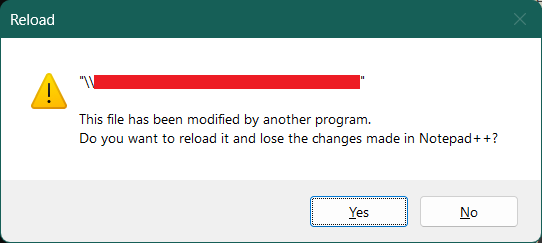
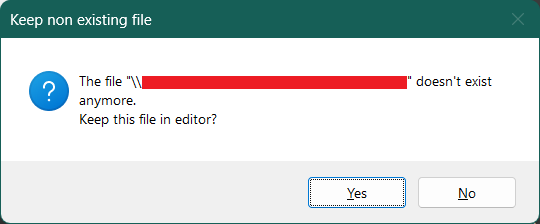
This must be some sort of XP or SMB1 problem, because I have no difficulty editing files from other machines - not that I do that very often; I tried it just to test. -
You really should have shared version information, or better the full Debug Info – as someone who’s been here years, you should know this is part of standard asking for help for esoteric issues. (I give this first, because after my first and second read of my post, I thought you were asking about running an ancient N++ on your ancient OS, and was going to chastise you for such… it wasn’t until I had started to draft a response and reread that I interpreted your question differently; I hope I’ve got it right, but since you were rather vague, I still may be misreading. Sharing Debug Info would have proven you were running N++ on the newer PC, and would have avoided confusion and misinterpretation.)
But, if I understand your text correctly, you are saying some modern(ish) Notepad++ on some modern(ish) OS is trying to access a SMB1 samba drive (that happens to be hosted on your XP machine).
Honestly, it doesn’t surprise me: MS stinks at networking, so given that SMB1 is pretty ancient and MS tries to avoid access them when at all possible, it is probably not sending Notepad++ up-to-date information.
IMO, your best bet is to use Explorer to copy from the SMB1 drive to a local drive on the machine before trying to access it with Notepad++, because I think it’s just too much of a leap for the OS to handle the connection between N++ and the barely-acknowledged SMB1 connection, otherwise.
-
Yeah, you’re right - I was just so frustrated with what at first seemed to be random error messages that I banged out the post without thinking. N++ is a big piece of my administrative arsenal, so when it seems to be failing me, I overreact. If you care anymore:
Notepad++ v8.7.1 (64-bit)
Build time : Oct 31 2024 - 00:48:56
Path : C:\Program Files\Misc. Shareware and Freeware\Notepad++\notepad++.exe
Command Line : “\\{REDACTED}”
Admin mode : OFF
Local Conf mode : OFF
Cloud Config : OFF
Periodic Backup : ON
OS Name : Windows 11 Home (64-bit)
OS Version : 23H2
OS Build : 22631.5768
Current ANSI codepage : 1252
Plugins :
ComparePlus (1.1)
DSpellCheck (1.5)
ExtSettings (1.3.1)
HexEditor (0.9.12)
HTMLTag (1.3.7)
JSMinNPP (1.2205)
mimeTools (3.1)
NppConverter (4.6)
NppEditorConfig (0.4)
NppExec (0.8.4)
NppExport (0.4)
PythonScript (2)
XMLTools (3.1.1.13)
_CustomizeToolbar (5.3)
One interesting, but equally pointless observation: if I switch N++ to showing a local file, I don’t get the errors, no matter how many XP files I have open in other tabs. -
Sounds like the bug I fixed for the v8.7.5, so try to update to any N++ v8.7.5+ (ideally to the latest, as of now v8.8.5)
-
@xomx, @TBugReporter
I am facing the same issue, most particularly with large files stored on the network. I work hybrid, and have this issue both at home (more network hops involved) and in the office. My debug info is below. The file cited in the command line is 4.9 MB (4952691 bytes), and is an example where I receive both of the error windows cited by @TBugReporter. Before I open a ticket with my helpdesk, I want to know if there is anything I am missing on the application configuruation level.
Thanks,
DanNotepad++ v8.8.8 (64-bit)
Build time: Nov 16 2025 - 20:55:01
Scintilla/Lexilla included: 5.5.7/5.4.5
Boost Regex included: 1_85
Path: C:\Program Files\Notepad++\notepad++.exe
Command Line: “J:\cba04archives\BlueExchange\CBABlue\archive\271benefits5010_Sun.txt”
Admin mode: OFF
Local Conf mode: OFF
Cloud Config: OFF
Periodic Backup: OFF
Placeholders: OFF
Scintilla Rendering Mode: SC_TECHNOLOGY_DEFAULT (0)
Multi-instance Mode: monoInst
asNotepad: OFF
File Status Auto-Detection: cdEnabledNew (for current file/tab only)
Dark Mode: OFF
Display Info:
primary monitor: 1920x1080, scaling 100%
visible monitors count: 2
installed Display Class adapters:
0000: Description - Intel® UHD Graphics
0000: DriverVersion - 31.0.101.2135
0001: Description - NVIDIA Quadro P520
0001: DriverVersion - 32.0.15.7357
OS Name: Windows 10 Pro (64-bit)
OS Version: 22H2
OS Build: 19045.6456
Current ANSI codepage: 1252
Plugins:
ColumnsPlusPlus (1.0.5)
ComparePlugin (2.0.2)
mimeTools (3.1)
NppConverter (4.7)
NppExport (0.4)
NPPJSONViewer (2.0.4) -
@Dan-Walter-0 said in Networking problem:
Notepad++ v8.8.8 (64-bit)
Plugins:
ColumnsPlusPlus (1.0.5)
ComparePlugin (2.0.2)
[…]
NPPJSONViewer (2.0.4)While this is almost certainly unrelated to the problem you are reporting, I noticed that the three plugins listed above are far out of date. Current versions of Columns++ and JSON Viewer are available at Plugins | Plugins Admin… on the Updates tab.
The author of Compare-plugin replaced it with ComparePlus over three years ago. Unless you have a specific reason for keeping the old plugin, you really should use Plugins Admin to remove it (Installed tab) and install ComparePlus (Available tab) to replace it.
-
@Dan-Walter-0 said in Networking problem:
Before I open a ticket with my helpdesk, I want to know if there is anything I am missing on the application configuruation level.
From your N++ DebugInfo, I think not.
But could you 1st follow the instructions in my linked issue and paste here the
nppLogNetworkDriveIssue.logobtained?





Hello! It looks like you're interested in this conversation, but you don't have an account yet.
Getting fed up of having to scroll through the same posts each visit? When you register for an account, you'll always come back to exactly where you were before, and choose to be notified of new replies (either via email, or push notification). You'll also be able to save bookmarks and upvote posts to show your appreciation to other community members.
With your input, this post could be even better 💗
Register Login