Marking Sing Letters In a Document To Clear
-
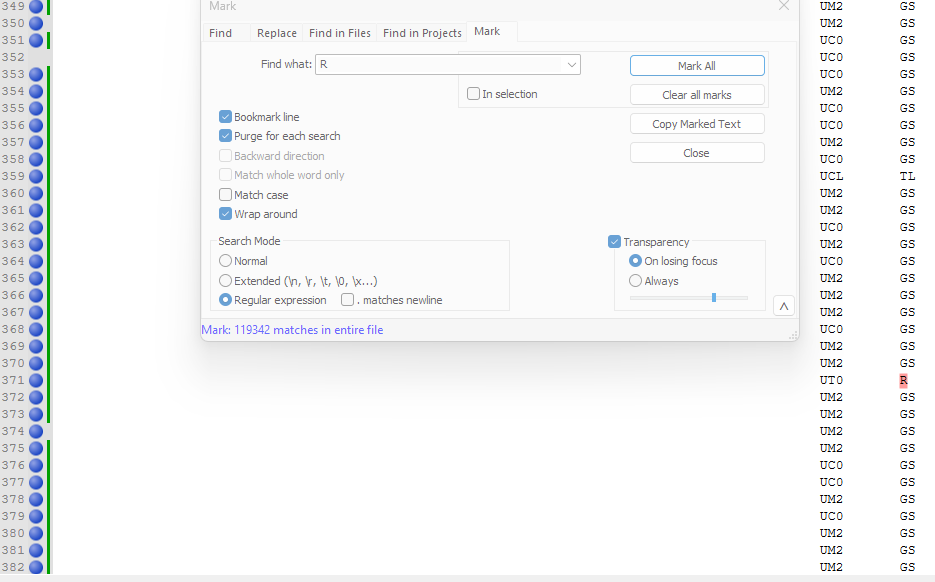
In one column in a text file, there are different indicators for my works data. I need to clear all indicators that are “R”.
However, when marking only R within the text file it obviously marks all R’s throughout the file.
Any insight on how to search for singular R’s instead of every R in the file?
I understand this may not be the best description - below is attached what I am referring to.
-
@Drake-McCleary said in Marking Sing Letters In a Document To Clear:
Any insight on how to search for singular R’s instead of every R in the file?
Well the description is a bit light on details. Such as how do the other
Rcharacters appear? Are they only within text or at least next to other alpha characters. Are they in the middle of lines, not at the end like your example shows for the one you do wish to remove?If the R you wish to remove was always at the end of a line, then
R$would work, the$denotes end of line. Possibly\sR(\s|$)might work if you need to test for a leading space, then the R and a trailing space or end of line?Terry
-
The additional R’s that are being marked, but I do not wish to remove, are in the middle of lines. See Below.
I suppose what I’m truly getting at is I need to remove all lines with a “singular” or “stand alone” R instead of all R’s throughout the entire file.

-
@Drake-McCleary
So try my last option, I think that will be close enough. Maybe use the find function to seek them and check if any that you don’t want selected are still being selected. Then let us see what it is, so that we may better help you.
Terry
-
Your second option \sR(\s|$) worked like a charm.
Thanks so much for the insight - huge help!

Hello! It looks like you're interested in this conversation, but you don't have an account yet.
Getting fed up of having to scroll through the same posts each visit? When you register for an account, you'll always come back to exactly where you were before, and choose to be notified of new replies (either via email, or push notification). You'll also be able to save bookmarks and upvote posts to show your appreciation to other community members.
With your input, this post could be even better 💗
Register Login