Printing (laser) black on white darkness
-
Hi, first post but using NP++ for years and very thankful for those who made and keep it.
Is there a way to darken printing to equivalent in MS Office/LibreOffice?
I have searched the forums and changed style parameters but nothing comes close to black on white, more like grey on white. I printed out a cookie recipe in NP++ and LO Writer and writer is imminently easier to read b/c its directly black on white paper whereas NP++ words are grey.
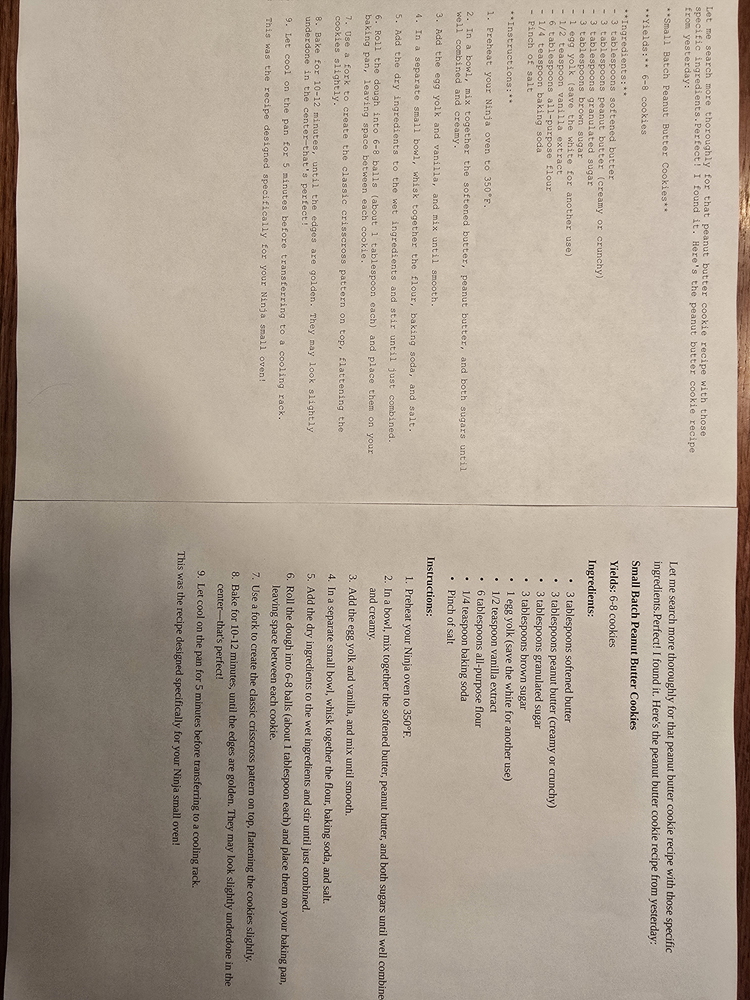
moderator copied original image hosted at imgur Darkness comparison, resized, and pasted directly in message: imgur images don’t show when linked from imgur, and those images may be deleted after a year or two. just paste the image in here directly (you might need to scale back the image to something smaller than the original 3000x4000 pixels)
-
@me said in Printing (laser) black on white darkness:
Is there a way to darken printing to equivalent in MS Office/LibreOffice?
You aren’t comparing apples to apples. Your fonts are completely different. Your monospace font appears to have very thin strokes, whereas your serif font in LO has reasonably-thick strokes.
Try printing from LibreOffice using the same font you use in Notepad++ … or, alternatively, try printing from Notepad++ using the same font you use in LO. (See Settings > Preferences > Style Configurator > Language:
Global Styles> Style:Default Styleto find out what your “plain text” font is in N++). I think you will find that your font choice is what makes the difference, not the application.BTW: printing preferences are documented here: using the “black on white” option guarantees it’s black on white. If your eyes still disagree, then it’s definitely your font choice, not Notepad++.
-
I printed out a cookie recipe in NP++ and LO Writer
Try to be more explicit. I actually use LibreOffice and, until @PeterJones explicitly stated it in his response, I had no idea what you were talking about when you said “LO”.



Hello! It looks like you're interested in this conversation, but you don't have an account yet.
Getting fed up of having to scroll through the same posts each visit? When you register for an account, you'll always come back to exactly where you were before, and choose to be notified of new replies (either via email, or push notification). You'll also be able to save bookmarks and upvote posts to show your appreciation to other community members.
With your input, this post could be even better 💗
Register Login