The issue still relevant on Windows 11 - Operating system version 10.0.26200.7171
-
Re: NPP cannot save on Windows Onedrive
After updated of a Notepad++ v8.8.8 it cannot save files to users OneDrive and comes with elevation prompt.
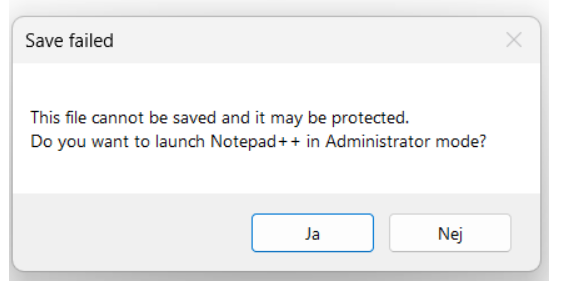
files and folders are created with no issue and with build in notepad it works to save files on OneDrive just fine.
-
@KingRustamus said in The issue still relevant on Windows 11 - Operating system version 10.0.26200.7171:
Re: NPP cannot save on Windows Onedrive
After updated of a Notepad++ v8.8.8 it cannot save files to users OneDrive and comes with elevation prompt.
files and folders are created with no issue and with build in notepad it works to save files on OneDrive just fine.
This is a long shot, but does anything change if you go to Settings | Preferences… | MISC. and in the top left section change File Status Auto-Detection to Disabled?
-
@KingRustamus
Saving to OneDrive is not a problem for me with v8.8.8 but with 10.0.26200.7309. -
I’ve encountered such stuff before and it was caused by the Windows ransomware protection “Controlled folder access” in action. (build in Notepad.exe works in such a case because all the Microsoft own signed binaries have a build-in exception).
So check (try to set temporary off or add a new Notepad++.exe exception there) the Windows Settings > Privacy & Security > Windows Security > Virus & threat protection > Ransomware protection > Controlled folder access.
If it doesn’t help, I can prepare a testing build of the notepad++.exe binary showing us exact system error code (and it’s not the ERROR_ACCESS_DENIED for sure, otherwise in the v8.8.6+ you saw the UAC-elevation prompt 1st) leading to this SaveFailed N++ messagebox.



Hello! It looks like you're interested in this conversation, but you don't have an account yet.
Getting fed up of having to scroll through the same posts each visit? When you register for an account, you'll always come back to exactly where you were before, and choose to be notified of new replies (either via email, or push notification). You'll also be able to save bookmarks and upvote posts to show your appreciation to other community members.
With your input, this post could be even better 💗
Register Login