Trying to auto copy select text from a .nfo file
-
Here is what I have and what I’m trying to do:
I’m running this on a windows 11 laptop
I’m trying to clean up my “Movies” and “TV Show” external hard drives.I’m trying to add tags to my .mkv and .mp4 files
So here is what I’m trying to do:
I want to keep some select text but not all text.I will be making copies of the nfo files and making the copies txt files and then editing the txt files.
Here is what my nfo file currently looks like for my movie called “6 Underground (2019)”
Here is a bunch of code:
<?xml version=“1.0” encoding=“UTF-8” standalone=“yes”?>
<movie>
<fileinfo>
<streamdetails>
<video>
<width>720</width>
<height>300</height>
<aspect>2.39</aspect>
<codec>h264</codec>
<format>avc1</format>
<durationinseconds>7732</durationinseconds>
<bitrate>1 100 kb/s</bitrate>
<container>.mp4</container>
<scantype>Progressive</scantype>
<framerate>23.976</framerate>
<NumVideoBits>8</NumVideoBits>
</video>
<audio>
<language>eng</language>
<DefaultTrack>Yes</DefaultTrack>
<codec>aac</codec>
<channels>2</channels>
<bitrate>256 kb/s</bitrate>
</audio>
</streamdetails>
</fileinfo>
<title>6 Underground</title>
<originaltitle>6 Underground</originaltitle>
<sorttitle>6 Underground</sorttitle>
<outline>Six individuals from all around the globe, each the very best at what they do, have been chosen not only for their skill, but for a unique desire to delete their pasts to change the future.</outline>
<plot>Six individuals from all around the globe, each the very best at what they do, have been chosen not only for their skill, but for a unique desire to delete their pasts to change the future.</plot>
<tagline>They say no one can save the world. Meet no one.</tagline>
<year>2019</year>
<premiered>2019-12-10</premiered>
<ratings>
<rating name=“imdb” max=“10” default=“true”>
<value>6.100000</value>
<votes>196747</votes>
</rating>
<rating name=“themoviedb” max=“10”>
<value>6.300000</value>
<votes>4566</votes>
</rating>
</ratings>
<userrating>0</userrating>
<top250>0</top250>
<country>United States of America</country>From the code above all I need is the <year>2019</year> but I want to 2019 not the <year></year>. The next thing I would need is:
<genre>Action</genre>
<genre>Thriller</genre>
and then the:
<stars>Ryan Reynolds / Mélanie Laurent / Manuel Garcia-Rulfo</stars>And no I don’t need every single “Actor” since some actors are not even credited. I just want the main actors which are already listed in the “Stars” area.
So I want the stuff in between the “year”, “Genre”, “Stars”. So this way I can add the main tags myself. It is a lot of text to work through so I was wondering if this is at all possible with “Notepad++” and if so could someone please let me know how to do this. Thank you in advance.
-
I’m don’t know if Notepad++ will be a great deal of help here, though I’m not sure I follow your proposed workflow.
I take it you have a bunch of media with Kodi-style nfo files beside the media files. What program produced the nfo files? (If it happens to be Tiny Media Manager, I know that program can export a CSV or similar file from selected fields. That file could then be manipulated in Notepad++.)
There is an XML Tools plugin for Notepad++. I don’t use it, so I’m not sure if it has the capacity to work with an entire directory tree of xml files.
Unless a facility like the one I mentioned for Tiny Media Manager is available, most likely you would be better using a scripting language, like Python, to discover the files, read them as XML, and write a file containing the information you need to process. You could then load that into Notepad++ for editing.
(I’m not saying it’s impossible with just Notepad++, but it will be slow, annoying and error-prone.)
I’m trying to add tags to my .mkv and .mp4 files
That will require some sort of scripting. If it’s something like a batch file you’re planning to write, with a line for each file calling mp4box for mp4 files and something else for mkv files, Notepad++ could be of help turning a file with one line for each nfo file into a batch file to update the corresponding media files.
-
@Dawn-Brockman-0 You should be able to do this with a few find and replace.
- You make copies in a new folders as you said you do, let’s say “D:\MoviesFolder”
- You can use “Find in Files” with Regex to remove all the rows that are not year/genre/stars. make sure the “Directory” is the correct directory so you don’t break files from other places, don’t know if there is undo for this operation. I never tried to run it on mkv/mp4, but I assume you already have files that look like the xml you provided and we use them.
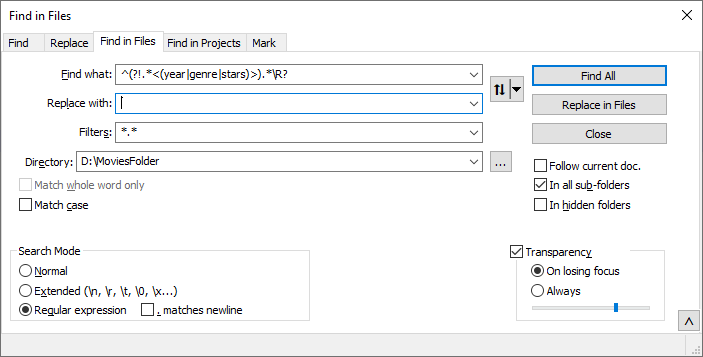
- If you want to remove the tags, you can run another find&replace with:
Find: .<(year|genre|stars)>(.?)</\1>.*\R?
Replace: \2\n
You will now have only number and names so you will have to deduce yourself what is a year, what is a genre, and what is a star, but as long as Ryan Reynolds is not a genre yet you should be fine.


Hello! It looks like you're interested in this conversation, but you don't have an account yet.
Getting fed up of having to scroll through the same posts each visit? When you register for an account, you'll always come back to exactly where you were before, and choose to be notified of new replies (either via email, or push notification). You'll also be able to save bookmarks and upvote posts to show your appreciation to other community members.
With your input, this post could be even better 💗
Register Login