Menu command for ensuring current position is visible
-
I almost never used code folding in Notepad++, so it’s only today that I noticed that there doesn’t really seem to be an easy way to recursively unfold everything above the current caret position if the caret is not directly below the uppermost folded level. This came up because PeterJones made an issue in my JsonTools plugin regarding code folding. Below I will describe a couple of existing ways to do this, and argue that it might be beneficial to add a new feature.
And yes, I’m aware that feature requests have to be submitted at the GitHub repo, but I just wanted to post here initially to see what others thought.
For example, suppose I have this document:
{
    "foo": [
        {
            "ONE": [
                1234
            ]
        },
        {
            "TWO": [
                null
            ]
        }
    ]
}
and suppose that my caret is currently at position 70 inside the number
1234, four fold levels deep.Now suppose that use
View->Fold Level->3to fold the document so it looks like this:
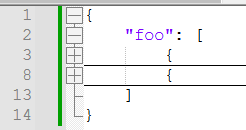
Now my caret is hidden, and I want to unfold just enough to make the caret visible, so that the document would look like this:
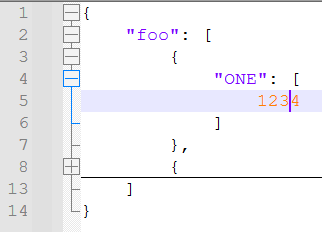
Since the caret is currently under fold level 4 but the uppermost fold level above it is level 2,
View->Unfold Current Leveldoesn’t do what I want. The folding command that would come closest to achieving my goal would be View->Unfold Level->3`, but (a) that would unfold everything at that fold level (not just directly above the caret), and (b) I would need to know to unfold level 3, as opposed to some other level.In general, the easiest way to do this is by typing any character and then reverting that change, but this very simple solution does not work if the current document is read-only.
It is possible to do this using only builtin menu commands and dialogs:
- Open a dialog with
Search->Go to... - Click the
Offsetoption. - Enter the current offset indicated in the dialog.
- Hit
Go
While I am generally in favor of not adding a new feature to do X when X can already be done somewhat easily with a combination of existing features, it does seem to me like the most general current workaround is a little bit hard to discover, especially since the desired functionality involves manipulating folding (generally in the
Viewmenu) but the workaround uses theSearchmenu instead.In any case, it seems that the
Search->Go to...dialog uses a Scintilla command calledSCI_ENSUREVISIBLEto make the current line visible without moving the caret (full implementation here). It is also quite easy to script this using PythonScript with the below one-liner:
editor.ensureVisible(editor.lineFromPosition(editor.getCurrentPos()))So basically I’m thinking that it might be helpful to have a new command under the
Viewmenu calledMake current position visibleor something like that. - Open a dialog with
-
@Mark-Olson said in Menu command for ensuring current position is visible:
In general, the easiest way to do this is by typing any character and then reverting that change, but this very simple solution does not work if the current document is read-only.
My expectation for the scenario would be, that using the arrow keys to move the caret, would also unfold and make the current position visible.
But obviously this is not happening. Instead the caret goes to nearst visible position without doing unfolding actions. My vote would be to change this behaviour, but changing it would possibly make some users unhappy which are used to use the arrow keys in the way they currently work.
-
Since nobody here has indicated strong disagreement with my position, I’ve created an issue in the GitHub repo asking for this feature.
@MarkusBodensee said:
My expectation for the scenario would be, that using the arrow keys to move the caret, would also unfold and make the current position visible.
I agree with you that this is pretty confusing, and agree that using the arrow keys should have the same effect as typing. This would obviously be a separate feature request though, and as you noted I rather doubt that it would be accepted because it would only add confusion for some other users.
-
@Mark-Olson said in Menu command for ensuring current position is visible:
I agree with you that this is pretty confusing, and agree that using the arrow keys should have the same effect as typing. This would obviously be a separate feature request though, and as you noted I rather doubt that it would be accepted because it would only add confusion for some other users.
After sleeping one night about it, and rereading your posting about typing any char and undo. Also in your issue #17297 and @Alan-Kilborn 's issue #12107 … I have changed my mind a bit, because I think that both situations of keystrokes (typing char from keyboard input or pressing arrow key) should be handled in the same way. This would make consistent behaviour of the application.
I think, keystrokes should always have direct effect on a visible caret, so the caret should be made visible first, and afterwards perform the action from keyboard (typing char/moving caret).
Keystrokes on an invisible caret look more like undefined behaviour. The user does not know, where his focus is. Even making caret jump to next visible position could be unexpected, because user did not know where he previously has been. Maybe user is even confused, because of the jump.
So from this perspective, the current behaviour of arrow keys could be worth considering if it is unexpected/inconsistent.
-
As described in this comment, I noticed that the
Search->Go to...dialog and typing do not reveal the current position if it’s in a hidden line range. This seems to me to further highlight the importance of creating a “Make current position visible” command.


Hello! It looks like you're interested in this conversation, but you don't have an account yet.
Getting fed up of having to scroll through the same posts each visit? When you register for an account, you'll always come back to exactly where you were before, and choose to be notified of new replies (either via email, or push notification). You'll also be able to save bookmarks and upvote posts to show your appreciation to other community members.
With your input, this post could be even better 💗
Register Login