'Find in Files' doesn't appear to work
-
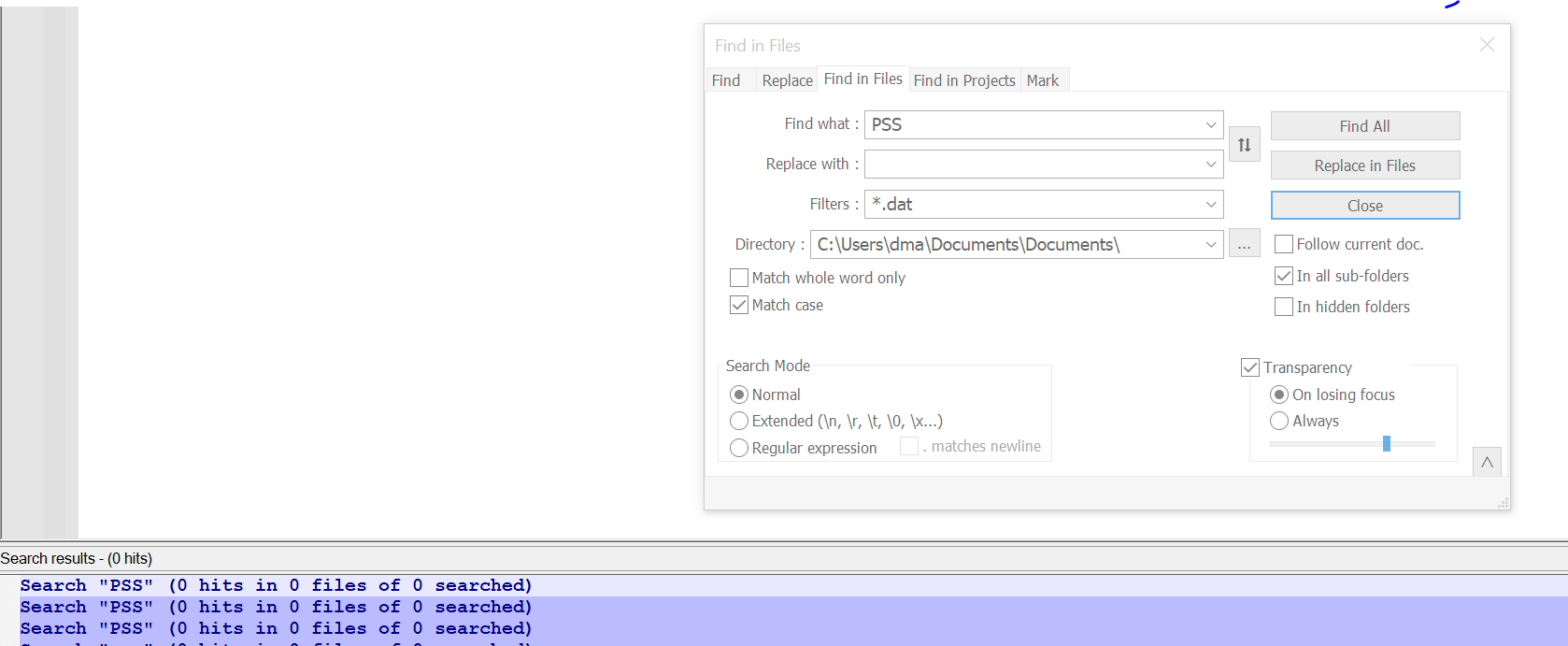
Here’s what I see; there are lots of .dat files, but none get searched. What am I doing wrong?
-
@D-Mac said in 'Find in Files' doesn't appear to work:
What am I doing wrong
Do you know what is actually in the DAT files you are searching for. DAT is a fairly generic extension for a file format. It could be ordinary text, or it could be binary information or a mixture. If it isn’t just pure text then you are using the wrong application to search the content of the DAT file.
What application created these files, that would be a start to understanding what type of content there is.
Terry
PS you could just open 1 DAT file in Notepad++ to see what the content looks like. Just don’t make any changes nor save it and you won’t cause any problems.
-
Is it possible that you have line-ending character(s) after the second
S? -
@D-Mac said in 'Find in Files' doesn't appear to work:
What am I doing wrong?
Are you sure your directory is correct?
DocumentswithinDocuments? -
@Coises said:
Are you sure your directory is correct? Documents within Documents?
If a folder doesn’t exist, I think when the search is initiated, input focus will immediately jump to the
Directory:box, signaling a problem with that folder to the user (without a message box). Not on a PC right now, so can’t verify; going from memory. -
@Alan-Kilborn said in 'Find in Files' doesn't appear to work:
If a folder doesn’t exist, I think when the search is initiated, input focus will immediately jump to the
Directory:box, signaling a problem with that folder to the user (without a message box). Not on a PC right now, so can’t verify; going from memory.I see you are correct. However… I also see that the search results show 0 files searched. So I don’t see how it could be a problem with what is in the Find box. The directory might exist, but not be the one OP meant to search.



Hello! It looks like you're interested in this conversation, but you don't have an account yet.
Getting fed up of having to scroll through the same posts each visit? When you register for an account, you'll always come back to exactly where you were before, and choose to be notified of new replies (either via email, or push notification). You'll also be able to save bookmarks and upvote posts to show your appreciation to other community members.
With your input, this post could be even better 💗
Register Login