Enter key duplicated in macros
-
@László-Botka
It’s due to this v8.9 commit (I reported it to the author):
https://github.com/notepad-plus-plus/notepad-plus-plus/commit/b9df41ad3354c0657ab7762a4a5b5a0991a6d1d8 -
 X xomx referenced this topic on
-
@xomx
With my macro, the result with v.8.8.9 used to be correctly with CRLF:

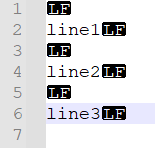
With v8.9, now LF is used with one superfluous preceding each line:
-
@datatraveller1 said in Enter key duplicated in macros:
With v8.9, now LF is used with one superfluous preceding each line
Yes, we know. For further details you can see discussion below this post:
https://github.com/notepad-plus-plus/notepad-plus-plus/pull/17233#issuecomment-3707224810In N++ v8.9 has started (without specific N++ release announcement) long awaited replacement of the old obsolete tinyxml library. Now there is a completely new N++ xml layer code allowing also transparent xml-libraries switching independence (in the future, if needed, pugixml lib has been already tested). Benefits are many, here you can check e.g. the xml-handling code speed-up and memory saving (compare tinyxml vs tinyxml-2 there): https://pugixml.org/benchmark.html
That transition is not even complete yet. And given the amount of new relevant code, it’s no wonder that there is at least one such xml-regression.
-
There is a fix PR
Notepad++.exebinary you can test (for me, it works ok):
https://github.com/notepad-plus-plus/notepad-plus-plus/actions/runs/20680668193/artifacts/5014383401 -
@xomx For me, the fix does not work yet (same result as before with v8.9).
BTW, not sure if needed, but here is the is interesting part of the old macro in shortcuts.xml:

-
As for the doubling of the 2170 messages:
https://github.com/notepad-plus-plus/notepad-plus-plus/pull/17233#issuecomment-3707329328Could you please post here your shortcuts.xml testing macro to I can debug your case?
-
@xomx
No change using the downloaded exe. Here is my test macro c1 :</Macro> <Macro name="c1" Ctrl="no" Alt="no" Shift="no" Key="0"> <Action type="0" message="2345" wParam="0" lParam="0" sParam=""/> <Action type="1" message="2170" wParam="0" lParam="0" sParam=" "/> <Action type="1" message="2170" wParam="0" lParam="0" sParam=" "/> </Macro> -
@xomx Here is the image for showing eols

-
@xomx It is difficult to post here, because the EOL characters aren’t depicted correctly, but I think you can simply reproduce the issue: Record a new macro with v8.8.9 and type the following three lines pressing ENTER after each line:
line1
line2
line3
Then save the macro as “testcrlf”.
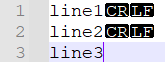
Result when executing the macro with v8.8.9:
Result when executing the macro with v8.9 (original and patched exe):
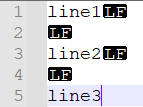
BTW, strangely this time the superfluous LF are trailing (instead preceding with my old macro).
-
Thanks for the tests.
I currently cannot check it myself but the PR fix author @ozone10 found the culprit (tinyxml-2 xml standard EOL normalization), so it will need more for a fix.
See: https://github.com/notepad-plus-plus/notepad-plus-plus/pull/17357#issuecomment-3707930342 -
What does seem to work now only with the new patched exe:
Freshly created macros with this version are also compatible with earlier Notepad++ versions.
Hex values (xDxA) seem to be used now correctly for CRLF.
However, the old macros get converted to two LF (“
”):

-
So with installation of a new notepad 8.9 version, these settings in shortcuts.xml should be updated (maybe automatically with installation):
from:

to:

I’m only a user so I don’t know the details, but maybe simply
CRcould be changed to
andCRLFto
(and if existentLFto
)? -
D donho referenced this topic on
-
-
-


Hello! It looks like you're interested in this conversation, but you don't have an account yet.
Getting fed up of having to scroll through the same posts each visit? When you register for an account, you'll always come back to exactly where you were before, and choose to be notified of new replies (either via email, or push notification). You'll also be able to save bookmarks and upvote posts to show your appreciation to other community members.
With your input, this post could be even better 💗
Register Login