Notepad ++ double context menu showing after uninstalling
-
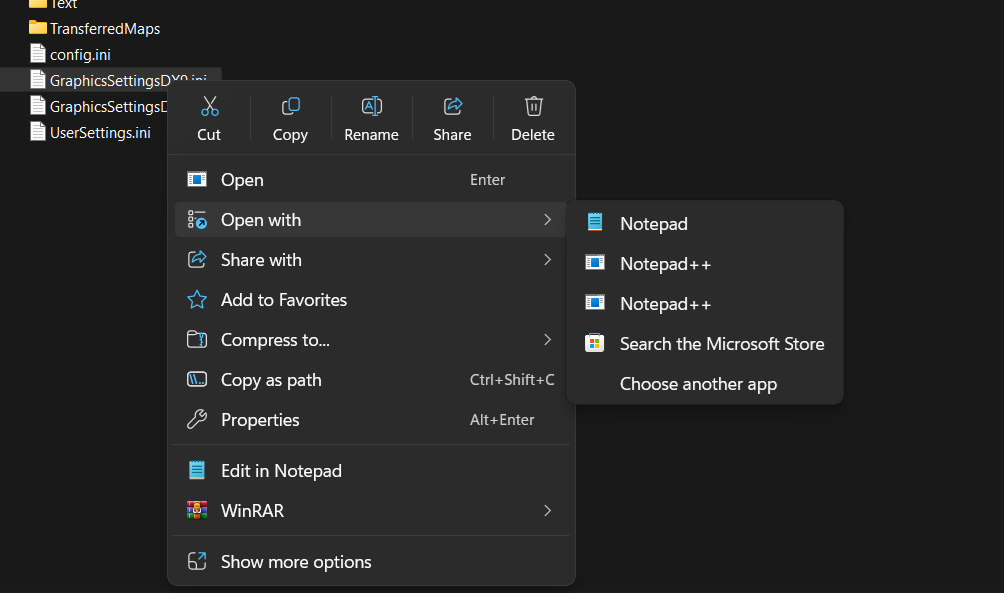
Like the title says, i got double context entries
How can i fix this?
-
@Imiona
The NPP manual devotes a large section to the right click menu, however it is noted that since Windows 11 it has been problematic to get it exactly right everytime.
Have a read of this section of the manual. Hopefully it might help you.
Terry
-
thats not helpfull, it explains how to add it to the context menu, not how to remove it.
-
@Imiona
Well then you need to read it again. There’s the reference to unregistering the nppshell.dll, that’s one thing that might help. Then there’s the references to the registry, so you could go looking for those references and remove them if they still exist.Terry
-
The
Open Withextension is not theEdit with Notepad++extension. The later isNppShell.Open a cmd prompt and enter:
reg delete "HKCU\Software\Classes\Applications\notepad++.exe"Press Return key and if no error, then it will prompt to delete the key and reply with
yes.Open Withcreates this key and some others. Removing this key removes the orphanedOpen Withentry ofNotepad++.Some installers add this key, the Notepad++ installer currently does not add this key so it does not remove it on uninstall.
The duplicate entry is something else. Try:
reg query "HKCU\Software\Microsoft\Windows\CurrentVersion\Explorer\FileExts\.ini" /sand will print information about the entries to discover more details about the entries. You may see something like
Applications\other.exeand if another ophaned entry, can use a similar command to remove it:reg delete "HKCU\Software\Classes\Applications\other.exe"Always use care with the registry. Ensure the commands are correct before executing them.

Hello! It looks like you're interested in this conversation, but you don't have an account yet.
Getting fed up of having to scroll through the same posts each visit? When you register for an account, you'll always come back to exactly where you were before, and choose to be notified of new replies (either via email, or push notification). You'll also be able to save bookmarks and upvote posts to show your appreciation to other community members.
With your input, this post could be even better 💗
Register Login