"In Find, Regex Search in Current File Limited to "Find Next" Downward Direction Only"
-
Hello,
When search in Find : the regex ^((?=.(Don))(?=.(Ho))(?=.(is))(?=.(the))(?=.(one))).$
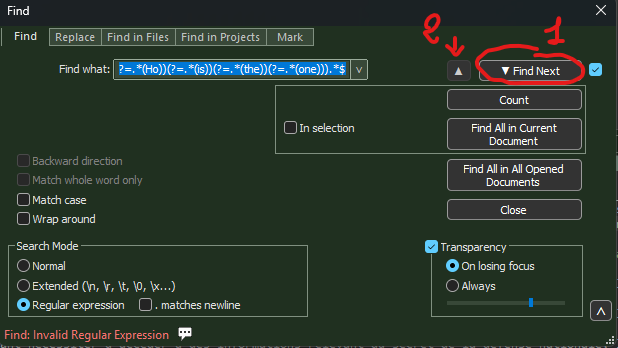
Only 1 is available, not 2 , (1 and 2 defined in the picture above)
While 2 is available when in search mode : Normal is selected, andnot regular expression,
Would be nice to have 1 and 2 in regular expression, wouldn’t be ?
Thanks all for you time !
-
Regular expressions don’t work the way you expect in search-backwards mode, so it’s disabled except for advanced users.
Advanced users can look at the user manual and figure out how to enable
regexBackward4PowerUserhttps://npp-user-manual.org/docs/preferences/#preferences-for-advanced-users
-
@PeterJones , Sorry for my late repy,
Thanks for yours !
Enjoy your day,
I let you know, -
This solution requires a change in config.xml,
But :
regexBackward4PowerUser at yes seems to be not an accepted value for my version V8.9.1.
And :observed behavior :
if config.xml is detected with value not conformed at start then config.xml is not considered and default parameters are used,
if config.xml is not conformed then config.xml is rewritten at close,Reason for considering regexBackward4PowerUser at yes as not a accepted value :
going backward with a regex requires more computation than going forward, and that value is not accepted in V8.9.1,Do you confirm ?
-
@Fred-Morant said in "In Find, Regex Search in Current File Limited to "Find Next" Downward Direction Only":
This solution requires a change in config.xml,
As described in the user manual, yes.
regexBackward4PowerUser at yes seems to be not an accepted value for my version V8.9.1.
Nope. Works just fine for me in v8.9.1. My guess is you used your active Notepad++ to edit
config.xml. But Notepad++ overwrites config.xml when it exits, so you lost your change. The user manual has a few paragraphs at Config Files Details > Editing Configuration Files which explains how to edit most of the Notepad++ configuration files, and then explains the workaround for theconfig.xmlexception.Until you properly edit and save the
config.xml, Notepad++ will not see yourregexBackward4PowerUser="yes"if config.xml is detected with value not conformed at start then config.xml is not considered and default parameters are used,
if config.xml is not conformed then config.xml is rewritten at close,Correct. That’s described in more detail in the user manual, where I just linked you.
Reason for considering regexBackward4PowerUser at yes as not a accepted value :
going backward with a regex requires more computation than going forward, and that value is not accepted in V8.9.1,Wrong. Don’t believe AI hallucinations. It has nothing to do with computation. Regular expressions parse characters in byte order, and when they do that but go backwards through the bytes for the start of the match, there are quirks that users don’t expect; the Developer got tired of people reporting bugs in the regex engine because they didn’t understand the implications of how backward mode interacts with regular expression parsing, so turned it off by default, but gave power users the ability to turn it back on. That ability has not been taken away, despite the lies the AI is telling you.
Do you confirm ?
I confirm it’s nonsense from AI that just says the most likely next words based on context. “Most likely” does not equal “true”.
-
@PeterJones said in "In Find, Regex Search in Current File Limited to "Find Next" Downward Direction Only":
Perfect, thank you for the explanation about how the config file is managed.
One point: I was the one who hallucinated, trying to find a reason for this limitation in regex usage.
Thanks for the clarification!
Much appreciated!


Hello! It looks like you're interested in this conversation, but you don't have an account yet.
Getting fed up of having to scroll through the same posts each visit? When you register for an account, you'll always come back to exactly where you were before, and choose to be notified of new replies (either via email, or push notification). You'll also be able to save bookmarks and upvote posts to show your appreciation to other community members.
With your input, this post could be even better 💗
Register Login