Plugin Manager v8.9.1 has ghosted us
-
I couldn’t find another post about this specific topic so here I am.
I use a lot of plugins and after my most recent update I have found that the plugin manager is no longer available under the Plugins menu. I have also noticed that the plugin files are no longer in the plugin folder. Will the plugin manager be replaced? Will I be able to recover my plugins that were lost?
Debug info:
Notepad++ v8.9.1 (64-bit) Build time: Jan 18 2026 - 22:45:31 Scintilla/Lexilla included: 5.5.8/5.4.6 Boost Regex included: 1_90 pugixml included: 1.15 nlohmann JSON included: 3.12.0 Path: C:\Program Files\Notepad++\notepad++.exe Command Line: "\\mushqxstr1dv\e$\Oracle\apache-tomcat-10.0.21\bin\log\Rollout_SCRUM.log" Admin mode: OFF Local Conf mode: OFF Cloud Config: OFF Periodic Backup: ON Placeholders: OFF Scintilla Rendering Mode: SC_TECHNOLOGY_DIRECTWRITE (1) Multi-instance Mode: monoInst asNotepad: OFF File Status Auto-Detection: cdEnabledNew (for current file/tab only) Dark Mode: OFF Display Info: primary monitor: 1920x1080, scaling 100% visible monitors count: 2 installed Display Class adapters: 0000: Description - Intel(R) UHD Graphics 0000: DriverVersion - 32.0.101.6556 OS Name: Windows 11 Enterprise (64-bit) OS Version: 24H2 OS Build: 26100.7628 Current ANSI codepage: 1252 Plugins: mimeTools (3.1) NppConverter (4.7) NppExport (0.4) -
The thing truly named “Plugin Manager” was last compatible with Notepad++ in v7.5.9 from October 2019. Had you really not updated since then?
Or are you talking about Plugins Admin? That’s the builtin replacement since v7.6 in November 2019
And it’s still in v8.9.1:
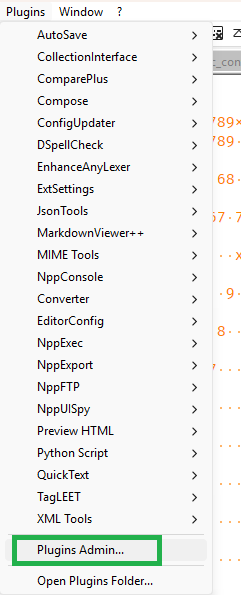
My guess is that you deleted gup.exe and/or other of the content in the updater folder, or the plugin list DLL. To find out:
- Exit Notepad++
- Perform steps 1-3 for each of the following files
- List of files
C:\Program Files\Notepad++\notepad++.exeC:\Program Files\Notepad++\plugins\Config\nppPluginList.dllC:\Program Files\Notepad++\updater\GUP.exeC:\Program Files\Notepad++\updater\libcurl.dll
- If any of those files are missing, you will need to reinstall, making sure to include the auto-updater and Plugins Admin, because all of those files are required for Plugins Admin to work
- Steps
- Right click on the file and choose Properties
- Look to see if it still has the Unblock checkbox
- If it does, checkmark it, then click Apply / OK
- List of files
here is an example of a GUP.exe that still has the mark of the web:
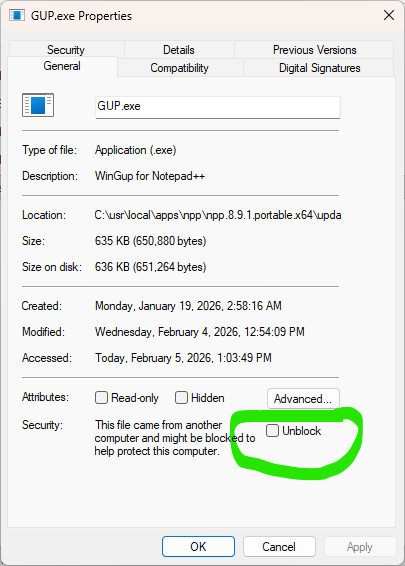
After making sure the Mark of the Web is gone from all those files, then restart Notepad++, and Plugins Admin should be there.

Hello! It looks like you're interested in this conversation, but you don't have an account yet.
Getting fed up of having to scroll through the same posts each visit? When you register for an account, you'll always come back to exactly where you were before, and choose to be notified of new replies (either via email, or push notification). You'll also be able to save bookmarks and upvote posts to show your appreciation to other community members.
With your input, this post could be even better 💗
Register Login