Localization problem
-
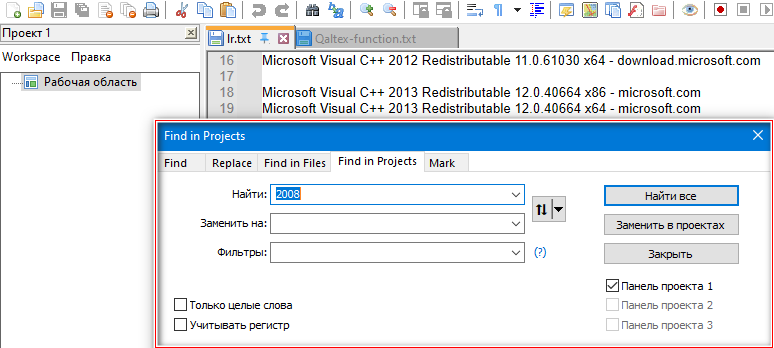
View - Project - Project Panel. In the panel that opens, the word “Workspace” remains untranslated (01a). If you click “Workspace” and select “Find in projects” in the drop-down menu (at the very bottom), a search window opens, where there are simultaneously items in English and in the localization language (01b).
The same problem occurs when switching to other localizations (I checked 3 languages).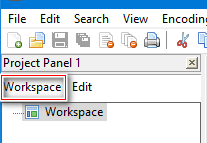
-
So I concur on the
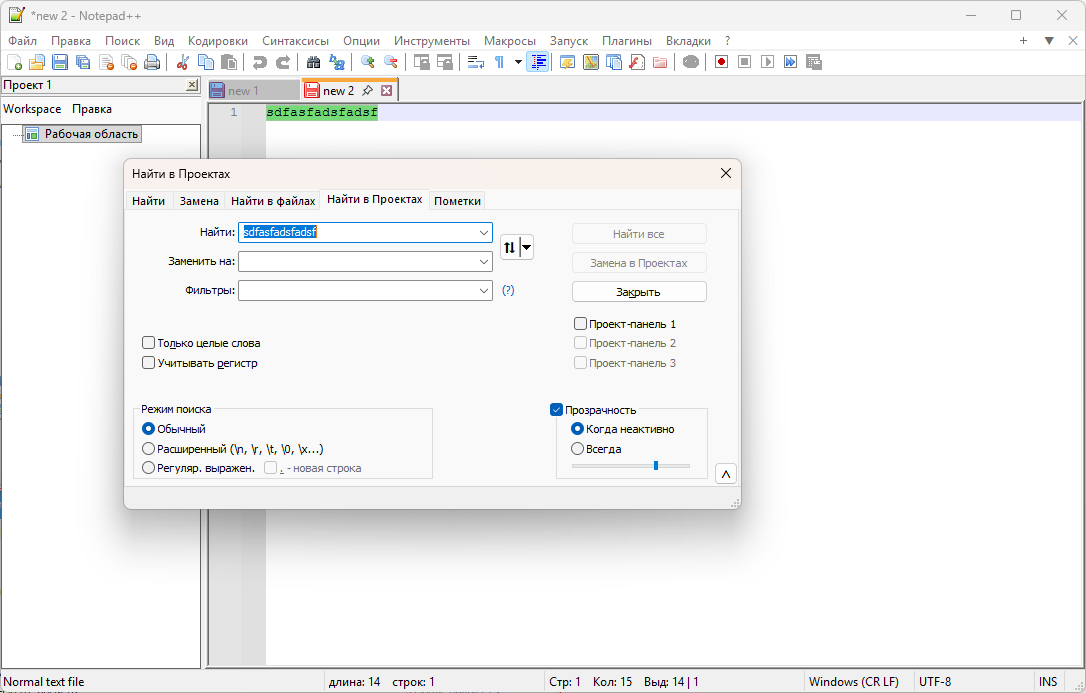
Workspacelabel.But with some of the mixed ones, it might be a matter of needing to restart Notepad++ after you change localizations, because when I restarted with that localization selected, the Find in Projects dialog had the proper localization on all its labels, instead of mixed:
That sounds familiar to me, but searching through the active and historic issues for ‘localization’, I am not seeing anything that jumps out as describing this problem.
So the workaround is to just exit Notepad++ and restart, after you set the localization. But for a long-term fix, someone would need to create a new issue (or be better than searching/skimming than me, and upvote the existing issue).
As far as the
Workspacebeing wrong: it appears that it’s supposed to use theItem id="0"text
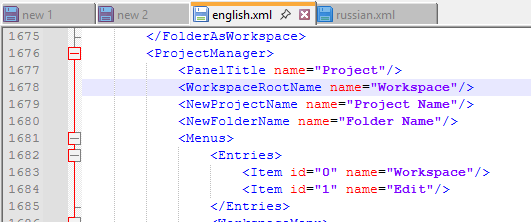
… which seems to be defined in other localizations as well:
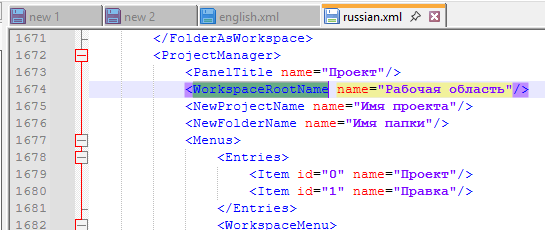
So that looks like a separate bug, to me.Again, someone would need to create a separate issue for that one (assuming it doesn’t exist already)
Our bug report FAQ explains how one would go about searching for existing issues, and creating new issues if they don’t exist.
-
@PeterJones
Thank you for the recommended actions. True, the result for some reason is not stable.
I use my own version of localization (but not the one that comes “bundled” with the Notepad++ release).
In my version, initially everything was as you advised: <Item id=“0” name=“Рабочая область”/>
If you switch localization, for example: to English and then to Russian, then most often you can see a localized search window. But, after restarting Notepad++, two languages are consistently present in the search window. And this effect is repeated very steadily.
The screenshot shows a fragment of the language file that was there before I noticed the problem.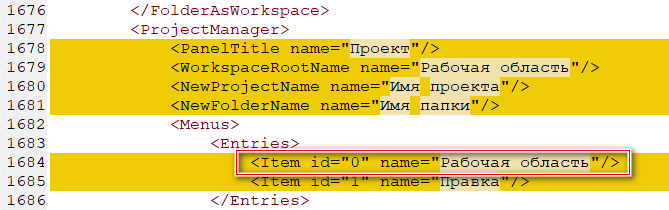
-
@Uwo222777 said in Localization problem:
I use my own version of localization (but not the one that comes “bundled” with the Notepad++ release).
…
But, after restarting Notepad++, two languages are consistently present in the search window. And this effect is repeated very steadily.Not for me. It probably has something to do with your custom localization. Are you sure that your localization has all the fields that the most recent official localizations do? Because if any of those are missing, then it will default to the English terms for those fields. (The Find in Projects entries are in another location of the file, not in the
<ProjectManager>section, so I’d look for those values, to make sure your localization has those defined.) -
@PeterJones
Localization was done “in the image and likeness” of the English file, as recommended on the Notepad++ website. Later, once again, I will carefully review both files (English and localization file).
Now, I’ll try to explain how you can “get the problem”.
Localization is set, Notepad++ is restarted. If I immediately open the search box (Search - Find), then everything is OK! After that: View - Project - Project panel (any one). In the “Workspace” drop-down menu, through “Find in projects…” I open the search box - everything is OK! The subsequent call of the search box via Search - Find is also OK!Notepad++ has been restarted. Immediately through the View - Project - Project Panel - menu item “Workspace” - “Find in projects…” I open the search box - it will be with two languages. If you then open the search box via Search - Find, then it will also have two languages.
That is, there is a dependence on whether the first call to the search box will be through Search -To-Find or not. If the answer is Yes, everything is OK. If “No”, there will be a problem. -
@Uwo222777 said in Localization problem:
That is, there is a dependence on whether the first call to the search box will be through Search -To-Find or not.
Yes, the Find-dlg (and most of the others dialogs in N++, like the various panels) is created only once and then hidden instead of closed (when the user closes it), so that the next time you need it, such dialog boxes are not created from the scratch, but only shown again.
So there seems to be an initialization bug when it’s launched 1st from the ProjectPanels.
And I also confirm the Workspace label problem.
-
@xomx
I forgot to mention that I have all these “miracles” on Win 10x64. I consistently switched to localization in Ukrainian, Romanian and German. In all cases, the method described above “works” to get the problem. It is logical to assume that the language files have nothing to do with it. -
“Workspace” problem is a v8.9 regression and is caused by the huge N++ tinyxml1 to pugixml transition changes. I reported the culprit to @ozone10, he’ll fix it for the next version for sure.
That Find-dlg 1st launch from ProjectPanels is a long-standing issue, the problem is in the NPPM_INTERNAL_FINDINPROJECTS message handler, I will do a PR myself.
-
@xomx
Thank you very much for the work you have done, which will lead to improvements in Notepad++ in the future.
I am very grateful to you. -
D donho referenced this topic on
-


Hello! It looks like you're interested in this conversation, but you don't have an account yet.
Getting fed up of having to scroll through the same posts each visit? When you register for an account, you'll always come back to exactly where you were before, and choose to be notified of new replies (either via email, or push notification). You'll also be able to save bookmarks and upvote posts to show your appreciation to other community members.
With your input, this post could be even better 💗
Register Login