Regex matching anomaly
-
I seem to be experiencing a regex matching anomaly, but I don’t know how to reproduce it. I have a UTF-8 SRT subtitle file open in my main (usually only) NPP window, along with a number of other files. I’m trying to match blocks of monologue/dialogue/sung lines, always beginning with an alphabetical character, that could be one or more lines, preceded by a digit at the end of the line above (the timing line) and followed by two EOL sequences. My regex:
(?s)(\d)(\R)([[:alpha:]].+?)\2\2Example of a number of lines from the SRT:
961
01:24:24,924 --> 01:24:28,155
It’s the book of your life
that you’re writing

962
01:24:29,829 --> 01:24:34,129
You’re a diamond in the rough
A brilliant ball of clay

963
01:24:34,200 --> 01:24:38,296
You could be a work of art
If you just go all the way
In my main NPP window, SRT file tab, my regex shown above is matching:
5
It’s the book of your life
that you’re writing

962
01:24:29,829 --> 01:24:34,129
You’re a diamond in the rough
A brilliant ball of clay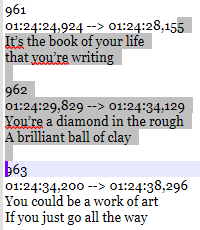
I’ve opened a new NPP instance via
Notepad++.exe -multiInst -nosession, copied the full block of example SRT text from the first instance to a blank UTF-8 tab in the new instance, and then used the same regex sequence shown above on it, but in the new instance it matches:5 It’s the book of your life that you’re writing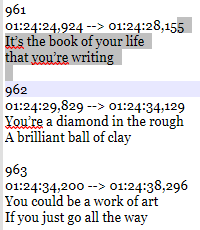
…which is what I really wanted it to match in the first place. I’m aware that there are alternate regex strings I could use to match my intended target, but I don’t understand why this string won’t work in my main NPP instance, nor why it then works correctly in the new instance. Also now checked, my regex works correctly in a new UTF-8 tab in the first NPP instance.
Anybody have any suggestions?
Debug info:
Notepad++ v8.9.1 (32-bit)
Build time: Jan 18 2026 - 22:44:01
Scintilla/Lexilla included: 5.5.8/5.4.6
Boost Regex included: 1_90
pugixml included: 1.15
nlohmann JSON included: 3.12.0
Path: C:\Program Files (x86)\Notepad++\Notepad++.exe
Command Line: D:\Users\MAZE\AppData\AutoHotkey\AutoHotkey.ahk
Admin mode: OFF
Local Conf mode: OFF
Cloud Config: OFF
Periodic Backup: OFF
Placeholders: OFF
Scintilla Rendering Mode: SC_TECHNOLOGY_DIRECTWRITE (1)
Multi-instance Mode: monoInst
asNotepad: OFF
File Status Auto-Detection: cdEnabledNew (for current file/tab only)
Dark Mode: OFF
Display Info:
primary monitor: 1920x1080, scaling 100%
visible monitors count: 1
installed Display Class adapters:
0000: Description - Intel® HD Graphics 620
0000: DriverVersion - 31.0.101.2111
0001: Description - NVIDIA GeForce 940MX
0001: DriverVersion - 30.0.15.1169
OS Name: Windows 10 Enterprise (64-bit)
OS Version: 22H2
OS Build: 19045.6466
Current ANSI codepage: 1252
Plugins:
BetterMultiSelection (1.5)
ColumnsPlusPlus (1.3)
ColumnTools (1.4.5.1)
ComparePlus (2.2)
DSpellCheck (1.5)
ExtSettings (1.3.1)
HTMLTag_unicode (1.5.5)
mimeTools (3.1)
MultiClipboard (2.1)
MultiReplace (4.6.0.33)
NppCalc (1.5)
NppConverter (4.7)
NppExport (0.4)
NPPJSONViewer (2.1.1)
NppTextFX (1.4.1)
NppXmlTreeviewPlugin (2)
PreviewHTML (1.3.3.3)
PythonScript (2.1)
RegexTrainer (1.2)
SessionMgr (1.4.4)I have not installed or tried this in v8.9.2 because of the reported UDL regression (doesn’t apply to this particular file, but it does to other work I do).
-
@M-Andre-Z-Eckenrode said in Regex matching anomaly:
copied the full block of example SRT text from the first instance to a blank UTF-8 tab in the new instance
I have a guess. When you copy and paste, line endings get normalized to whatever is set as the line ending for the tab into which you are pasting.
Your expression looks for the blank line between subtitles by using a backreference to the line ending of the timing line. If the line endings in the file aren’t consistent, it could mismatch.
So I think that if you use \R\R instead of \2\2 the problem will go away. Alternatively, reset the line endings to anything consistent (Edit | EOL Conversion; you can change them and change them back to what the were supposed to be originally, if you like) and I suspect the problem will go away.
-
@Coises said in Regex matching anomaly:
If the line endings in the file aren’t consistent, it could mismatch.
Huh. Right you are. Ironically, that possibility had actually occurred to me, and I even thought I’d checked for it adequately by enabling
View > Show Symbol > Show EOL, but apparently I failed to pick the singleLFout of all theCRLF. Thanks.


Hello! It looks like you're interested in this conversation, but you don't have an account yet.
Getting fed up of having to scroll through the same posts each visit? When you register for an account, you'll always come back to exactly where you were before, and choose to be notified of new replies (either via email, or push notification). You'll also be able to save bookmarks and upvote posts to show your appreciation to other community members.
With your input, this post could be even better 💗
Register Login