[New Plugin] Line Number Highlight — VS Code-style active line number for Notepad++
-
Hi everyone,
I’ve built a small plugin that brings one nice VS Code small features to Notepad++: highlighted active line number.
The active line number is shown in a bright color, all other line numbers are dimmed — making it instantly clear where you are in the file without any distraction.Features:
- Active line number highlighted, inactive ones dimmed
- Automatically adapts to Notepad++ dark and light themes
- Separate colors remembered for each theme independently
- Colors fully customizable via Settings dialog (pick any color you like)
- No timers, no background threads — negligible performance impact
Default colors match VS Code’s Dark Modern theme (
#CCCCCCactive /#6E7681inactive).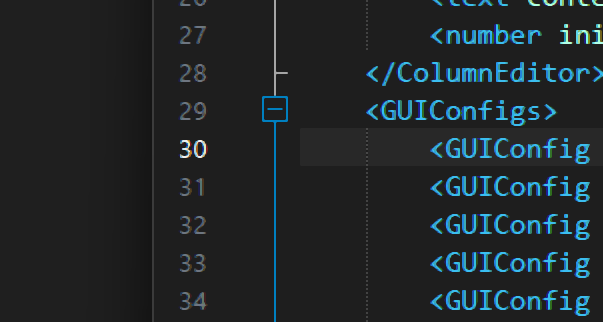
Download & source: GitHub
Installation: Download
LineNumberHighlight.dllfrom the Releases page, place it in:
C:\Program Files\Notepad++\plugins\LineNumberHighlight\
and restart Notepad++.Built with C++, no runtime dependencies. Tested on Notepad++ v8.9.2 / Windows 11.
Free to use, provided as-is. Feedback welcome!
-
An interesting idea and serious knowledge of WinAPI!
I’d propose to replace all the ANSI versions of the functions in the code (such asGetEnvironmentVariableA,GetClassNameA,CreateWindowExAand so on and so forth) with their corresponding Unicode versions.
Also I’d replace all the macros such asSendMessagewith the explicit usage of the corresponding Unicode functions such asSendMessageW.
Here is why it is important. Today’s Notepad++ is internally a Unicode application, and the usage of ANSI functions in it, especially when we are talking about SendMessage and GUI-related things, potentially may introduce problems with file paths that contain Unicode characters and even with proper rendering of Unicode text in the UI. -
@Vitalii-Dovgan
Thanks for the feedback!
v1.1 is now out with full Unicode compliance - all Win32 API calls migrated to W variants.
Also added separate color settings for dark and light themes.

Hello! It looks like you're interested in this conversation, but you don't have an account yet.
Getting fed up of having to scroll through the same posts each visit? When you register for an account, you'll always come back to exactly where you were before, and choose to be notified of new replies (either via email, or push notification). You'll also be able to save bookmarks and upvote posts to show your appreciation to other community members.
With your input, this post could be even better 💗
Register Login