C# Plugin for ARM64
-
Hello,
The situation
My Plugin SQLinForm (SQL Formatter) is written in C# and is available for x86 and x64. It thanksfully uses the template NotepadPlusPlusPluginPack.Net from Kasper B. Graversen (kbilsted).
Now I was able to produce a ARM64 based Version for the Plugin ( https://www.sqlinform.com/download-free-notepad-plugin/ ). But it needs as a prereq that the user has .net8 installed. Unlike .NET Framework 4.8, it is not automatically available with Windows11. I have 2 options:- include .net 8 in a “self-contained zip” but this would increase the size of the zip file up to 50 MB which is huge for a plugin.
- require as pre-req to install .net8.
My question
I wonder how to publish the ARM64 plugin:
- publish a Plugin for N++ and to add as a prereq that .net8 is to be installed
- or should i produce a self-contained zip conatint .net 8 runtime with around 50 MB size?
- or should I just allow to install it manually?
More Details about the migration to ARM64
Building ARM64 Notepad++ Plugins in C# with DNNE
The Problem
The classic approach for building Notepad++ plugins in C# relies on NppPlugin.DllExport (or the older UnmanagedExports by Robert Giesecke) to generate native exports from a .NET Framework assembly. These tools only support x86 and x64 — there is no ARM64 support, and .NET Framework itself doesn’t run on ARM64.
With Windows on ARM becoming mainstream (Snapdragon X, Apple Silicon via Parallels), Notepad++ now ships an ARM64 build — but the existing C# plugin ecosystem can’t follow.The Solution
DNNE (Dot-Net Native Exports) is a modern NuGet package that generates a native C wrapper DLL around your .NET 8 assembly. It uses [UnmanagedCallersOnly] attributes to define exports and supports ARM64 natively.
The architecture becomes:
Notepad++ (ARM64)
↓ LoadLibrary
SQLinFormNpp.dll ← Native C wrapper (generated by DNNE)
↓ loads .NET runtime
SQLinFormNppLib.dll ← managed C# code -
@Guido-Thelen said in C# Plugin for ARM64:
DNNE (Dot-Net Native Exports) is a modern NuGet package that generates a native C wrapper DLL around your .NET 8 assembly. It uses [UnmanagedCallersOnly] attributes to define exports and supports ARM64 natively.
I assume you mean this?
I tried it, and quickly ran into the limitation that custom types require user-defined C-language equivalents, which are passed to the code generator as strings of C code(!)
So, for example, to export the
setInfofunction from a plugin, you would provide a definition of the C++ template’sNppDatastructure that compiles to the C99 standard. (The generator can emit C or Rust, but not C++, in the interest of portability, I guess.) Then you annotate the method with your type definition code, and apply the C type specifier to the corresponding C# type:[UnmanagedCallersOnly] [DNNE.C99DeclCode("#include <windows.h>\r\nstruct NppData { HWND _nppHandle, _scintillaMainHandle, _scintillaSecondHandle; };")] public static void setInfo([DNNE.C99Type("struct NppData")]NppData theData) { // use theData ... }This would be quite fragile against API changes, unless you can produce the code strings automatically from the Notepad++ headers.
It’s much easier to install a template package and target ARM64 with Native AOT. You can even start a project in Visual Studio:
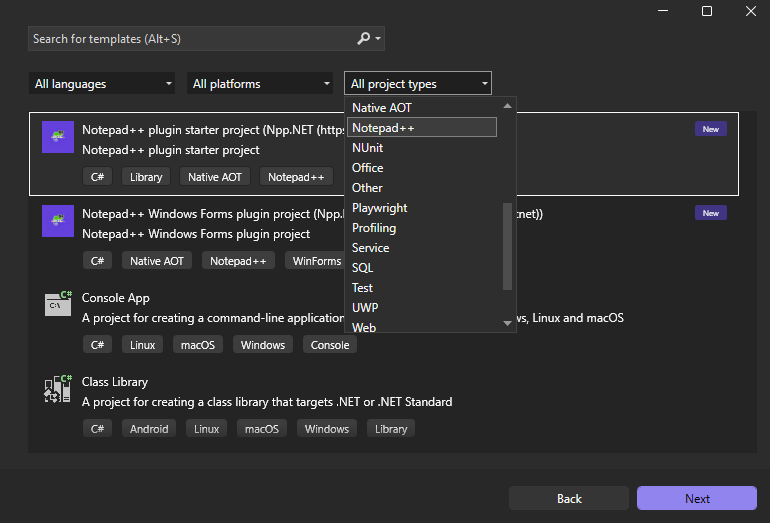
-
@rdipardo ,
Thanks for pointing out the Native AOT template — I wasn’t aware of it when I started the ARM64 migration.I did actually try Native AOT early on, but ran into two issues: the export limitations you mentioned, and the resulting DLL size (~57 MB), which felt way too large for a Notepad++ plugin. That’s why I ended up going with DNNE — the plugin DLL stays small (~1 MB), though it comes with the .NET 8 runtime dependency.
How large are the DLLs you’re getting with the Native AOT template? Has trimming improved enough to bring the size down to something reasonable for a plugin?


Hello! It looks like you're interested in this conversation, but you don't have an account yet.
Getting fed up of having to scroll through the same posts each visit? When you register for an account, you'll always come back to exactly where you were before, and choose to be notified of new replies (either via email, or push notification). You'll also be able to save bookmarks and upvote posts to show your appreciation to other community members.
With your input, this post could be even better 💗
Register Login