Search++: A work in progress
-
Hello, @coises,
Many thanks for this new release ! The new
Spy (temporarily show hidden lines)is interesting as it allows to see all context lines at a glance !The fact that the
Mark,Select,ShowandSpyfonctionalities work per tab is really a plus, too !
Now, after UNCHECKING :
-
In the
Settings > Selectionssection, theDefault commands automatically search within selections.option -
In the
Setings > Marked and shown textsection, theDefault commands automatically search within marked text.option -
In the
Settings > Focussection, all the options, as below :
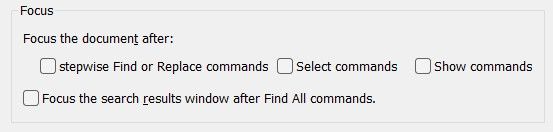
All the following commands keep focus to the
Search++dialog and do the following actions :Alt + F Finds the NEXT occurrence of the SEARCH string, in current file Alt + Shift + F Finds the PREVIOUS occurrence of the SEARCH string, in current file ( when 'PLAIN' button selected ) Alt + R Replaces the NEXT occurrence of SEARCH string, in current file Alt + A Displays ALL occurrences of the SEARCH string, from current file, in the 'Find Results' panel ( CANCEL with Ctrl + Shift+ R ) Alt + C Counts ALL occurrences of the SEARCH String, in current file Alt + E Replace ALL occurrences of the SEARCH string by the REPLACEMENT string, in current file ( when 'PLAIN' or 'REGEX' button selected ) Alt + H Shows ALL lines containing an occurrence of the SEARCH string, in current file ( CANCEL operation with Ctrl + Shift + A ) Alt + K Marks ( and possibly boobmarks ) ALL occurrences of the SEARCH string, in current file ( CANCEL operation with Ctrl + Shift + C ) Alt + S Select ALL occurrences of the SEARCH string, in current file ( NO CANCEL operation provided, so far ? ) ---------------------------------------------------------------------------------------------------------------------------------------------------------------- Alt + D Toggles 'Dot matches line Breaks' option ( when 'Regex' or 'ICU' button selected ) Alt + G Toggles 'Free Spacing' option ( when 'Regex' or 'ICU' button selected ) Alt + M Toggles 'Match case' option Alt + U Toogles 'Unicode Word boundaries' option ( when 'ICU' button selected ) Alt + W Toggles 'Whole word only' option ( when 'PLAIN' button selected ) ---------------------------------------------------------------------------------------------------------------------------------------------------------------- Alt + P Selects 'PLAIN' button Alt + X Selects 'REGEX' button Alt + I Selects 'ICU' button Alt + T Toogles 'TOOLS' button contents Alt + O Toogles between the 'FIND' and 'REPLACE' dialogs ---------------------------------------------------------------------------------------------------------------------------------------------------------------- Alt + Shift + 1 Opens the FIND drop-down menu Alt + Shift + 2 Opens the COUNT drop-down menu Alt + Shift + 3 Opens the FIND ALL drop-down menu Alt + Shift + 4 Opens the REPLACE drop-down menu Alt + Shift + 5 Opens the REPLACE ALL drop-down menu ---------------------------------------------------------------------------------------------------------------------------------------------------------------- Alt + L Displays the N++ 'Language' menu Alt + N Displays the N++ 'Encoding' menu Alt + V Displays the N++ 'View' menu ---------------------------------------------------------------------------------------------------------------------------------------------------------------- ALT + B Nothing ALT + J Nothing ALT + Q Nothing ALT + Y Nothing ALT + Z Nothing
As you can see, the different drop-down menus are opened with an
Alt + Shift + ...shortcut ( and not with anAlt + ...) ! I suppose, you did something wrong while attributing these5shortcuts, didn’t you ?Best Regards,
guy038
-
-
Alt + S Select ALL occurrences of the SEARCH string, in current file ( NO CANCEL operation provided, so far ? )
Since all you need to do to cancel a selection is to click anywhere in the document, I didn’t figure anything more would be needed.
As you can see, the different drop-down menus are opened with an
Alt + Shift + ...shortcut ( and not with anAlt + ...) ! I suppose, you did something wrong while attributing these5shortcuts, didn’t you ?I am guessing that you use one of the French keyboard layouts that requires the Shift key to type digits, correct?
Does this present a problem in actually using the shortcuts, or is it primarily a documentation issue?
Does this correspond to “normal” operation with underlined letters (the usual use of Alt+)? That is, if a dialog has a button labeled
Option 1with the1underlined, do have to use Alt+Shift+ to activate it, or does just Alt+{whatever character is under the1} do it? -
Hi, @coises and All,
You said :
Since all you need to do to cancel a selection is to click anywhere in the document, I didn’t figure anything more would be needed.
I agree with you that’s not a big task ! I just wanted to point out, that if you want to keep focus on the
Search++dialog, in order to use any otherAlt + ...command, I do not see any command which could cancel the selection !
Now, regarding the five shortcuts problem, you’re totally right : my FRENCH keyboard is a standard one and in order to get, for example, the
Alt + 1action, I must use the combinationAlt + Shift + 1! Now, I do not mind to stay with theseAlt + Shift + 1-5shortcuts ! But, if you find a way to detect the keys themselves, that would be fine too !BR
guy038
P.S. : Sorry for thinking you might have made a mistake when assigning those
5shortcuts ! -
 G guy038 referenced this topic on
-
Hello @coises
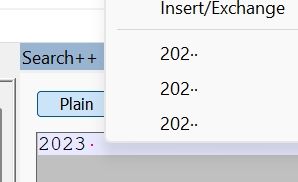
I think there is a small visual glitch in search/replace history
If a search or replace string ends with a blank character the entry is not displayed correctly in the history: the character just in front of the blank is not shown, instead it shows a blank as well:
-
Hello, @coises,
Could you take a look at my three consecutive posts, below , relative to simultaneous search of
compatible Unicode forms / characters?https://community.notepad-plus-plus.org/topic/27611/is-there-a-way-to-find-both-alphabets-with-and-without-accents-at-the-same-time-when-searching/11
https://community.notepad-plus-plus.org/topic/27611/is-there-a-way-to-find-both-alphabets-with-and-without-accents-at-the-same-time-when-searching/12
https://community.notepad-plus-plus.org/topic/27611/is-there-a-way-to-find-both-alphabets-with-and-without-accents-at-the-same-time-when-searching/13Do you think it would be possible to add this feature to Search++ as part of the plugin’s future development ?
Many thanks for your attention !
Best Regards,
guy038
-
Do you think it would be possible to add this feature to Search++ as part of the plugin’s future development ?
I do think it would be possible, and that it would be a useful enhancement.
I haven’t studied the problem in detail yet. The relevant concepts exist and are well-defined: Unicode canonical equivalence and compatibility equivalence. Probably someone has already implemented practical searches using canonical and compatibility equivalence in open source code, so finding and studying existing, mature solutions that have already encountered and resolved whatever complications inevitably arise will no doubt be my first step.
-
-
Hello, @coises, @thomas-knoefel and All,
For some obscure reasons, one day, my usual
USBkey for tests was just considered as containingRAWtext. I did not even succeeded to reformat it ! So I threw it in the trash and from a ( not too old ) copy of that key, I was able more or less, to reconstruct the original contents of thisUSBdrive !
Now, when I asked Google about “softwares able to search canonical and compatibility Unicode characters”, the IA answer, at the beginning, proposed, among other things, the CLI software
ripgrep (rg). Although it does not seem to really treat canonical and compatibility Unicode forms AFAIK, it is quite fast and has plenty of interesting options !Refer to https://github.com/BurntSushi/ripgrep. The last release is version
16.0. Download, preferably, theripgrep-16.0.0-x86_64-pc-windows-msvc.ziparchive which is compatible with64-bit Windows11laptopsAfter extraction of the
rg.exesoftware, in a CMD window, runrg -hfor short descriptions orrg --helpfor more details !
Following my usual procedure, I searched for any file, including binary ones as well, of my new USB key, the string
Fi, with this exact case, in regex mode and I got these results :Search "Fi" (32 189 hits in 624 files of 1 119 searched) [RegEx: Case] with native N++ v8.9.9.1 Search "Fi" (32 189 hits in 624 file(s)) [1 119 file(s) searched] with MultiReplace v6.2.0.38 32 189 matches in 624 of 1 118 files (Regex, match case): Fi with Search++ v0.8 (x64) And running the DOS command "rg -a --stats Fi", it displayed, at the end : 32189 matches 24492 matched lines 624 files contained matches 1118 files searched 12462212 bytes printed 498369521 bytes searched 0.173930 seconds spent searching 0.573693 seconds total
As you can see, the count of matches and the files concerned are identical for these
4tests However, the number of files analyzed varies :-
1,119for N++ and MultiReplace -
1,118for Search++ and rg.exe
I figured out why ! On my
D:key, I have only :-
One directory which is hidden :
System Volume Information -
One file which is hidden :
Thumbs.db
As the
Hidden foldersoption was unchecked,N++andMultiReplacedid not consider the folderSystem Volume Informationbut did take in account theThumbs.dbfile !Whereas,
the Search++plugin and thergsoftware did not consider, both, hidden files AND folders. Thus, it did not analyse theThumbs.db, as well !Consequently, @coises, I suppose that you have enough place to modify the label of the option from
Hidden filestoHidden files and folders. Alternatively, you could also decide to add a new optionHidden folders. Do as you like !
Now, I ran the same tests again, on
txtfiles ONLY and there are the results :•==============•==========•========•===========•===============•===============•==========================• | Software | Hits | In | Scanned | First Time | Second Time | Command | | / Plugin | | Files | Files | After Restart | Right after | | •==============•==========•========•===========•===============•===============•==========================• | Notepad++ | 10600 | 311 | 641 | 17 s 25 " | 5 s 32 " | | •--------------•----------•--------•-----------•---------------•---------------•--------------------------• | MultiReplace | 10600 | 311 | 641 | 11 s 80 " | 1 s 78 " | | •--------------•----------•--------•-----------•---------------•---------------•--------------------------• | Search++ | 10600 | 311 | 641 | 16 s 94 " | 0 s 66 " | | •--------------•----------•--------•-----------•---------------•---------------•--------------------------• | rg.exe | 10600 | 311 | 641 | 16 s 69 " | 0 s 55 " | rg -a -ttxt --stats Fi | •==============•==========•========•===========•===============•===============•==========================•Best Regards,
guy038
P.S. : Please note that the tests were all conducted BEFORE I wrote this post, which, obviously, modify the results !
-
-
Refer to https://github.com/BurntSushi/ripgrep.
An interesting and sophisticated piece of software. It is written in Rust and by default uses that language’s regular expression search engine, which is a “finite state machine” implementation rather than a “backtracking” implementation. The practical effect of that is that the default engine doesn’t support lookarounds or backreferences, though it does support some constructs Boost::regex does not. It also avoids the “complexity” error that can occur during matching with Boost::regex. (The expression itself can still be “too complex,” but if it is, that’s known before matching ever begins.)
One of the “someday…” wishes I have for Search++ is to add an alternate regex engine that uses a finite state machine (e.g., RE2), for use when the search expression doesn’t need backtracking-only features but the total space to be searched is huge.
Consequently, @coises, I suppose that you have enough place to modify the label of the option from
Hidden filestoHidden files and folders. Alternatively, you could also decide to add a new optionHidden folders.Yes, I see I should be more clear. Without thinking about it, I always assumed that if you were excluding “hidden” anything, that meant both hidden files and anything that could only be reached through a hidden folder. I hadn’t realized that Notepad++’s native search would still search hidden files if that box was not checked, so long as they weren’t in a hidden folder.
I’m curious whether you, or anyone, foresees practical cases in which you would want to omit one from a search but not the other.
-
Hi, @coises and All,
You said :
The practical effect of that is that the default engine [ of rg.exe ] doesn’t support lookarounds or backreferences …
Well, actually, if you choose the
--pcre2option, it does support them ! For example :The
rg -a -t txt --stats Fi(?=le)DOS command returns :C:\>d: D:\>rg -a -t txt --stats Fi(?=le) rg: regex parse error: (?:Fi(?=le)) ^^^ error: look-around, including look-ahead and look-behind, is not supported Consider enabling PCRE2 with the --pcre2 flag, which can handle backreferences and look-around. D:\>And, indeed, the command
rg -a -t txt --stats --pcre2 Fi(?=le), after a restart, is quite functional and give these results :2250 matches 1596 matched lines 104 files contained matches 642 files searched 271490 bytes printed 88413019 bytes searched 130.606157 seconds spent searching 17.113812 seconds totalNote that I do not understand why the total search took about
17 sand the search, itself, took about130 s? But this is an off-topic question !
Then, the next step, to my mind, was to try, for example, the regexes :
(?=[[=O=]])\X(?=[[=u=]])\X(?=[[=r=]])\X(?=[[= =]])\X(?=[[=f=]])\X(?=[[=r=]])\X(?=[[=i=]])\X(?=[[=e=]])\X(?=[[=n=]])\X(?=[[=d=]])\X(?=[[= =]])\X(?=[[=S=]])\X(?=[[=a=]])\X(?=[[=r=]])\X(?=[[=u=]])\X(?=[[=n=]])\X(?=[[=a=]])\X(?=[[=s=]])\X
(?=[[=O=]])\X(?=[[=u=]])\X(?=[[=r=]])\X(?=[[= =]])\X(?=[[=f=]])\X(?=[[=r=]])\X(?=[[=i=]])\X(?=[[=e=]])\X(?=[[=n=]])\X(?=[[=d=]])\X(?=[[= =]])\X(?=[[=Š=]])\X(?=[[=a=]])\X(?=[[=r=]])\X(?=[[=ū=]])\X(?=[[=n=]])\X(?=[[=a=]])\X(?=[[=s=]])\X
(?=[[=O=]])\X(?=[[=u=]])\X(?=[[=r=]])\X(?=[[= =]])\X(?=[[=f=]])\X(?=[[=r=]])\X(?=[[=i=]])\X(?=[[=e=]])\X(?=[[=n=]])\X(?=[[=d=]])\X(?=[[= =]])\X(?=[[=S=]])\X(?=[[=a=]])\X(?=[[=r=]])\X(?=[[=u=]])\X(?=[[=n=]])\X(?=[[=a=]])\X(?=[[=s=]])\X

Our friend Sarunas
Our friend Šarūnas
Our friend Šarūnas
And verify if EACH of these three regexes did match the three lines beginning with
Our friend ..., right below !Alas, thrice alas ! The program returns the message :
D:\>rg --stats --pcre2 (?=[[=O=]])\X(?=[[=u=]])\X(?=[[=r=]])\X(?=[[= =]])\X(?=[[=f=]])\X(?=[[=r=]])\X(?=[[=i=]])\X(?=[[=e=]])\X(?=[[=n=]])\X(?=[[=d=]])\X(?=[[= =]])\X(?=[[=Š=]])\X(?=[[=a=]])\X(?=[[=r=]])\X(?=[[=ū=]])\X(?=[[=n=]])\X(?=[[=a=]])\X(?=[[=s=]])\X Coises.txt
rg: PCRE2: error compiling pattern at offset 12: POSIX collating elements are not supported

D:\>
Even this simple command, below, fails :
D:\>rg --stats --pcre2 [[=q=]] Coises.txt
rg: PCRE2: error compiling pattern at offset 9: POSIX collating elements are not supported

D:\>
You can verify this assumption, at the end of this page : https://www.regular-expressions.info/refcharclass.html
Now, you said :
I’m curious whether you, or anyone, foresees practical cases in which you would want to omit one from a search but not the other.
Well, I do not need that distinction for myself ! It’s just that your excellent
Search in Filesdialog can already filter :-
By folder
-
And /or by included extensions or excluded extensions or *regex
-
And/or by size
-
And/or by date-type and date
Thus, it seemed to me that you could also add these two separate options
Hiden filesandHidden folders, in order that this dialog was even more flexible ! But, of course, do as you like ;-)Best Regards,
guy038
-


Hello! It looks like you're interested in this conversation, but you don't have an account yet.
Getting fed up of having to scroll through the same posts each visit? When you register for an account, you'll always come back to exactly where you were before, and choose to be notified of new replies (either via email, or push notification). You'll also be able to save bookmarks and upvote posts to show your appreciation to other community members.
With your input, this post could be even better 💗
Register Login