Search++: A work in progress
-
Hi, @coises, @thomas-knoefel and All,
FIRST test :
The only way to bookmark the last empty line
10, that I found, is to use the regex^((?!test).)*$again my example text, below :bla blah This is the test to do bla blah test bla blahSome observations :
-
Using Search++, in mode Regex, this regex counts
8matches, whose line1with ONLY a small blue triangle at bottom of line1and the last empty line10with the calltip^ zero length match -
Using Columns++, this regex counts also
8matches, but, this time, the first line returns, instead, the calltip^ zero length match -
Using Search++, in mode ICU this regex counts
7matches, whose line1with ONLY a small blue triangle at bottom of line1. So the line10is not a match
SECOND test :
Paste the text below in a new tab and search, in regex mode, for the regex
^abcabc abc abc 0011 abc 0012 abc abc 0085 abc 2028 abc 2029 abc After the above \r\n ==================================== abc 0009 abc 0020 abc 00A0 abc 00AD abc 2000 abc 200A abc 202F abc 205F abc 3000 abc 200B abc 200C abc 200D abc 2060 abc FEFF abc FFFA abc FFFB abc FFFCMay be, after pasting, you’ll have to change the line
2which needs to be anLFchar ONLY and line5which needs to be anCRchar ONLY !-
With N++ and MultiReplace the
^abcregex counts8matches. So a beginning of line is seen :-
At the very beginning of the file
-
After a
LFcharacter -
After a
FFcharacter -
After a
CRcharacter -
After a
NELcharacter -
After a
LScharacter -
After a
PScharacter -
After a
\r\nstring, in line9
-
-
With the Columns++ and Search++ Regex the
^abcregex counts4matches. So a beginning of line is seen :-
At the very beginning of the file
-
After a
LFcharacter -
After a
CRcharacter -
After a
\r\nstring, in line9
-
-
With Search++ ICU, the
^abccounts9matches. So a beginning of line is seen, like with N++ and MultiReplace and, also, after aVTcharacter.
Seemingly, in
ICUmode, the\r\ncouple is not considered as one char. Thus, the regex^\n|Qdo see theCRcharacter as a beginning of line (^). However, in this case, I do not understand why the^\nregex finds nothing at all !
THIRD test
-
Note that in Search++ Settings, I checked the
Always unmark all text before Mark command. (Otherwise add to existing marked text.)option. -
In addition, I chose the
Bookmark lines when marking textoption, in theToolsmenu
Thus, in all cases, all the marked text and all the bookmarked lines should be wiped out before a new
Markcommand.Using my example text, described above, I marked, in
ICUmode, all the lines which match the regex^\n|Q, as shown in the snapshot below :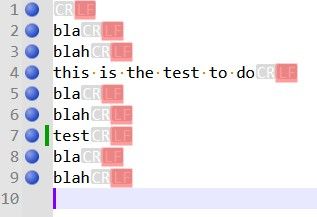
Then, I simply searched for the
^\nregex. As noticed above, this regex finds nothing. However, after clicking on theMark in Whole documentoption, the previous marks and bookmarks remain unchanged ?I expected no marked text and no bookmrked line ! I suppose it’s a bug.
Best Regards
guy038
-
-
Hello, @coises,
I said, at the end of the second test section :
Thus, the regex
^\n|Qdo see theCRcharacter as a beginning of line (^)I didn’t express myself clearly. I should have written :
Thus, the regex
^\n|Qdo see the transition between eachCRcharacter to its nextLFcharacter as a beginning of line (^)BR
guy038
-
The only way to bookmark the last empty line
10, that I found, is to use the regex^((?!test).)*$Yes, that’s the bug you found. The precise conditions are that if a match includes the last character in the file, Search++ fails to check for the possibility of a null match at the end of the file. That will be fixed in the next release.
- Using Search++, in mode Regex, this regex counts
8matches, whose line1with ONLY a small blue triangle at bottom of line1and the last empty line10with the calltip^ zero length match
Yes. Where possible I use the small triangle to mark a zero-length match. There are two situations where that isn’t possible, due to Scintilla limitations: when the match is at the end of a line, before the line ending characters, and line ending characters are not shown; and when the match is at the very end of the file. In those cases, I use the
^ zero length matchbanner instead.I use triangles for zero length matches in the Search++ results list and with the Show command, too. The same limitations apply with Show, but because call tips disappear when you interact with the text, I can’t really do anything about the indicators you can’t see. In the results list you can always see them because I can safely change some settings so that I can use line ending characters that Scintilla considers displayed, but that don’t actually show anything you can see.
- Using Columns++, this regex counts also
8matches, but, this time, the first line returns, instead, the calltip^ zero length match
Yes, I hadn’t thought of the triangle method yet when I wrote Columns++.
- Using Search++, in mode ICU this regex counts
7matches, whose line1with ONLY a small blue triangle at bottom of line1. So the line10is not a match
As best I can tell, ICU’s regex engine does not consider the position following the last character in the document to be the beginning of line, regardless of whether the last character is a line ending character. That makes sense, really, but it doesn’t conform to the way Scintilla lays out lines. So your expression doesn’t match because the circumflex doesn’t match.
-
With N++ and MultiReplace the
^abcregex counts8matches. So a beginning of line is seen :-
At the very beginning of the file
-
After a
LFcharacter -
After a
FFcharacter -
After a
CRcharacter -
After a
NELcharacter -
After a
LScharacter -
After a
PScharacter -
After a
\r\nstring, in line9
-
-
With the Columns++ and Search++ Regex the
^abcregex counts4matches. So a beginning of line is seen :-
At the very beginning of the file
-
After a
LFcharacter -
After a
CRcharacter -
After a
\r\nstring, in line9
-
-
With Search++ ICU, the
^abccounts9matches. So a beginning of line is seen, like with N++ and MultiReplace and, also, after aVTcharacter.
Yes, Columns++ and Search++ Regex do their best (I think they succeed) to treat the same things as line endings that are visible as line endings in Notepad++. So, for example, in your Total_Chars.txt,
^matches 3 times in Columns++ and in Search++ Regex; it matches 13 times in Search++ ICU; and in Notepad++ native search, if you use Find Next (since Count ignores null matches) and count manually (making sure not to miss the match at the very beginning of the file) there are 7 matches.Likewise,
(?-s:(?!.))(?s:.)produces 6 matches in Notepad++ (you can use Count for this one), 2 matches in Columns++ and Search++ Regex, and 7 matches in Search++ ICU.I’m not sure yet what causes the extra matches for
^in ICU; it could be something I’ve done wrong in preparing the string, it could be a bug in ICU4C, or could just be something I don’t understand.Seemingly, in
ICUmode, the\r\ncouple is not considered as one char. Thus, the regex^\n|Qdo see theCRcharacter as a beginning of line (^). However, in this case, I do not understand why the^\nregex finds nothing at all !ICU appears to treat
^differently in different expressions. So far, it looks to me as if, when it is the first thing to match in the only alternative, it treats CRLF as one, but when it’s anywhere else, it treats CR and LF each as line ending characters even when they are together in that order. That’s just from trying to infer a pattern behind what I’ve observed; I can’t find any documentation of such a thing. It could be a bug, or just something I don’t know.Then, I simply searched for the
^\nregex. As noticed above, this regex finds nothing. However, after clicking on theMark in Whole documentoption, the previous marks and bookmarks remain unchanged ?I expected no marked text and no bookmrked line ! I suppose it’s a bug.
It is working as intended, but perhaps the design is confusing. I had to keep the text in the Settings dialog reasonably brief, but I see I didn’t describe the details correctly in the help.
Existing marks (and bookmarks, if applicable) are cleared if the command is successful, meaning it finds at least one match. (Internally, it waits until it finds the first match and only clears the existing marks after it has found the first match, but before it marks it.) If there is an error, or if no match is found, nothing is cleared.
Since you can’t “undo” changes in marks and bookmarks, I thought that at least in the case where someone mistypes a search string resulting in no matches, it would be better not to lose the marks (or selections, or shown text and lines, as the case might be), so one could easily try again.
- Using Search++, in mode Regex, this regex counts


Hello! It looks like you're interested in this conversation, but you don't have an account yet.
Getting fed up of having to scroll through the same posts each visit? When you register for an account, you'll always come back to exactly where you were before, and choose to be notified of new replies (either via email, or push notification). You'll also be able to save bookmarks and upvote posts to show your appreciation to other community members.
With your input, this post could be even better 💗
Register Login