Search++: A work in progress
-
Hi, @coises,
I’ve just tested your new
v.0.7.1release !
Let’s suppose that we marked the occurrences of the word
testin the text below, that you’ll paste in a new tab :bla blah This is the test to do bla blah test bla blahAnd that we checked the
Bookmark lines when marking text (Shift: configureoption, in theToolsmenu=> The line
4and7are bookmarked and the two occurrences of the wordtestare markedIn an old post, I said that, in order to get the complementary regex, we had to use the
^((?!test).)*$regex as below :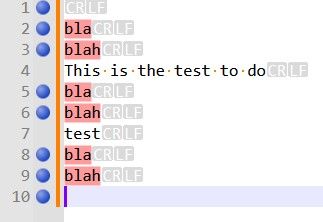
Luckily, there’s no need to find out this complementary regex, anymore :
- First, mark all the occurrences of the word
test.
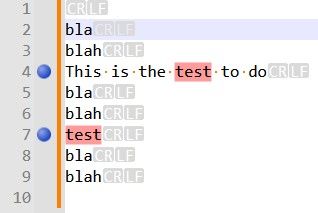
- Right-click within the bookmark margin of N++ and choose the
Inverse bookmarksoption.
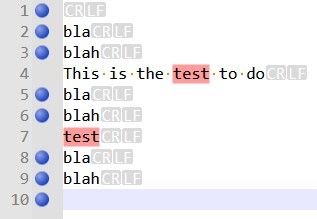
- Then, go to the
Synchronize marks and bookmarksoption of theToolsmenu and choose theMark all text in bookmarked lines and clear other marksoption
=> You should get this snapshot :
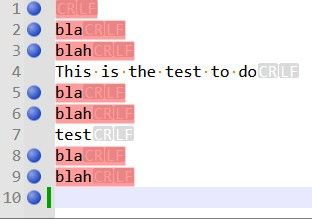
Which correctly bookmarked all the lines not containing the word
testand then marked all contents of the bookmarked lines, including theEOLs, as well !
I tested, both :
-
The
Bookmark lines with marked text, and clear other bookmarksoption VS theAdd bookmarks to lines with marked textoption -
The
Mark all text in bookmarked lines, and clear other marksoption VS theAdd marks to all text in bookmarked linesoption
And, if I understand you correctly, you mean that the
Synchronize marks and bookmarkssub-menu, in your future release, will look as below :Bookmark lines with marked text, and clear other bookmarks Bookmark visible lines, and clear other bookmarks Mark all text in bookmarked lines, and clear other marks Add bookmarks to lines with marked text Add bookmarks to visible lines Add marks to all text in bookmarked linesYes, that’s totally coherent : The first three items do a
clearoperation whereas the last three items simply add bookmarks / marks to the existing layout !Best Regards
guy038
P.S. :
Just a random question about regex. In the sample of text above :
-
If I try to mark the
\zregex with your plugin, I do get the bookmarkred line10, which is the final empty line of the text -
If I mark all the occurrences of the
(?-s)^((?!test).)*\Rregex => All lines, but lines4, 7, 10, are bookmarked and text withEOLs, in lines1, 2, 3, 5, 6, 8, 9is marked
However, marking all occurrences of the
^(?-s)((?!test).)*\R|\zregex do not bookmark the final line10, nor the(?-s)^((?!test).)*$\R?regex and nor the(?-s)^((?!test).)*(\R|\z)regex !Not important, though. Do you have an explanation ?
- First, mark all the occurrences of the word
-
Do you have an explanation ?
This is exceedingly odd. Thank you for identifying and describing it clearly. I do not have an explanation, but I think it has to be a bug (and not just a quirk of regex). Here’s why.
We can’t compare the same test in native Notepad++ search, because Mark doesn’t count or bookmark null matches. (The same with Count and Find All: in Notepad++ native search, they ignore null matches.)
However, single-step Find does identify null matches in both engines. In Notepad++ native search using Find Next, your expression
(?-s)^((?!test).)*\R|\zidentifies eight matches. The last is at the end of the file and shows the^ zero length matchmessage.In Search++ Regex with Find, it only finds seven.
What is even more peculiar is if you switch to the ICU engine and Mark the same expressions. In ICU as in Regex,
\zalone does as you would expect, bookmarking the last line and showing the message “Found 1 match (0 marked, 1 null).” ICU also does the same as Regex with(?-s)^((?!test).)*\R, marking and bookmarking seven lines, exactly as you would expect.Adding the
|\zto the end changes nothing in Regex, though you would expect to see “Found 8 matches (7 marked, 1 null)” and a bookmark on the last line. In ICU it not only doesn’t bookmark the last line, it finds and bookmarks nine matches, marking the LF, but not the CR or the rest of the line, on the lines containingtest!As far as I can tell (I might not have tested every possible combination yet), both Regex and ICU are self-consistent in that they Find and Count and Find All the same things they mark/bookmark.
Why adding
|\zcauses such strange behavior — in ICU even leading to new matches in the middle of the file — as yet I have no clue. -
Do you have an explanation ?
and I wrote:
I think it has to be a bug
It is, and it’s a fairly simple error in my logic. If a match ends at the end of the file (or the end of a selection or a span of marked text, if you’re searching within one of those), the search ends (or moves on to the next selection or span of marked text) without checking whether the expression can match null there. It will be fixed in the next release.
Why adding
|\zcauses such strange behavior — in ICU even leading to new matches in the middle of the file — as yet I have no clue.The code supporting ICU search has the same logic error as the Regex search does, but there’s an additional oddity which seems to be built into ICU’s regular expression search. As best I can tell, it treats the circumflex (
^) differently when it is the first element of the only alternative and in all other contexts. As an example, see the difference between marking^\n(which matches nothing in Guy’s test text) and^\n|Q(which matches the line feed at the end of each of the first nine lines).Note: I suggested using Mark to show this because Scintilla will not allow a selection to encompass only part of a line ending, so it’s less clear what is happening with Select or stepwise Find commands. The Search++ results list doesn’t have the option to show line endings — perhaps it should! — so Find All is also unclear.
I’m not sure if this is expected behavior. ICU describes the circumflex as “Match at the beginning of a line” but, as far as I can find, says nothing about it behaving differently in different positions or expressions.
-
Hi, @coises, @thomas-knoefel and All,
FIRST test :
The only way to bookmark the last empty line
10, that I found, is to use the regex^((?!test).)*$again my example text, below :bla blah This is the test to do bla blah test bla blahSome observations :
-
Using Search++, in mode Regex, this regex counts
8matches, whose line1with ONLY a small blue triangle at bottom of line1and the last empty line10with the calltip^ zero length match -
Using Columns++, this regex counts also
8matches, but, this time, the first line returns, instead, the calltip^ zero length match -
Using Search++, in mode ICU this regex counts
7matches, whose line1with ONLY a small blue triangle at bottom of line1. So the line10is not a match
SECOND test :
Paste the text below in a new tab and search, in regex mode, for the regex
^abcabc abc abc 0011 abc 0012 abc abc 0085 abc 2028 abc 2029 abc After the above \r\n ==================================== abc 0009 abc 0020 abc 00A0 abc 00AD abc 2000 abc 200A abc 202F abc 205F abc 3000 abc 200B abc 200C abc 200D abc 2060 abc FEFF abc FFFA abc FFFB abc FFFCMay be, after pasting, you’ll have to change the line
2which needs to be anLFchar ONLY and line5which needs to be anCRchar ONLY !-
With N++ and MultiReplace the
^abcregex counts8matches. So a beginning of line is seen :-
At the very beginning of the file
-
After a
LFcharacter -
After a
FFcharacter -
After a
CRcharacter -
After a
NELcharacter -
After a
LScharacter -
After a
PScharacter -
After a
\r\nstring, in line9
-
-
With the Columns++ and Search++ Regex the
^abcregex counts4matches. So a beginning of line is seen :-
At the very beginning of the file
-
After a
LFcharacter -
After a
CRcharacter -
After a
\r\nstring, in line9
-
-
With Search++ ICU, the
^abccounts9matches. So a beginning of line is seen, like with N++ and MultiReplace and, also, after aVTcharacter.
Seemingly, in
ICUmode, the\r\ncouple is not considered as one char. Thus, the regex^\n|Qdo see theCRcharacter as a beginning of line (^). However, in this case, I do not understand why the^\nregex finds nothing at all !
THIRD test
-
Note that in Search++ Settings, I checked the
Always unmark all text before Mark command. (Otherwise add to existing marked text.)option. -
In addition, I chose the
Bookmark lines when marking textoption, in theToolsmenu
Thus, in all cases, all the marked text and all the bookmarked lines should be wiped out before a new
Markcommand.Using my example text, described above, I marked, in
ICUmode, all the lines which match the regex^\n|Q, as shown in the snapshot below :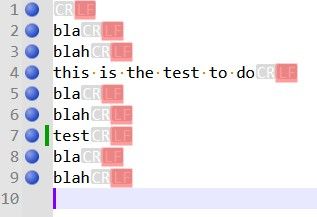
Then, I simply searched for the
^\nregex. As noticed above, this regex finds nothing. However, after clicking on theMark in Whole documentoption, the previous marks and bookmarks remain unchanged ?I expected no marked text and no bookmrked line ! I suppose it’s a bug.
Best Regards
guy038
-
-
Hello, @coises,
I said, at the end of the second test section :
Thus, the regex
^\n|Qdo see theCRcharacter as a beginning of line (^)I didn’t express myself clearly. I should have written :
Thus, the regex
^\n|Qdo see the transition between eachCRcharacter to its nextLFcharacter as a beginning of line (^)BR
guy038
-
The only way to bookmark the last empty line
10, that I found, is to use the regex^((?!test).)*$Yes, that’s the bug you found. The precise conditions are that if a match includes the last character in the file, Search++ fails to check for the possibility of a null match at the end of the file. That will be fixed in the next release.
- Using Search++, in mode Regex, this regex counts
8matches, whose line1with ONLY a small blue triangle at bottom of line1and the last empty line10with the calltip^ zero length match
Yes. Where possible I use the small triangle to mark a zero-length match. There are two situations where that isn’t possible, due to Scintilla limitations: when the match is at the end of a line, before the line ending characters, and line ending characters are not shown; and when the match is at the very end of the file. In those cases, I use the
^ zero length matchbanner instead.I use triangles for zero length matches in the Search++ results list and with the Show command, too. The same limitations apply with Show, but because call tips disappear when you interact with the text, I can’t really do anything about the indicators you can’t see. In the results list you can always see them because I can safely change some settings so that I can use line ending characters that Scintilla considers displayed, but that don’t actually show anything you can see.
- Using Columns++, this regex counts also
8matches, but, this time, the first line returns, instead, the calltip^ zero length match
Yes, I hadn’t thought of the triangle method yet when I wrote Columns++.
- Using Search++, in mode ICU this regex counts
7matches, whose line1with ONLY a small blue triangle at bottom of line1. So the line10is not a match
As best I can tell, ICU’s regex engine does not consider the position following the last character in the document to be the beginning of line, regardless of whether the last character is a line ending character. That makes sense, really, but it doesn’t conform to the way Scintilla lays out lines. So your expression doesn’t match because the circumflex doesn’t match.
-
With N++ and MultiReplace the
^abcregex counts8matches. So a beginning of line is seen :-
At the very beginning of the file
-
After a
LFcharacter -
After a
FFcharacter -
After a
CRcharacter -
After a
NELcharacter -
After a
LScharacter -
After a
PScharacter -
After a
\r\nstring, in line9
-
-
With the Columns++ and Search++ Regex the
^abcregex counts4matches. So a beginning of line is seen :-
At the very beginning of the file
-
After a
LFcharacter -
After a
CRcharacter -
After a
\r\nstring, in line9
-
-
With Search++ ICU, the
^abccounts9matches. So a beginning of line is seen, like with N++ and MultiReplace and, also, after aVTcharacter.
Yes, Columns++ and Search++ Regex do their best (I think they succeed) to treat the same things as line endings that are visible as line endings in Notepad++. So, for example, in your Total_Chars.txt,
^matches 3 times in Columns++ and in Search++ Regex; it matches 13 times in Search++ ICU; and in Notepad++ native search, if you use Find Next (since Count ignores null matches) and count manually (making sure not to miss the match at the very beginning of the file) there are 7 matches.Likewise,
(?-s:(?!.))(?s:.)produces 6 matches in Notepad++ (you can use Count for this one), 2 matches in Columns++ and Search++ Regex, and 7 matches in Search++ ICU.I’m not sure yet what causes the extra matches for
^in ICU; it could be something I’ve done wrong in preparing the string, it could be a bug in ICU4C, or could just be something I don’t understand.Seemingly, in
ICUmode, the\r\ncouple is not considered as one char. Thus, the regex^\n|Qdo see theCRcharacter as a beginning of line (^). However, in this case, I do not understand why the^\nregex finds nothing at all !ICU appears to treat
^differently in different expressions. So far, it looks to me as if, when it is the first thing to match in the only alternative, it treats CRLF as one, but when it’s anywhere else, it treats CR and LF each as line ending characters even when they are together in that order. That’s just from trying to infer a pattern behind what I’ve observed; I can’t find any documentation of such a thing. It could be a bug, or just something I don’t know.Then, I simply searched for the
^\nregex. As noticed above, this regex finds nothing. However, after clicking on theMark in Whole documentoption, the previous marks and bookmarks remain unchanged ?I expected no marked text and no bookmrked line ! I suppose it’s a bug.
It is working as intended, but perhaps the design is confusing. I had to keep the text in the Settings dialog reasonably brief, but I see I didn’t describe the details correctly in the help.
Existing marks (and bookmarks, if applicable) are cleared if the command is successful, meaning it finds at least one match. (Internally, it waits until it finds the first match and only clears the existing marks after it has found the first match, but before it marks it.) If there is an error, or if no match is found, nothing is cleared.
Since you can’t “undo” changes in marks and bookmarks, I thought that at least in the case where someone mistypes a search string resulting in no matches, it would be better not to lose the marks (or selections, or shown text and lines, as the case might be), so one could easily try again.
- Using Search++, in mode Regex, this regex counts
-
Hello, @coises,
You said, at the end of my last post :
Existing marks (and bookmarks, if applicable) are cleared if the command is successful, meaning it finds at least one match. (Internally, it waits until it finds the first match and only clears the existing marks after it has found the first match, but before it marks it.) If there is an error, or if no match is found, nothing is cleared.
I verified that if I, simultaneously, check the third options :
-
☑
Always clear selections before Select command. (Otherwise add to existing selections.) -
☑
Always unmark all text before Mark command. (Otherwise add to existing marked text.) -
☑
Always hide all lines and remove Show style from text before Show command
Nothing is cleared if current search does not find any match or finds an error, regarding selections, marks, and shown text
Therefore, I think it would be a good idea to mention this fact in the Search++ documentation, within the cleaning section of Search++ settings !
Best Regards
guy038
-
-
Hi @guy038,
MultiReplace doesn’t use a regex engine of its own: its searches run through Notepad++'s Scintilla, i.e. through Notepad++'s Boost regex engine. So
^and$see the same line breaks as the native Find dialog, which with Boost also includes FF, NEL, LS and PS. That is intended: MultiReplace should always find the same matches as Notepad++ itself. -
@astewart77, @guy038 and anyone else who cares to comment:
As noted, I still didn’t get the Synchronize marks and bookmarks sub-menu right in version 0.7.1. I am interested if you have any preference among these three possibilities:
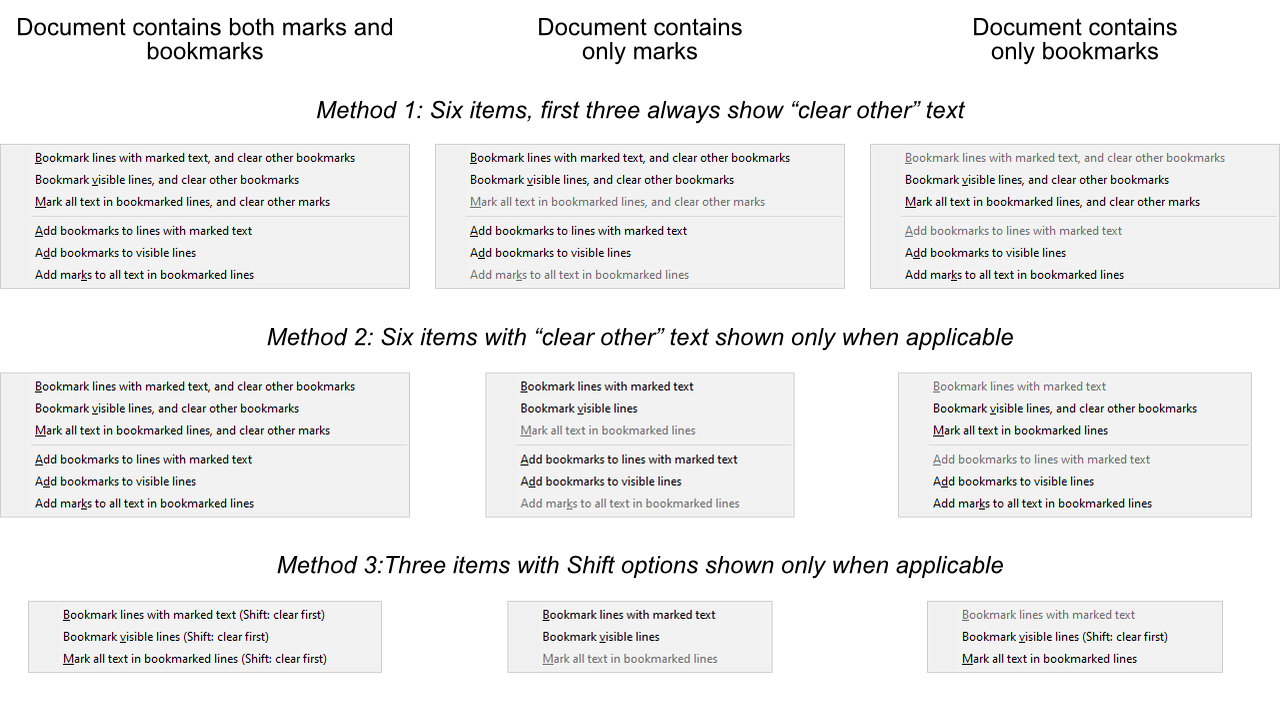
or if you would suggest anything else?
As elsewhere, right-click would be equivalent to Shift+click.
-
Hi, @coises, @astewart77 and All,
Ah,…, personally, I’m voting for the Methiod 3 as we are already used to the
Shiftbehaviour. In addition, it remains only three items in the menu which appears more clear !This is coherent with the
Mark selected text (Shift: clear first)andMark shown text (Shift: clear first)options, in theToolsmenu !Best Regards,
guy038
-
I also vote for Method 3.
Method 2 has too much text changing from use to use. For me, the only advantage to Method 1 is being a bit easier to automate with AutoHotkey.
-
C Coises referenced this topic on
-
Search++ version 0.7.2 is available:
-
Correct failure to find a zero-length match at the end of a file, selection or span of marked text when the previous match included last character of the file, selection or span of marked text.
-
Condense Tools | Synchronize sub-menu.
-
Implement Tools | Expand visible configure tool window.
-
Keep use of hidden lines in Search++ (almost) consistent with the way Notepad++ handles hidden lines and fold points. Hidden lines now show unhide margin markers. Hidden lines stay hidden after leaving and returning to a tab (except for the first and last line, which Search++ Hide all lines and implicit hide before Show commands hide, but Notepad++ native actions never do).
-
Stepwise searches, Select and Show commands, and clicking on a match in the results window now properly unfold collapsed sections when necessary to show a match.
Comments, criticisms, suggestions, bug reports and other observations are most welcome!
A little over a month ago I claimed:
I use Scintilla’s hidden lines feature directly. Notepad++ also uses that feature, but it doesn’t provide a way for plugins to use it through Notepad++, and it keeps internal status information that assumes only it is using hidden lines. There appears to be no way to make Notepad++ synchronize its own idea of which lines it thinks are hidden with the actual state of Scintilla. Various bizarre things happen because of this.
I was wrong about that. I didn’t read the Notepad++ code carefully enough and jumped to an incorrect conclusion.
I fixed a couple bugs in this release, but the main change in 0.7.2 is making hidden lines, particularly as used by the Show command, work consistently with the way Notepad++ uses them. Aside from any errors in my implementation, the one known, intentional discrepancy is that when Search++ hides all lines that includes the first and last line of the document. Notepad++ refuses to hide those. Under some circumstances, such as switching from a tab in which you’ve run a Show command to another tab and then switching back, Notepad++ will show the first and last line; at present I don’t attempt to override that.
Versions of Search++ prior to 0.7.2 failed to coordinate hidden lines properly with Notepad++ at all, so switching tabs would lose all information about what Search++ had hidden.
I also added more flexibility to Tools | Expand visible, which is primarily for showing context around matches after a Show command. You can now open a small tool window that lets you choose how many lines to show before and after in one step, and whether to show them around all visible blocks or only the block(s) containing the cursor or selection. This is a new feature, so observations about its clarity and usability are most welcome. It is described here in the help.
One known problem is that when double-clicking a match or other position in the Search++ results window opens a new tab (that is, the file wasn’t open in Notepad++ already), the document fails to scroll to show the match or position. Double-clicking a second time (now that the document is open) scrolls correctly. I think I understand why this is happening, but I have not yet devised a way to make it work as expected.
-
-
Search++ version 0.7.2 is available
Additional known bugs thus far:
Show only lines with shown text, and the Reset button in the Expand visible dialog, do not restore hidden line markers correctly. That’s a simple omission which will be fixed in the next release.
Some Search++ operations that affect hidden lines do not take into account the possibility that the hidden and shown lines and the markers in the margin that indicate hidden lines can fall out of sync. If the same file is opened in both views, Search++ affects hidden/visible lines only in the view which is active, but the markers are changed in both views.
In Scintilla, markers and fold points are properties of the document, but hidden lines and whether a given fold is expanded or contracted are properties of the view. Because Notepad++ uses markers to keep track of hidden lines and to implement the ability to show them again, there’s a bit of a conflict. In principle, it should be impossible to have lines shown in one view and not in the other, except when the only thing hiding lines is collapsed fold points.
As far as I can tell, Notepad++ doesn’t let you hide or show lines in one view of the document without the same thing happening in the other view, so long as you use only native Notepad++ commands. However, it’s useful to be able to have one view showing the entire document and another showing only lines of interest, and I don’t want to break that.
The extent of problems this might cause is not yet known. For now, expect surprises if you open the same document in both views and use any of the Search++ features that affect hidden lines.
-
This post is deleted! -
Hello, @coises and All,
Many thanks, @coises, for your new release. Sorry for the late reply — every Friday, since the beginning of fall, I’ve been going on hikes with a group of seniors !
You said :
Correct failure to find a zero-length match at the end of a file, selection or span of marked text when the previous match included last character of the file, selection or span of marked text.
I did verify, for example, that the regexes
^(?-s)((?!test).)*\R|\z,(?-s)^((?!test).)*$\R?and(?-s)^((?!test).)*(\R|\z)correctly detect the last empty line 10. Nice !
You said :
Condense Tools | Synchronize sub-menu.
To this purpose, here is a little test, using my example text, below, pasted in a new tab :
bla
blah
this is the test to do
bla
blah
test
bla
blah
Preamble :
-
Uncheck, if necessary, the
Bookmark lines when marking text (Shift: Configure)option in theToolsmenu -
Uncheck, if necessary, the
Default commands search within selectionsoption in theSettingsdialog -
Uncheck, if necessary, the
Default commands search within marked textoption in theSettingsdialog -
Uncheck, if necessary, the
Always unmark all text before Mark command. (Otherwise add to existing marked text).option in theSettingsdialog
Now :
-
1 Mark every
testword -
2 Mark every
blahword -
3 Then, manually, bookmark the lines
4and7containing the wordtest -
4 Choose the
Synchronize marks and bookmarksoption -
5 Finally, hit the
Shiftkey and click on theMark all text in bookmarked lines (Shift:clear first)
=> All the existing marked test is cleared first, then all text, in the two
bookmarkedlines, is marked, as shown below :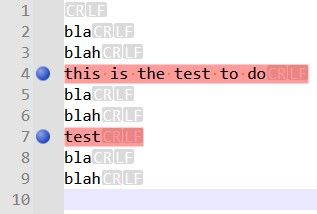
-
6 Now, use the
Remove marks from active documentdocument to clear all the marked text and click on the two blue bookmarks to clear them, as well -
7 Redo the steps from 1 to 4
-
8 Finally, simply click on the
Mark all text in bookmarked lines (Shift:clear first)
=> All the existing marked text is preserved, then all text, in the two bookmarked lines, is marked, as shown below :
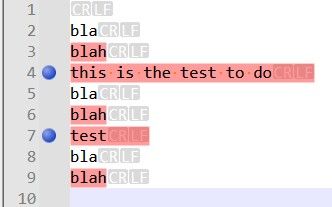
You said :
Implement Tools | Expand visible configure tool window.
Bravo for your new configurable dialog via the
Expand visible 1:1 (Shift:configure)option, in theToolsmenu. Every click, possibly repeated, on buttonsExpand before,Expand afterandExpandact as expected !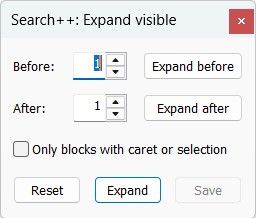
The button
Resetclears all these context lines and I suppose that thesavebutton ( not tested ) can remember special settings like : show me, by default3lines before andtwolines after !
You said :
Hidden lines now show unhide margin markers. Hidden lines stay hidden after leaving and returning to a tab (except for the first and last line,…
As an example, I chose to hide all lines containing the
the propertystring, with this exact case, in theICU.txtfile : I had the bottom messageShowing 13 matchesand, indeed, only13lines were visible. However :-
I did not see any unhide margin markers ???
-
While switching to another tab then switching back to the
ICU.txtdid show me allthe propertystrings but all the lines were visible and not the13lines containing thethe propertystring only ???
Best Regards,
guy038
Oh… I have not read your very last post yet. You said :
Show only lines with shown text, and the Reset button in the Expand visible dialog, do not restore hidden line markers correctly.
Personally, I did not notice this bug, even when clicking on the
Resetbutton during my test with theICU.txtfile, described above ? -
-
As an example, I chose to hide all lines containing the
the propertystring, with this exact case, in theICU.txtfile : I had the bottom messageShowing 13 matchesand, indeed, only13lines were visible. However :-
I did not see any unhide margin markers ???
-
While switching to another tab then switching back to the
ICU.txtdid show me allthe propertystrings but all the lines were visible and not the13lines containing thethe propertystring only ???
Thank you for all your tests! This surprised me (I’m assuming you meant Show and not hide all)… until it occurred to me that I might not have tested recently with Always hide all lines and remove Show style from text before Show command not checked. Sure enough, if that setting is not checked and no lines are hidden and you do a Show command, the hide markers in the margin are not established.
It’s a simple omission, similar to the one that causes the Show only lines with shown text bug, and it will also be fixed in the next release. I think the reason you didn’t notice the Show only lines with shown text bug was probably that markers weren’t set in the first place because of this bug, so there was nothing different.
The inside story is that when I started the work for the 0.7.2 release to use markers consistent with Notepad++ for hidden lines, I left the showing and hiding code alone and added a step at the end of commands that can affect hidden lines to remove existing markers and then add markers consistent with the current visibility of each line in the document. Then I gave more thought to how folding blocks and explicitly hidden lines interact, and realized that when the document contains both explicitly hidden lines and collapsed folding blocks, it is not possible to reconstruct the hidden line markers knowing only the current visibility of every line. (E.g., you can have a span of hidden lines within a collapsed folding block. When you expand the block, Notepad++ still keeps the lines you explicitly hid hidden.) So I switched to a method where I update the markers as lines are hidden or shown rather than reconstructing them at the end. The problem with that is that I missed some spots. :-(
-
-
I suppose that the save button ( not tested ) can remember special settings like : show me, by default 3 lines before and two lines after !
The Save button makes the Before, After and Only blocks with caret or selection settings apply to future Expand visible commands (without the Shift key or right click). It also makes the settings “stick” if you close the dialog and later open it again. (At present, there is no way to separate these functions. When opened, the dialog always shows the settings that apply to the Expand visible command without Shift or right click, not necessarily the (unsaved) settings when you last closed it.)
Since this dialog is new, it is very much open to change. I do want to keep it small, so it can be left open but moved out of the way when a user expects to use these functions repeatedly in a short period of time.
-
Hi, @coises,
First of all, sorry for the typo. I did mean :
As an example, I chose to show all lines containing the
the propertystring, with this exact case, in theICU.txtfile !
You’re perfectly right about the bug. It occurs only when the
Always hide all lines and remove Show style from text before Show commandoption, in theSettingsdialog is uncheckedAfter checking this option in the
Settingdialog, I could easily verify, with theICU.txtfile, that the13green markers were there, along with the13lines containing thethe propertystring
I also noted that, right after you just show these
13lines, clicking in the margin right below the line1183just displays the remaining lines of theICU.txtfile ! I think that behavior is normal because if you then click on the marker of the1183line, it then also displays all lines between lines1164and1183.Moreover, if after showing these
13lines, in theICU.txtfile, you switch to an other tab, then switch back to theICU.txtfile, this time, it also displays a triangular green marker in the last line2132of the file !
Finally, as you said, I could verify that the markers :
-
Were not restored at all after a click on the
Resetbutton which follows a click on theExpandbutton -
Were not completly restored after a click on the
Resetbutton which follows a click on theExpand beforeorExpand afterbutton -
Were correctly preserved if you immediately click on the
Resetbutton
However, the
Show only lines with shown textin theToolsdialog seem to work properly, even after switching tabs : lines to show and markers seem preserved !Best Regards,
guy038
-
-
Search++ version 0.8 is available:
-
Fix failure to handle hidden lines markers correctly when executing Show commands with Always hide all lines… not checked and when executing the Show only lines with shown text command on the Tools menu.
-
Track and restore first line and last line hidden states across tab changes.
-
Add Spy (temporarily show hidden lines) toggle to the Tools menu. When spy mode is on all lines are visible even though the markers for hidden lines and collapsed folding groups remain; hidden lines can be restored by toggling spy mode off again.
-
Replace the Reset button in the Expand visible configuration dialog with a Tools button. Make Tools menu keyboard shortcuts work in that dialog.
-
General reassignment of shortcut keys for greater consistency. Quite a few things have changed, so it is important to check the help, the community thread and/or the Tools menu and the Find and Replace box context menus for the new assignments if you use keyboard shortcuts in Search++. I regret the disruption; hopefully this will be a one-time change, and keyboard shortcuts will stay the same after this.
There are two big changes in this release: the addition of “Spy mode” and some fairly extensive changes to the keyboard shortcuts to yield greater consistency between mnemonics (underlined letters) and shortcuts, some additional capabilities, and hopefully a generally more logical set of assignments. Those changes are detailed below.
There is now a Tools button on the Expand visible configuration dialog instead of the previous Reset button, and Tools command keyboard shortcuts work when focus is in the Expand visible dialog. My rationale for this is that Reset wasn’t very clear, it just did a command from the Tools menu anyway (Show only lines with shown text), and especially with the new Spy toggle available, I’m not at all convinced there’s a reason to give any one command special accessibility.
There is a small change in the way the keyboard shortcuts for Show selected/all text (now Ctrl+O / Ctrl+Shift+O) work. Previously, the unshifted version, like the menu item, would show all lines if all selected text, or the caret if no text was selected, was visible. The menu item still changes to Show all lines, not requiring a shift or a right-click, if none of the selection is hidden, but Ctrl+O will do nothing if none of the selection is hidden, so that Ctrl+Shift+O is required to show all lines. My rationale is that especially when spy mode is active, it might be easy to accidentally show all lines when that is not intended if Ctrl+O does both. When using the menu, you have the item text to clue you in.
As always, comments, critiques, suggestions, problem reports and experiences are most welcome, and thank you for giving this work-in-progress a try.
Spy mode lets you temporarily view all lines in the active document while keeping the markers that define what should be hidden intact. The idea is from this feature request and the subsequent discussion.
I expect this to be most useful after a Show command. If the caret or selection is visible on the screen when you toggle Spy to checked, that part of the text will remain in (approximately) the same place on the screen while all lines become visible. That lets you see additional context for the match. You can use Show selected lines from the Tools menu to change the markers so the selected lines are not marked as hidden; then when you toggle Spy to unchecked, those lines will remain visible.
The Spy setting is per tab and is preserved when you change tabs and change back again. (As of this release, hidden first and last lines are also preserved.) While you cannot have different hidden line markers or fold markers for the same document in different views (that’s a Notepad++/Scintilla limitation), you can have Spy checked in one view and unchecked in the other.
It is possible to use the Notepad++ Hide Lines command or the icon for collapsing a fold block while Spy is checked. In this circumstance some lines will be hidden, but there may be other lines that are marked as hidden or are part of a collapsed fold block that are not hidden. The Spy entry on the Tools menu will then show a bullet instead of a check mark to indicate an indeterminant state. Clicking once will return to full Spy checked state (all lines visible), and clicking a second time will return to normal display. An indeterminant state is not preserved when changing tabs: upon switching back to the tab it will have Spy checked and all lines visible.
Spy is new feature. Expect there to be some glitches. If you have the time and patience, reports of your experience will be much appreciated.
There were a few interconnected rationales for the keyboard shortcut changes, all centered around trying to make things as convenient and coherent as I can for users who prefer to use the keyboard whenever possible. I am sorry for the disruption to those who are already used to some of these shortcuts; hopefully I have it “right” this time, and I won’t have to make such extensive changes again.
I’ll try to list the main changes. They’re all in the help and on the menus, but I can’t guarantee I’ve caught every last one of them here.
General navigation — these work in the main Search++ dialog, the Search in Files dialog, the Search++ results window and the Expand visible configuration dialog:
-
Ctrl+F toggles keyboard focus between the Search in Files dialog and the main Search++ dialog. If the target dialog isn’t visible, it is opened. Ctrl+Shift+F closes the Search in Files dialog.
-
Ctrl+R toggles keyboard focus between the Search++ results window and the main Search++ dialog. If the target dialog or window isn’t visible, it is opened. Ctrl+Shift+R closes the Search++ results window.
-
Ctrl+N puts keyboard focus in the active Notepad++ document. Ctrl+Shift+N closes the main Search++ dialog.
-
Ctrl+Shift+Q closes all Search++ dialogs and windows and puts keyboard focus in the active Notepad++ document.
-
Note that all these except Ctrl+N have changed. Also, Ctrl+O and Ctrl+Shift+O, which used to be general navigation commands, are now the Tools commands Show selected lines and Show all lines.
Main Search++ dialog navigation:
-
Alt+O (the letter “o”) toggles between the Find box and the Replace box.
-
Alt+1 through Alt+5 (only on the main keyboard, not the numeric keypad) open the drop-down menus on the five search command buttons. These were previously difficult to access by keyboard alone.
-
The third (“Find All”) command button uses the mnemonic (underlined letter)
A,S,KorHwhen the one-click command action is Find All, Select, Mark or Show. (Recall that you can set any command on the drop-down menu as the one-click command for a button by right clicking or Shift+clicking the command.) The Alt key plus that letter performs the one-click command (as it always did), while the Alt key plus one of the remaining letters performs the default command for the associated action.
Search in Files dialog navigation:
-
Alt+O (the letter “o”) toggles between the Find box and the Replace box.
-
Alt+T puts keyboard focus in the table of files at the bottom of the dialog.
Find and Replace box context menus (in the main Search++ dialog and the Search in Files dialog):
-
Ctrl+G is Exchange Find/Replace (formerly Ctrl+E). This swaps the Find and Replace fields in the dialog in which you are working.
-
Ctrl+Shift+H is Insert Find (formerly Ctrl+F and called Copy Find). This inserts the contents of the Find box in the main Search dialog at the location of the caret or in place of the selection. If you are working in the Find box in the main Search dialog, it replaces the contents of the Replace box with the contents of the Find box.
-
Ctrl+Shift+J is Insert Replace (formerly Ctrl+R and called Copy Replace). This inserts the contents of the Replace box in the main Search dialog at the location of the caret or in place of the selection. If you are working in the Replace box in the main Search dialog, it replaces the contents of the Find box with the contents of the Replace box.
Tools menu commands:
-
Show selected/all lines is now Ctrl+(Shift+)O.
-
Expand visible is now Ctrl+E, and configure is Ctrl+Shift+E.
-
Hide all lines is now Ctrl+H.
-
Remove marks from selected text is now Ctrl+Shift+V.
-
Select marked text is now Ctrl+Shift+S.
-
Copy marked text is now Ctrl+P with Ctrl+Shift+P for the configuration dialog.
-
Clear marks [and bookmarks] from active document (formerly Remove marks…) is now Ctrl+Shift+C.
-
Clear marks from multiple documents… (formerly Remove marks…) is now Ctrl+Shift+D.
-
Settings… is now Ctrl+Shift+G.
-
The mnemonic (underlined letter) for every item on the Tools menu which has a keyboard shortcut is now the same as the letter used in the keyboard shortcut. Keyboard shortcuts for Tools commands work when keyboard focus is in the main Search++ dialog or in the Expand visible configuration dialog. In the Expand visible configuration dialog, Ctrl+Shift+E opens or switches focus to the main Search++ dialog.
-



Hello! It looks like you're interested in this conversation, but you don't have an account yet.
Getting fed up of having to scroll through the same posts each visit? When you register for an account, you'll always come back to exactly where you were before, and choose to be notified of new replies (either via email, or push notification). You'll also be able to save bookmarks and upvote posts to show your appreciation to other community members.
With your input, this post could be even better 💗
Register Login