Code Folding: Don't include the closing brace in the folded text for UDL or existing language
-
When I fold a code level, I don’t want to also include the final, closing
})]delimiter in the hidden part of the fold. How do I modify an existing language or UDL to include this brace folding behavior frompython?If I select
pythonas the language, and fold a layer using{}braces, the beginning line and the final line will be shown, which allows you to use the margin select to grab the entire block cleanly. Whereas most languages will include the closing line in the hidden part of the fold, and you need to rely on a newline after a block to properly select the entire block while it’s folded.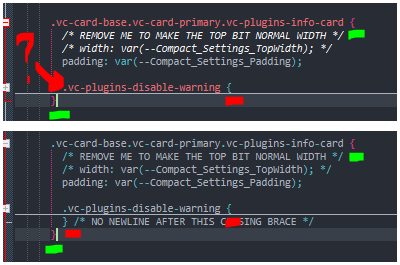
In this image, the top is
CSSsyntax, the bottom ispythonand in thepythonimage, you see the code block’s closing brace is visible, but theCSStext, does not; the next visible line is the closing brace for the fold level above this block. I highlighted level 1 with green and 2 with red.https://www.youtube.com/watch?v=cvPrOKPnfD4
I also made this quick demonstration of how the folds are different. -
@Yellow-Folderzip Since i don’t know how to edit a post (can you?), a quick clarification for:
I don’t want to also include the final closing } brace or any ) delimiter
By “any delimiter” I mean whichever one delimiter the language happens to use, not any delim in the block.
-
@Yellow-Folderzip said in Code Folding: Don't include the closing brace in the folded text for UDL or existing language:
If I select python as the language, and fold a layer using {} braces, … How do I modify an existing language or UDL to include this brace folding behavior from python?
Python doesn’t fold on braces. Python folds on indentation. So it’s not including the braces in the fold because braces have nothing to do with Python indentation.
And no, you cannot set UDL to use indentation for folding; it was defined to be keyword/symbol-based for everything, including folding. (It’s been requested in the official feature-request multiple times, and hasn’t been implemented yet.)
Looking through the Scintilla documentation (Scintilla being the library that Notepad++ uses for doing things like the folding), I don’t think it has an option to “don’t hide the last/closing line of a fold section when folded”… and without that option, there’s nothing that Notepad++ can do to do the folding the way you want. (However, it’s possible that I’ve missed something; one of the other Scintilla experts could chime in and let me know which SCI message would allow it.)
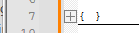
However, as a workaround, there is a Scintilla message, SCI_SETDEFAULTFOLDDISPLAYTEXT, which can be used to set extra text at the end of the shown fold line… so if you sent that message with “}” as the lParam, it would then do
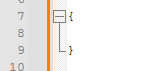 =>
=> 
… if that’s sufficient for you, then you could use the PythonScript plugin set toATSTARTUP, and in your userstartup.py, you could have the lineseditor1.setDefaultFoldDisplayText("}"); editor2.setDefaultFoldDisplayText("}");which would then make it show that extra
}at the end of the folding line when it is collapsed. -
@Yellow-Folderzip said in Code Folding: Don't include the closing brace in the folded text for UDL or existing language:
@Yellow-Folderzip Since i don’t know how to edit a post (can you?),
In general, one can edit a post using the ⋮ menu on the post:
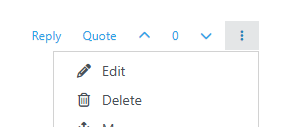
A post is editable for 4 hours after it’s made. (But it might require a user to get a few upvotes before they gain the edit-their-post privilege, as part of the anti-spam settings on the forum.)
a quick clarification for:
I don’t want to also include the final closing } brace or any ) delimiter
By “any delimiter” I mean whichever one delimiter the language happens to use, not any delim in the block.
My example PythonScript just assumes the
}, so it wouldn’t work in general for you. A more complicated script could be used that would change that default extra-text every time you change to a different file/tab/view, and choose that text based on the filetype.(But part of me is hoping, for your sake, that I’ve just not found the right message, and that there is one that allows changing whether the last line of folded text is hidden or not. I am hoping someone else will eventually chime in…)
-
@PeterJones This does show the closing brace on the end, but it unfortunately doesn’t do what I am looking to fix here. That being, the ability to select the entire block and its closing brace + newline.
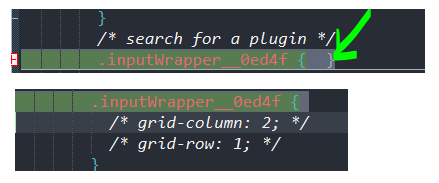
The top image appears to have selected until the closing
}brace, but when i expand the section, the bottom image shows that it has only selected the first line. -
@Yellow-Folderzip said in Code Folding: Don't include the closing brace in the folded text for UDL or existing language:
That being, the ability to select the entire block and its closing brace + newline.
That’s easy, and doesn’t need any change to Notepad++: that happens automatically when selecting a hidden block: if you just select from the beginning of the visible line to the end, it will only select that line, with no newline (just like what happens if you select a fully visible line that way); however, if you select to the start of the next line, then it will include the entire hidden block:
if I have the code
if(condition) {
	blah;
}
as here:
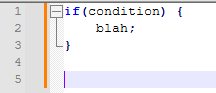
then hide it.
If I select just to the end of the line with the
{, then it will only select theif(condition) {with no newline and no contents from the block:
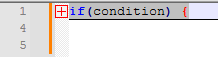
if(condition) {But if I do a shift+downarrow from the start of the line, to select to the beginning of the next line:
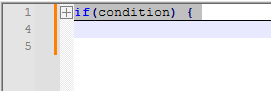
then the selected text includes the entire block, including the newline:if(condition) { blah; }This is the same behavior as selecting fully-visible text:
- newline not included in selection:
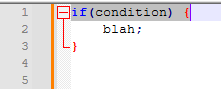
- newline of first line in selection:
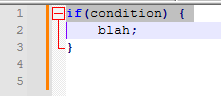
- whole block, but not final newline selected:
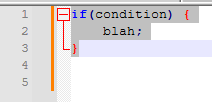
- whole block, with final newline selected:
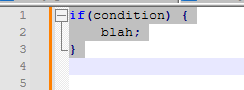
Notepad++ indicates whether the newline is selected by extending the visible selection beyond the end of the line when it is. And if you really want to be sure, use View > Show Symbol > Show End of Line:
- EOL not selected, so not whole block:
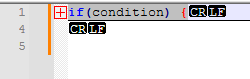
- EOL selected, so whole block is actually selected, including final EOL:
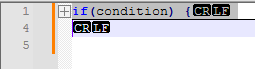
- newline not included in selection:
-
@PeterJones This is what I meant to describe by:
and you need to rely on a newline after a block to properly select the entire block while it’s folded
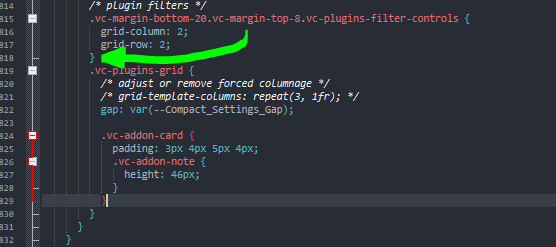
in the original post. Because without a double newline after the closing brace, selecting down one row will grab the first line of the next block. If I were to rely on this functionality, I would have to insert a double newline after every block, at the green arrow.

-
@Yellow-Folderzip said in Code Folding: Don't include the closing brace in the folded text for UDL or existing language:
Because without a double newline after the closing brace, selecting down one row will grab the first line of the next block.
If you select the whole second fold line, of course it will select from that, just like with non-folded text. If you end the selection at the beginning of the line, rather than selecting the line, then it will work as you desire.
{
	.class1 {
		color: red;
		border: 1px solid green;
	}
	.class2 {

	}

}
Normal (visible) text:
- To select one line (including EOL) of indented text when next line is indented to the same level, stop the selection at the beginning of the next line
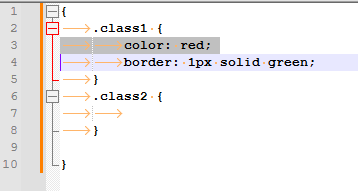
- To select both lines (including EOL), then stop at the beginning of the line following those lines.
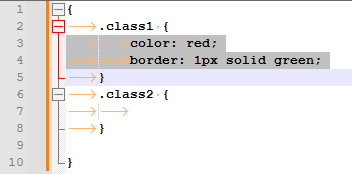
Similarly, with collapsed blocks:
- To select just the first .class1 block when collapsed, just select to the beginning of the next line:
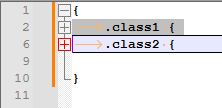
- To select both, then select to the beginning of the line after:
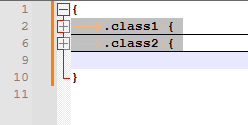
There is no need to have a blank line between them. Just select as much as you want to copy, exactly identical to how it works with no folded text.
- To select one line (including EOL) of indented text when next line is indented to the same level, stop the selection at the beginning of the next line
-
@PeterJones Ah yah, I understand now. I suppose this is a fine solution, so thank you for that. This still requires some finesse to get in front of the 1st column versus just click+dragging inside the margin, but definitely better than before. 😎


Hello! It looks like you're interested in this conversation, but you don't have an account yet.
Getting fed up of having to scroll through the same posts each visit? When you register for an account, you'll always come back to exactly where you were before, and choose to be notified of new replies (either via email, or push notification). You'll also be able to save bookmarks and upvote posts to show your appreciation to other community members.
With your input, this post could be even better 💗
Register Login