Line number issues
-
I have version 8.9.1 32-bit running under Windows 11. The line numbers keep disappearing - I have to re-load the file to get them back. Also, the first line number is 0, not 1, whereas other apps like Chrome Developer Tools start at 1.
Any ideas?
Thanks -
Which plugins do you have installed?
-
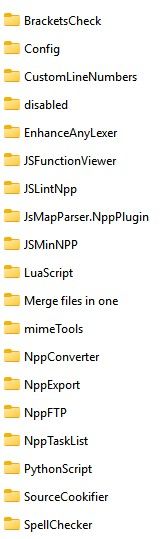
Thanks for the quick response. Here are my Plugins:
-
I see you have the CustomLineNumbers plugin installed: in its default configuration, it starts line numbering at 0, in hexadecimal. You need to change the plugin’s settings, or uninstall the plugin, if you don’t want it changing the Notepad++ line numbering like that.
As to why it doesn’t show up: I’ve never seen that bug, but it wouldn’t surprise me if the plugin had a glitch, especially if you’re on a High-DPI monitor, or some other unusual display circumstance. (If you disable/uninstall the plugin, and they stop disappearing, then it’s definitely specific to that plugin.)
-
@Ronald-Besdansky said in Line number issues:
Thanks for the quick response. Here are my Plugins:
When asked which plugins you have, it’s preferable to list them via the Notepad++ “Debug Info” option, which is under the ? menu.
The benefit of this is that it also identifies which version of the plugin is in use.
You can also look under Plugins, Plugins Admin to see the installed plugins, and another tab (Updates) there will identify if there are any updates to the current installed plugin. You can then select an update and install it.
Always a good idea to keep Plugins up to date via this method as often they fix bugs, or maybe add/enhance features.
It might be a good idea to familiarise yourself with both the Debug Info and Plugins Admin features.
Terry
-
@Terry-R Thank you very much Terry. I’ll try all that.
-
@Ronald-Besdansky Hi Terry Deleting that plugin fixed the issue. Thanks.



Hello! It looks like you're interested in this conversation, but you don't have an account yet.
Getting fed up of having to scroll through the same posts each visit? When you register for an account, you'll always come back to exactly where you were before, and choose to be notified of new replies (either via email, or push notification). You'll also be able to save bookmarks and upvote posts to show your appreciation to other community members.
With your input, this post could be even better 💗
Register Login