HTML and CSS language color coding in the same document
-
Hi,
I’m sure this has been asked but didn’t get any useful hits in search. I sometimes code larger HTML documents with internal CSS so was wondering if there’s a way to apply color coding for both languages in the one document?
CSS in an HTML document is completely unchanged. HTML in a CSS document is partly colored, but not in the same way and not properly.
Thanks.
-
Notepad++ uses a library called “Lexilla” (written and maintained by the Scintilla team) to handle syntax highlighting. They have chosen not to support CSS embedded in HTML. If they don’t, Notepad++ cannot (because Notepad++ uses the syntax highlighter “lexer” code from Lexilla without customizing it – trying to customize it would be a maintenance nightmare that the Notepad++ developers have rejected on multiple occasions.)
I will quote here some of what I wrote in a related GitHub issue a little over a year ago:
I confirmed that SciTE (Scintilla/Lexilla’s test-bed editor) doesn’t highlight CSS-embedded-in-HTML, either. It’s definitely up to the Lexilla project to implement embedded CSS, unfortunately. (I was hoping that there was a configuration that Notepad++ just wasn’t using, but alas, they don’t give us that feature)
I dug through the old requests at the Scintilla project (the Lexilla library used to be part of Scintilla as a whole, but it’s been split out to its own project, though it’s still run by the Scintilla organization). There, I found this 2007 request for for embedded CSS, and following some of the links, I’ve found it’s been a common request – and later replies, like this one have indicated that unless someone else implements it or pays the Lexilla team to implement it, it’s not going to happen (since the same individual is involved at the separated Lexilla library, I am assuming their position on embedded CSS is still the same). So, per the official Scintilla/Lexilla replies, it’s technically difficult and highly unlikely to ever happen, so I’d call this one “infeasible” to add to Notepad++.
Since Lexilla doesn’t have it, and no one has volunteered to implement it for them, Notepad++ is unable to support highlighting of embedded CSS inside HTML, which is unfortunate. (Someone once suggested, though I cannot find it either here or in GitHub, that we should just “see” that there’s embedded CSS, and fork out the CSS lexer instead of the HTML lexer for that part; unfortunately, the Lexilla library doesn’t provide that feature, and it would be hugely complicated (and maybe not at all feasible) for Notepad++ to try to provide that overtop of the Lexilla lexer. Which is unfortunate, because that would solve all such problems.)
-
Hi,
Thanks for the thorough explanation. I’ve seen highlighting of both in other apps in the one document so I wonder what their overhead is for it.
I suppose I must not understand the intricacies of it all, but on the surface, isn’t it just the HTML syntax highlighting, plus more or vice versa? I wouldn’t have thought coding to highlight certain terms would be that complicated.
-
This all depends on what you are expecting and what Notepad++ can do vs what you can do. There’s a lot of customization available to make N++ work your way, not necessarily the developer’s way.
If you want to add terms to highlight, you can use Style Configurator.
Select the language, say CSS and go through the list of styles. Some style types (PSEUDOCLASS is the first type on the list) allow you to add user-defined keywords. Once defined, you can use those terms in your text and they will be highlighted based on that styleIf you have terms that you want to have their OWN style, you can also use the EnhanceAnyLexer plugin. You pick a foreground color and then use a regular expression to define what receives that color.
Last, and this is more work, you can create your own custom html-css language as a User-Defined Language. I don’t believe that you can set it as the default for .html or .css files, but you can always select it instead.
-
This issue is one of the most consistently duplicated on the forum, for example:
- “Highlight HTML and CSS”
- “CSS comments should be in GREEN”
- “css formatting not working on embed style sheet…”
- etc.
@peterjones’s initial reply is the correct one. You can also refer to this more detailed explanation regarding the current limitations of Lexilla.
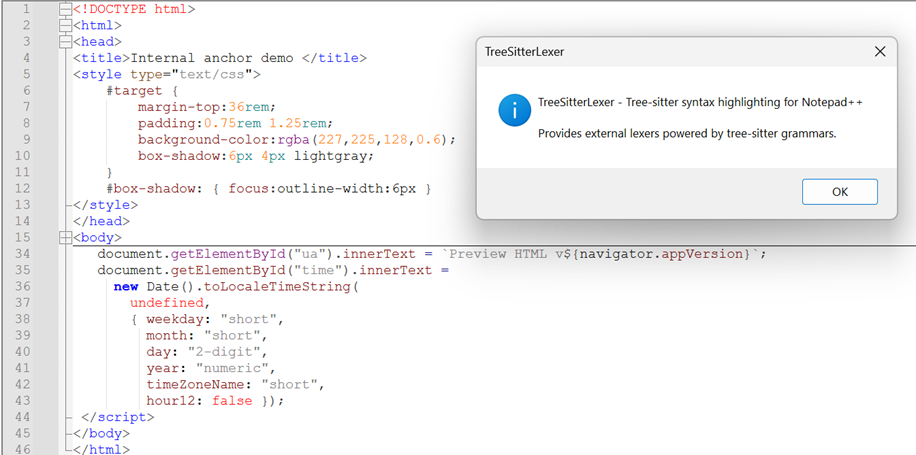
For now, a relatively simple way to edit HTML documents with embedded style and script highlighting is to use the tree-sitter plugin.
Note that only “light” style themes are currently supported, and you will have to manually download and extract the configuration files to get it working.




Hello! It looks like you're interested in this conversation, but you don't have an account yet.
Getting fed up of having to scroll through the same posts each visit? When you register for an account, you'll always come back to exactly where you were before, and choose to be notified of new replies (either via email, or push notification). You'll also be able to save bookmarks and upvote posts to show your appreciation to other community members.
With your input, this post could be even better 💗
Register Login