How can I do a search that results including/highlights the file name, the folder and the HDD name?
-
Hello!
I have created a Notepad++ file with 452036 lines (36,1 MB) of textfiles, from HDD directories, folders and files.
Folders have this in folder name --=[ (any letters, numbers following)
Drives have their names like this [ A ] [ WD-1 ] etc.
Here some screendumps of HDD and folders.




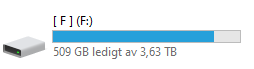
The directories are in 5 levels of subdirectories.
Each HDD is named [ A ] [ B ] or [ WD-1] [ WD-2 ] etc. and file names, like filename.jpg, filename.txt etc.
Doing a normal search I can find the folder, files or HDD drive name, but not listed together in the same search.How can I do a search that results will include and highlights the file name, the folder and the HDD name [ WD-1 ] [ WD-2 ]?
So if I do a search like this:
filename
I would like to get the result that includes
filename, folder and in what [ ] HDD drive the file and folder sits.I don’t know if this can be done but it would be of great help if it could.
As of now I have to scroll forever to find the right HDD…Thanks and best regards,
pellelin -
Your vague descriptions of text don’t make it clear to me what your text is actually like.
Could you use the ``` notation (from the
</>button on the post toolbar) to put some example text? Like``` [ A ] blah blah blah filename blah blah [ B ] blah blah blah notsamefile blah blah [ WD-40 ] is good for cleaning hardware ```which will render like
[ A ] blah blah blah filename blah blah
[ B ] blah blah blah notsamefile blah blah
[ WD-40 ] is good for cleaning hardware
In the mean time, assuming you wanted to highlight the entire line that includes specific
filename, it could be done with:- FIND =
(?-s)^.*filename.*$ - SEARCH MODE = Regular Expression
If you actually only want to highlight part of each line, you’re going to have to give example text that reasonably matches your actual data, and then do a screenshot showing which you’d like to highlight given a specific search example.
- FIND =
-
@peterjones
Hello!Many thanks for your reply, much appreciated!
[ WD-1 ] [ WD-2 ] etc. is the name of the drives given by me.
Windows assigns the drives as (D:) (E:) (F:) (G:) etc.
I use a software that creates the directory list, with chosen levels 5, 6 or more if needed.
I create a directory list of each HDD and then combine each list to a large .txt file, to do the search for files from.
Many large HDDs, many directories, thousands of files = a huge .txt file…Edit/ Forgot to thank you for the Regular expression, thanks!
Here is an Example of directories and files.
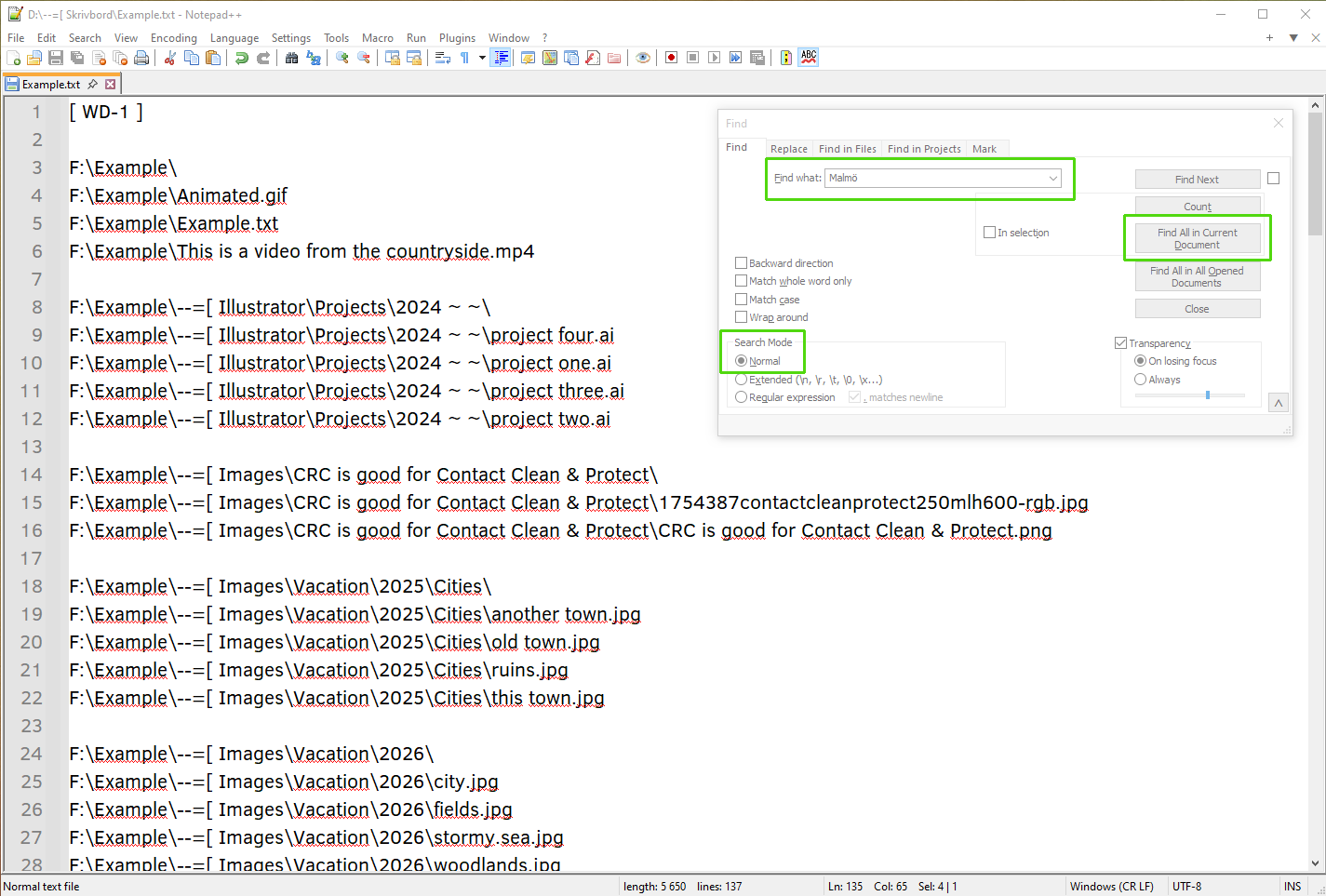
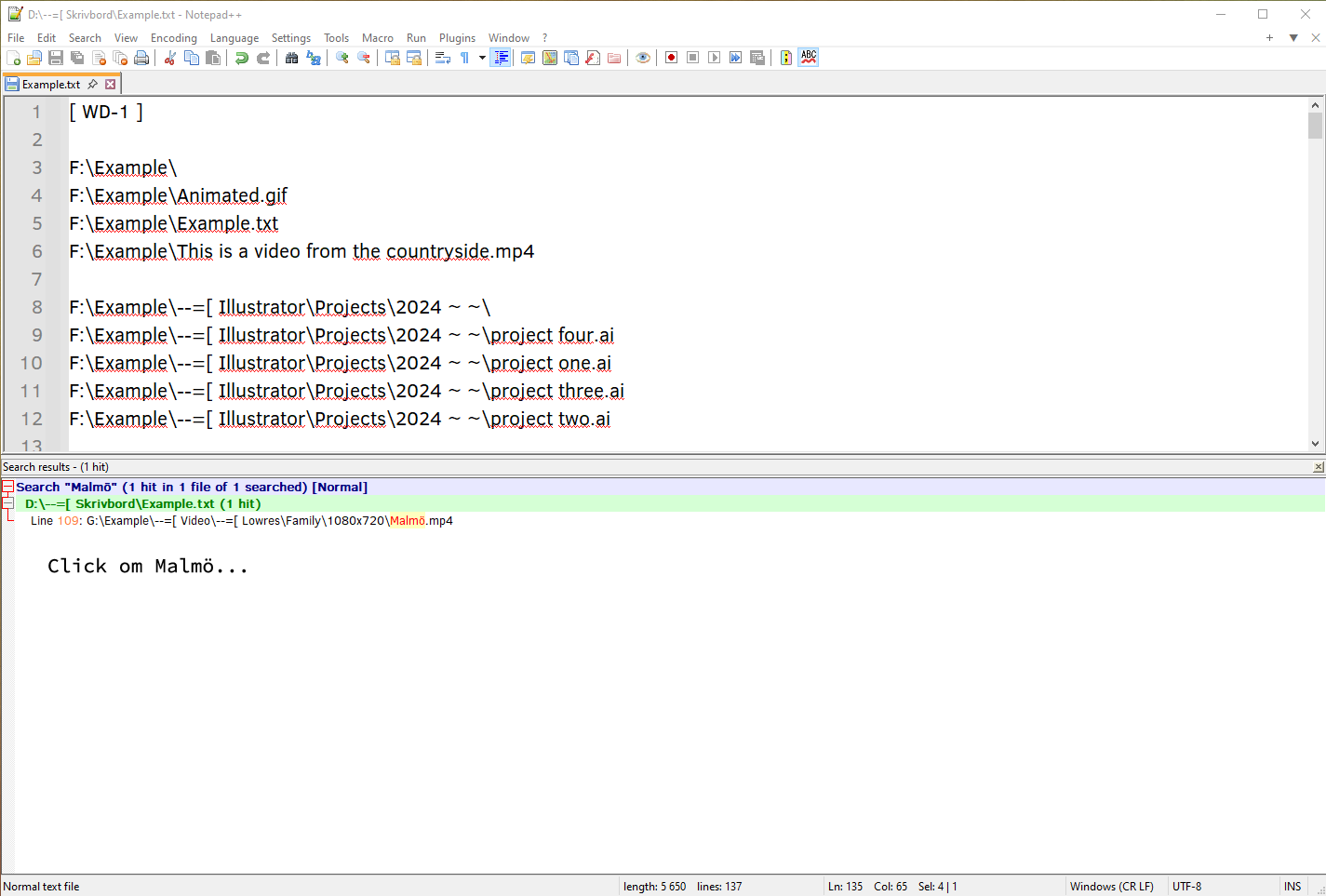
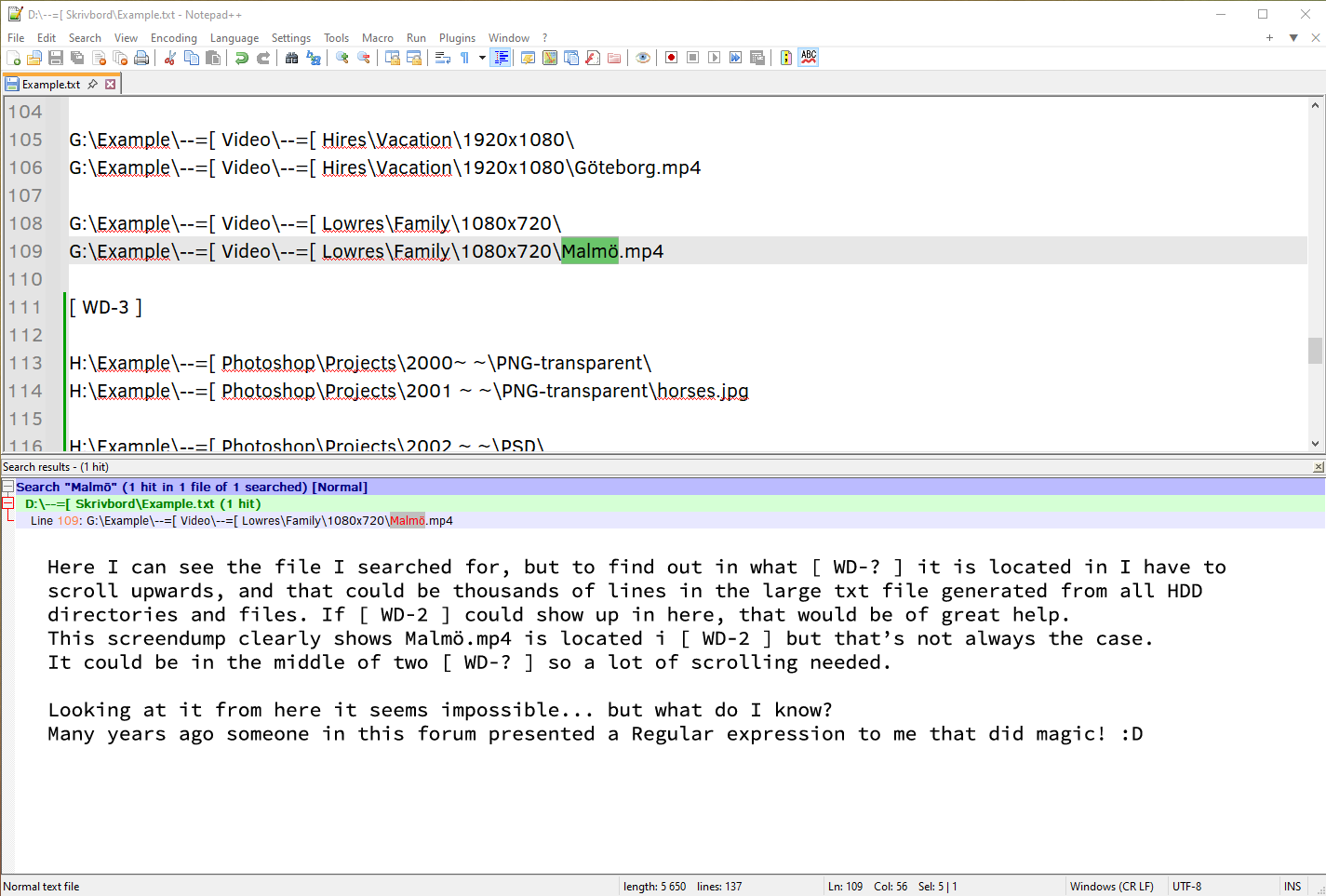
[ WD-1 ] F:\Example\ F:\Example\Animated.gif F:\Example\Example.txt F:\Example\This is a video from the countryside.mp4 F:\Example\--=[ Illustrator\Projects\2024 ~ ~\ F:\Example\--=[ Illustrator\Projects\2024 ~ ~\project four.ai F:\Example\--=[ Illustrator\Projects\2024 ~ ~\project one.ai F:\Example\--=[ Illustrator\Projects\2024 ~ ~\project three.ai F:\Example\--=[ Illustrator\Projects\2024 ~ ~\project two.ai F:\Example\--=[ Images\CRC is good for Contact Clean & Protect\ F:\Example\--=[ Images\CRC is good for Contact Clean & Protect\1754387contactcleanprotect250mlh600-rgb.jpg F:\Example\--=[ Images\CRC is good for Contact Clean & Protect\CRC is good for Contact Clean & Protect.png F:\Example\--=[ Images\Vacation\2025\Cities\ F:\Example\--=[ Images\Vacation\2025\Cities\another town.jpg F:\Example\--=[ Images\Vacation\2025\Cities\old town.jpg F:\Example\--=[ Images\Vacation\2025\Cities\ruins.jpg F:\Example\--=[ Images\Vacation\2025\Cities\this town.jpg F:\Example\--=[ Images\Vacation\2026\ F:\Example\--=[ Images\Vacation\2026\city.jpg F:\Example\--=[ Images\Vacation\2026\fields.jpg F:\Example\--=[ Images\Vacation\2026\stormy.sea.jpg F:\Example\--=[ Images\Vacation\2026\woodlands.jpg F:\Example\--=[ Images\WD-40 Multispray\ F:\Example\--=[ Images\WD-40 Multispray\WD-40 Multispray.jpg F:\Example\--=[ Photoshop\Projects\2024 ~ ~\PNG-transparent\ F:\Example\--=[ Photoshop\Projects\2024 ~ ~\PNG-transparent\printproject .png files.png F:\Example\--=[ Photoshop\Projects\2024 ~ ~\PSD\ F:\Example\--=[ Photoshop\Projects\2024 ~ ~\PSD\birthday-grandchildren print files.psd F:\Example\--=[ Photoshop\Projects\2024 ~ ~\PSD\print project .psd files - Copy.psd F:\Example\--=[ Text\Documents\Notepad++\ F:\Example\--=[ Text\Documents\Notepad++\[ WD-1 ].txt F:\Example\--=[ Text\Documents\Notepad++\[ WD-2 ].txt F:\Example\--=[ Text\Documents\Notepad++\[ WD-3 ].txt F:\Example\--=[ Text\Documents\Word\ F:\Example\--=[ Text\Documents\Word\ABC.docx F:\Example\--=[ Text\Documents\Word\DEF.docx F:\Example\--=[ Text\Documents\Word\GHI.docx F:\Example\--=[ Video\--=[ Hires\Vacation\1920x1080\ F:\Example\--=[ Video\--=[ Hires\Vacation\1920x1080\Berlin.mp4 F:\Example\--=[ Video\--=[ Lowres\Family\1080x720\ F:\Example\--=[ Video\--=[ Lowres\Family\1080x720\Paris.mp4 [ WD-2 ] G:\Example\ G:\Example\Animated Dog.gif G:\Example\Example 2.txt G:\Example\This is a video from the lakeside.mp4 G:\Example\--=[ Illustrator\Projects\2024 ~ ~\ G:\Example\--=[ Illustrator\Projects\2024 ~ ~\project eight.ai G:\Example\--=[ Illustrator\Projects\2024 ~ ~\project five.ai G:\Example\--=[ Illustrator\Projects\2024 ~ ~\project seven.ai G:\Example\--=[ Illustrator\Projects\2024 ~ ~\project six.ai G:\Example\--=[ Images\CRC is good for Contact Clean & Protect\ G:\Example\--=[ Images\CRC is good for Contact Clean & Protect\contactcleanprotect250mlh600-rgb.jpg G:\Example\--=[ Images\CRC is good for Contact Clean & Protect\CRC.png G:\Example\--=[ Images\Vacation\2023\ G:\Example\--=[ Images\Vacation\2023\lakeside.jpg G:\Example\--=[ Images\Vacation\2023\london.jpg G:\Example\--=[ Images\Vacation\2023\new-york.jpg G:\Example\--=[ Images\Vacation\2023\the atlantic.jpg G:\Example\--=[ Images\Vacation\2024\Cities\ G:\Example\--=[ Images\Vacation\2024\Cities\Copenhagen.jpg G:\Example\--=[ Images\Vacation\2024\Cities\Helsingfors.jpg G:\Example\--=[ Images\Vacation\2024\Cities\Stockholm.jpg G:\Example\--=[ Images\Vacation\2024\Cities\Tokyo.jpg G:\Example\--=[ Images\WD-40 Multispray\ G:\Example\--=[ Images\WD-40 Multispray\WD-40.jpg G:\Example\--=[ Photoshop\Projects\2022 ~ ~\PNG-transparent\ G:\Example\--=[ Photoshop\Projects\2022 ~ ~\PNG-transparent\hoodie .png files.png G:\Example\--=[ Photoshop\Projects\2022 ~ ~\PSD\ G:\Example\--=[ Photoshop\Projects\2022 ~ ~\PSD\grandchildren-print files.psd G:\Example\--=[ Photoshop\Projects\2022 ~ ~\PSD\print project 2022.psd G:\Example\--=[ Text\Documents\Notepad++\ G:\Example\--=[ Text\Documents\Notepad++\[ WD-4 ].txt G:\Example\--=[ Text\Documents\Notepad++\[ WD-5 ].txt G:\Example\--=[ Text\Documents\Notepad++\[ WD-6 ].txt G:\Example\--=[ Text\Documents\Word\ G:\Example\--=[ Text\Documents\Word\JKL.docx G:\Example\--=[ Text\Documents\Word\MNO.docx G:\Example\--=[ Text\Documents\Word\PQR.docx G:\Example\--=[ Video\--=[ Hires\Vacation\1920x1080\ G:\Example\--=[ Video\--=[ Hires\Vacation\1920x1080\Göteborg.mp4 G:\Example\--=[ Video\--=[ Lowres\Family\1080x720\ G:\Example\--=[ Video\--=[ Lowres\Family\1080x720\Malmö.mp4 [ WD-3 ] H:\Example\--=[ Photoshop\Projects\2000~ ~\PNG-transparent\ H:\Example\--=[ Photoshop\Projects\2001 ~ ~\PNG-transparent\horses.jpg H:\Example\--=[ Photoshop\Projects\2002 ~ ~\PSD\ H:\Example\--=[ Photoshop\Projects\2003 ~ ~\PSD\children-print files.psd H:\Example\--=[ Photoshop\Projects\2004 ~ ~\PSD\printchildren 2022.psd [ WD-4 ] I:\Example\--=[ Photoshop\Projects\2005 ~ ~\PNG-transparent\ I:\Example\--=[ Photoshop\Projects\2006 ~ ~\PNG-transparent\hooligans.jpg I:\Example\--=[ Photoshop\Projects\2007 ~ ~\PSD\ I:\Example\--=[ Photoshop\Projects\2008 ~ ~\PSD\hooligans-print files.psd I:\Example\--=[ Photoshop\Projects\2009 ~ ~\PSD\print hooligans 2022.psd [ WD-5 ] J:\Example\--=[ Photoshop\Projects\2012 ~ ~\PNG-transparent\ J:\Example\--=[ Photoshop\Projects\2013 ~ ~\PNG-transparent\hope.png J:\Example\--=[ Photoshop\Projects\2014 ~ ~\PSD\ J:\Example\--=[ Photoshop\Projects\2015 ~ ~\PSD\hope.psd J:\Example\--=[ Photoshop\Projects\2016 ~ ~\PSD\hopeproject 2016.psd [ WD-6 ] -
Hello, @pellelin, @peterjones and All,
Presently, in France, it’s about 10h30 and, unfortunately, I’m not free because I have a dentist appointment -(( But , this afternoon, @pellelin, I’ll be able to give you a solution. derived from this thread :
https://community.notepad-plus-plus.org/topic/27535/new-displaying-of-the-search-results-panel
I’ll create a new post where I’ll find out a way to insert, for each line outputed in the
Search Resultpanel :-
The drive name
-
The complete path
-
The file name
-
And of course, the text of each line containing occurrences of your search
The trick is to use the notepad++ option
Edit > Line operations > Reverse line orderbecause the replacement regular expression needs to get all the lines of a specific file right BEFORE the line containing this specific file name ! Then, after the replacement throughout all the search results, you just need to run again theEdit > Line operations > Reverse line orderoption to get back the right displaying !In the meantime, before I can post my own solution, @peterjones or others fellows will probably be able to elabore this regex replacement for you :-))
See you later,
Best Regards,
guy038
-
-
@guy038
Hello!Oh great news, this sounds promising, finger crossed! :D Thanks for your reply!
Best regards,
pellelin -
Hi, @pellelin, @peterjones and All,
@pellelin, see my new version at this location :
https://community.notepad-plus-plus.org/post/105618
May be, you do not agree exactly with the displaying and/or you would like the number of hits as well ! No problem : just tell me about it
Cheers,
guy038
-
@guy038
Hello!
I understand that you spent time on a solution for me, much appreciated!
But I don’t understand much of what you suggest, I’m not all that Notepad++ savvy.
I think I’ll stick with the solution I now use, open Notepad++, drag all (26) HDD txt’s into it, then do a search using “Find in All Opened Documents” and it does the job.
Not so elegant though, I was hoping for a solution with a search in one single txt with all HDDs directories combined.Best regards,
pellelin -
Hello, @pellelin and All,
You said in a previous post :
[ WD-1 ] [ WD-2 ] etc. is the name of the drives given by me.
Windows assigns the drives as (D:) (E:) (F:) (G:) etc.
I use a software that creates the directory list, with chosen levels 5, 6 or more if needed.
I create a directory list of each HDD and then combine each list to a large .txt file, to do the search for files from.
Many large HDDs, many directories, thousands of files = a huge .txt file…So, I suppose that you have
26files, namedWD-1.txt,WD-2.txtand so on tillWD-26.txtthat you combined in a single huge file, let’s say,Total.txt
BTW, the best way to combine several text files is to use the DOS command
copy WD-1.txt + WD-2.txt + WD-3.txt + .... + WD-26.txt Total.txtOr, if all your texts are in a same folder, once you’re located within that folder, use simply the DOS ommnand :
copy *.* Total.txtNow, if I try to interpret your text :
[ WD-1 ]

F:\Example\
F:\Example\Animated.gif
F:\Example\Example.txt
F:\Example\This is a video from the countryside.mp4

F:\Example\--=[ Illustrator\Projects\2024 ~ ~\
F:\Example\--=[ Illustrator\Projects\2024 ~ ~\project four.ai
F:\Example\--=[ Illustrator\Projects\2024 ~ ~\project one.ai
F:\Example\--=[ Illustrator\Projects\2024 ~ ~\project three.ai
F:\Example\--=[ Illustrator\Projects\2024 ~ ~\project two.ai

F:\Example\--=[ Images\CRC is good for Contact Clean & Protect\
F:\Example\--=[ Images\CRC is good for Contact Clean & Protect\1754387contactcleanprotect250mlh600-rgb.jpg
F:\Example\--=[ Images\CRC is good for Contact Clean & Protect\CRC is good for Contact Clean & Protect.png

F:\Example\--=[ Images\Vacation\2025\Cities\
F:\Example\--=[ Images\Vacation\2025\Cities\another town.jpg
F:\Example\--=[ Images\Vacation\2025\Cities\old town.jpg
F:\Example\--=[ Images\Vacation\2025\Cities\ruins.jpg
F:\Example\--=[ Images\Vacation\2025\Cities\this town.jpg

F:\Example\--=[ Images\Vacation\2026\
F:\Example\--=[ Images\Vacation\2026\city.jpg
F:\Example\--=[ Images\Vacation\2026\fields.jpg
F:\Example\--=[ Images\Vacation\2026\stormy.sea.jpg
F:\Example\--=[ Images\Vacation\2026\woodlands.jpg

F:\Example\--=[ Images\WD-40 Multispray\
F:\Example\--=[ Images\WD-40 Multispray\WD-40 Multispray.jpg

F:\Example\--=[ Photoshop\Projects\2024 ~ ~\PNG-transparent\
F:\Example\--=[ Photoshop\Projects\2024 ~ ~\PNG-transparent\printproject .png files.png

F:\Example\--=[ Photoshop\Projects\2024 ~ ~\PSD\
F:\Example\--=[ Photoshop\Projects\2024 ~ ~\PSD\birthday-grandchildren print files.psd
F:\Example\--=[ Photoshop\Projects\2024 ~ ~\PSD\print project .psd files - Copy.psd

F:\Example\--=[ Text\Documents\Notepad++\
F:\Example\--=[ Text\Documents\Notepad++\[ WD-1 ].txt
F:\Example\--=[ Text\Documents\Notepad++\[ WD-2 ].txt
F:\Example\--=[ Text\Documents\Notepad++\[ WD-3 ].txt

F:\Example\--=[ Text\Documents\Word\
F:\Example\--=[ Text\Documents\Word\ABC.docx
F:\Example\--=[ Text\Documents\Word\DEF.docx
F:\Example\--=[ Text\Documents\Word\GHI.docx

F:\Example\--=[ Video\--=[ Hires\Vacation\1920x1080\
F:\Example\--=[ Video\--=[ Hires\Vacation\1920x1080\Berlin.mp4

F:\Example\--=[ Video\--=[ Lowres\Family\1080x720\
F:\Example\--=[ Video\--=[ Lowres\Family\1080x720\Paris.mp4

[ WD-2 ]

G:\Example\
G:\Example\Animated Dog.gif
G:\Example\Example 2.txt
G:\Example\This is a video from the lakeside.mp4

G:\Example\--=[ Illustrator\Projects\2024 ~ ~\
G:\Example\--=[ Illustrator\Projects\2024 ~ ~\project eight.ai
G:\Example\--=[ Illustrator\Projects\2024 ~ ~\project five.ai
G:\Example\--=[ Illustrator\Projects\2024 ~ ~\project seven.ai
G:\Example\--=[ Illustrator\Projects\2024 ~ ~\project six.ai

G:\Example\--=[ Images\CRC is good for Contact Clean & Protect\
G:\Example\--=[ Images\CRC is good for Contact Clean & Protect\contactcleanprotect250mlh600-rgb.jpg
G:\Example\--=[ Images\CRC is good for Contact Clean & Protect\CRC.png

G:\Example\--=[ Images\Vacation\2023\
G:\Example\--=[ Images\Vacation\2023\lakeside.jpg
G:\Example\--=[ Images\Vacation\2023\london.jpg
G:\Example\--=[ Images\Vacation\2023\new-york.jpg
G:\Example\--=[ Images\Vacation\2023\the atlantic.jpg

G:\Example\--=[ Images\Vacation\2024\Cities\
G:\Example\--=[ Images\Vacation\2024\Cities\Copenhagen.jpg
G:\Example\--=[ Images\Vacation\2024\Cities\Helsingfors.jpg
G:\Example\--=[ Images\Vacation\2024\Cities\Stockholm.jpg
G:\Example\--=[ Images\Vacation\2024\Cities\Tokyo.jpg

G:\Example\--=[ Images\WD-40 Multispray\
G:\Example\--=[ Images\WD-40 Multispray\WD-40.jpg

G:\Example\--=[ Photoshop\Projects\2022 ~ ~\PNG-transparent\
G:\Example\--=[ Photoshop\Projects\2022 ~ ~\PNG-transparent\hoodie .png files.png

G:\Example\--=[ Photoshop\Projects\2022 ~ ~\PSD\
G:\Example\--=[ Photoshop\Projects\2022 ~ ~\PSD\grandchildren-print files.psd
G:\Example\--=[ Photoshop\Projects\2022 ~ ~\PSD\print project 2022.psd

G:\Example\--=[ Text\Documents\Notepad++\
G:\Example\--=[ Text\Documents\Notepad++\[ WD-4 ].txt
G:\Example\--=[ Text\Documents\Notepad++\[ WD-5 ].txt
G:\Example\--=[ Text\Documents\Notepad++\[ WD-6 ].txt

G:\Example\--=[ Text\Documents\Word\
G:\Example\--=[ Text\Documents\Word\JKL.docx
G:\Example\--=[ Text\Documents\Word\MNO.docx
G:\Example\--=[ Text\Documents\Word\PQR.docx

G:\Example\--=[ Video\--=[ Hires\Vacation\1920x1080\
G:\Example\--=[ Video\--=[ Hires\Vacation\1920x1080\Göteborg.mp4

G:\Example\--=[ Video\--=[ Lowres\Family\1080x720\
G:\Example\--=[ Video\--=[ Lowres\Family\1080x720\Malmö.mp4

[ WD-3 ]

H:\Example\--=[ Photoshop\Projects\2000~ ~\PNG-transparent\
H:\Example\--=[ Photoshop\Projects\2001 ~ ~\PNG-transparent\horses.jpg

H:\Example\--=[ Photoshop\Projects\2002 ~ ~\PSD\
H:\Example\--=[ Photoshop\Projects\2003 ~ ~\PSD\children-print files.psd
H:\Example\--=[ Photoshop\Projects\2004 ~ ~\PSD\printchildren 2022.psd

[ WD-4 ]

I:\Example\--=[ Photoshop\Projects\2005 ~ ~\PNG-transparent\
I:\Example\--=[ Photoshop\Projects\2006 ~ ~\PNG-transparent\hooligans.jpg
I:\Example\--=[ Photoshop\Projects\2007 ~ ~\PSD\
I:\Example\--=[ Photoshop\Projects\2008 ~ ~\PSD\hooligans-print files.psd
I:\Example\--=[ Photoshop\Projects\2009 ~ ~\PSD\print hooligans 2022.psd

[ WD-5 ]

J:\Example\--=[ Photoshop\Projects\2012 ~ ~\PNG-transparent\
J:\Example\--=[ Photoshop\Projects\2013 ~ ~\PNG-transparent\hope.png

J:\Example\--=[ Photoshop\Projects\2014 ~ ~\PSD\
J:\Example\--=[ Photoshop\Projects\2015 ~ ~\PSD\hope.psd
J:\Example\--=[ Photoshop\Projects\2016 ~ ~\PSD\hopeproject 2016.psd
I suppose that your
WD-1.txtcontains :[ WD-1 ] F:\Animated.gif F:\Example.txt F:\This is a video from the countryside.mp4 F:\--=[ Illustrator\Projects\2024 ~ ~\ F:\--=[ Illustrator\Projects\2024 ~ ~\project four.ai F:\--=[ Illustrator\Projects\2024 ~ ~\project one.ai F:\--=[ Illustrator\Projects\2024 ~ ~\project three.ai F:\--=[ Illustrator\Projects\2024 ~ ~\project two.ai F:\--=[ Images\CRC is good for Contact Clean & Protect\ F:\--=[ Images\CRC is good for Contact Clean & Protect\1754387contactcleanprotect250mlh600-rgb.jpg F:\--=[ Images\CRC is good for Contact Clean & Protect\CRC is good for Contact Clean & Protect.png F:\--=[ Images\Vacation\2025\Cities\ F:\--=[ Images\Vacation\2025\Cities\another town.jpg F:\--=[ Images\Vacation\2025\Cities\old town.jpg F:\--=[ Images\Vacation\2025\Cities\ruins.jpg F:\--=[ Images\Vacation\2025\Cities\this town.jpg F:\--=[ Images\Vacation\2026\ F:\--=[ Images\Vacation\2026\city.jpg F:\--=[ Images\Vacation\2026\fields.jpg F:\--=[ Images\Vacation\2026\stormy.sea.jpg F:\--=[ Images\Vacation\2026\woodlands.jpg F:\--=[ Images\WD-40 Multispray\ F:\--=[ Images\WD-40 Multispray\WD-40 Multispray.jpg F:\--=[ Photoshop\Projects\2024 ~ ~\PNG-transparent\ F:\--=[ Photoshop\Projects\2024 ~ ~\PNG-transparent\printproject .png files.png F:\--=[ Photoshop\Projects\2024 ~ ~\PSD\ F:\--=[ Photoshop\Projects\2024 ~ ~\PSD\birthday-grandchildren print files.psd F:\--=[ Photoshop\Projects\2024 ~ ~\PSD\print project .psd files - Copy.psd F:\--=[ Text\Documents\Notepad++\ F:\--=[ Text\Documents\Notepad++\[ WD-1 ].txt F:\--=[ Text\Documents\Notepad++\[ WD-2 ].txt F:\--=[ Text\Documents\Notepad++\[ WD-3 ].txt F:\--=[ Text\Documents\Word\ F:\--=[ Text\Documents\Word\ABC.docx F:\--=[ Text\Documents\Word\DEF.docx F:\--=[ Text\Documents\Word\GHI.docx F:\--=[ Video\--=[ Hires\Vacation\1920x1080\ F:\--=[ Video\--=[ Hires\Vacation\1920x1080\Berlin.mp4 F:\--=[ Video\--=[ Lowres\Family\1080x720\ F:\--=[ Video\--=[ Lowres\Family\1080x720\Paris.mp4Your
WD-2.txtcontains :[ WD-2 ] G:\Animated Dog.gif G:\Example 2.txt G:\This is a video from the lakeside.mp4 G:\--=[ Illustrator\Projects\2024 ~ ~\ G:\--=[ Illustrator\Projects\2024 ~ ~\project eight.ai G:\--=[ Illustrator\Projects\2024 ~ ~\project five.ai G:\--=[ Illustrator\Projects\2024 ~ ~\project seven.ai G:\--=[ Illustrator\Projects\2024 ~ ~\project six.ai G:\--=[ Images\CRC is good for Contact Clean & Protect\ G:\--=[ Images\CRC is good for Contact Clean & Protect\contactcleanprotect250mlh600-rgb.jpg G:\--=[ Images\CRC is good for Contact Clean & Protect\CRC.png G:\--=[ Images\Vacation\2023\ G:\--=[ Images\Vacation\2023\lakeside.jpg G:\--=[ Images\Vacation\2023\london.jpg G:\--=[ Images\Vacation\2023\new-york.jpg G:\--=[ Images\Vacation\2023\the atlantic.jpg G:\--=[ Images\Vacation\2024\Cities\ G:\--=[ Images\Vacation\2024\Cities\Copenhagen.jpg G:\--=[ Images\Vacation\2024\Cities\Helsingfors.jpg G:\--=[ Images\Vacation\2024\Cities\Stockholm.jpg G:\--=[ Images\Vacation\2024\Cities\Tokyo.jpg G:\--=[ Images\WD-40 Multispray\ G:\--=[ Images\WD-40 Multispray\WD-40.jpg G:\--=[ Photoshop\Projects\2022 ~ ~\PNG-transparent\ G:\--=[ Photoshop\Projects\2022 ~ ~\PNG-transparent\hoodie .png files.png G:\--=[ Photoshop\Projects\2022 ~ ~\PSD\ G:\--=[ Photoshop\Projects\2022 ~ ~\PSD\grandchildren-print files.psd G:\--=[ Photoshop\Projects\2022 ~ ~\PSD\print project 2022.psd G:\--=[ Text\Documents\Notepad++\ G:\--=[ Text\Documents\Notepad++\[ WD-4 ].txt G:\--=[ Text\Documents\Notepad++\[ WD-5 ].txt G:\--=[ Text\Documents\Notepad++\[ WD-6 ].txt G:\--=[ Text\Documents\Word\ G:\--=[ Text\Documents\Word\JKL.docx G:\--=[ Text\Documents\Word\MNO.docx G:\--=[ Text\Documents\Word\PQR.docx G:\--=[ Video\--=[ Hires\Vacation\1920x1080\ G:\--=[ Video\--=[ Hires\Vacation\1920x1080\Göteborg.mp4 G:\--=[ Video\--=[ Lowres\Family\1080x720\ G:\--=[ Video\--=[ Lowres\Family\1080x720\Malmö.mp4And so on, till the
WD-26.txt
Now, I do not understand exactly your problem ! Once all these
WD-??files are combined in the single fileTotal.txt, searching forMalmöin normal search mode, within theTotal.txt, will automatically redirect you to the line :G:\--=[ Video\--=[ Lowres\Family\1080x720\Malmö.mp4Where it’s easy to notice that the
Malmövideo file is located onG:\Video\Lowres\Family\1080x720!
So, in brief, I guess we just do not understand each other ! Could you give me some more information, if you think it’s worth it ?
Best Regards
guy038
-
@guy038
Hello!Yes, when search for Malmö in Total.txt I find G:--=[ Video--=[ Lowres\Family\1080x720\Malmö.mp4
Forget about the (G:) by Windows assigned drive letter as the actual HDDs are external hard drives.
What drive [ WD-? ] is Malmö.mp4 on? It is located somewhere between [ WD-1 ] and [ WD-26 ].Best regards,
pellelin -
Hello, @pellelin and All,
Ah… ! OK, I see your point ! Then, just follow the few steps below :
- Let’s start with this
Total.txtfile as the INPUT text that you’ll paste in a new tab :
[ WD-1 ] F:\ F:\Animated.gif F:\Example.txt F:\This is a video from the countryside.mp4 F:\--=[ Illustrator\Projects\2024 ~ ~\ F:\--=[ Illustrator\Projects\2024 ~ ~\project four.ai F:\--=[ Illustrator\Projects\2024 ~ ~\project one.ai F:\--=[ Illustrator\Projects\2024 ~ ~\project three.ai F:\--=[ Illustrator\Projects\2024 ~ ~\project two.ai F:\--=[ Images\CRC is good for Contact Clean & Protect\ F:\--=[ Images\CRC is good for Contact Clean & Protect\1754387contactcleanprotect250mlh600-rgb.jpg F:\--=[ Images\CRC is good for Contact Clean & Protect\CRC is good for Contact Clean & Protect.png F:\--=[ Images\Vacation\2025\Cities\ F:\--=[ Images\Vacation\2025\Cities\another town.jpg F:\--=[ Images\Vacation\2025\Cities\old town.jpg F:\--=[ Images\Vacation\2025\Cities\ruins.jpg F:\--=[ Images\Vacation\2025\Cities\this town.jpg F:\--=[ Images\Vacation\2026\ F:\--=[ Images\Vacation\2026\city.jpg F:\--=[ Images\Vacation\2026\fields.jpg F:\--=[ Images\Vacation\2026\stormy.sea.jpg F:\--=[ Images\Vacation\2026\woodlands.jpg F:\--=[ Images\WD-40 Multispray\ F:\--=[ Images\WD-40 Multispray\WD-40 Multispray.jpg F:\--=[ Photoshop\Projects\2024 ~ ~\PNG-transparent\ F:\--=[ Photoshop\Projects\2024 ~ ~\PNG-transparent\printproject .png files.png F:\--=[ Photoshop\Projects\2024 ~ ~\PSD\ F:\--=[ Photoshop\Projects\2024 ~ ~\PSD\birthday-grandchildren print files.psd F:\--=[ Photoshop\Projects\2024 ~ ~\PSD\print project .psd files - Copy.psd F:\--=[ Text\Documents\Notepad++\ F:\--=[ Text\Documents\Notepad++\[ WD-1 ].txt F:\--=[ Text\Documents\Notepad++\[ WD-2 ].txt F:\--=[ Text\Documents\Notepad++\[ WD-3 ].txt F:\--=[ Text\Documents\Word\ F:\--=[ Text\Documents\Word\ABC.docx F:\--=[ Text\Documents\Word\DEF.docx F:\--=[ Text\Documents\Word\GHI.docx F:\--=[ Video\--=[ Hires\Vacation\1920x1080\ F:\--=[ Video\--=[ Hires\Vacation\1920x1080\Berlin.mp4 F:\--=[ Video\--=[ Lowres\Family\1080x720\ F:\--=[ Video\--=[ Lowres\Family\1080x720\Paris.mp4 [ WD-2 ] G:\ G:\Animated Dog.gif G:\Example 2.txt G:\This is a video from the lakeside.mp4 G:\--=[ Illustrator\Projects\2024 ~ ~\ G:\--=[ Illustrator\Projects\2024 ~ ~\project eight.ai G:\--=[ Illustrator\Projects\2024 ~ ~\project five.ai G:\--=[ Illustrator\Projects\2024 ~ ~\project seven.ai G:\--=[ Illustrator\Projects\2024 ~ ~\project six.ai G:\--=[ Images\CRC is good for Contact Clean & Protect\ G:\--=[ Images\CRC is good for Contact Clean & Protect\contactcleanprotect250mlh600-rgb.jpg G:\--=[ Images\CRC is good for Contact Clean & Protect\CRC.png G:\--=[ Images\Vacation\2023\ G:\--=[ Images\Vacation\2023\lakeside.jpg G:\--=[ Images\Vacation\2023\london.jpg G:\--=[ Images\Vacation\2023\new-york.jpg G:\--=[ Images\Vacation\2023\the atlantic.jpg G:\--=[ Images\Vacation\2024\Cities\ G:\--=[ Images\Vacation\2024\Cities\Copenhagen.jpg G:\--=[ Images\Vacation\2024\Cities\Helsingfors.jpg G:\--=[ Images\Vacation\2024\Cities\Stockholm.jpg G:\--=[ Images\Vacation\2024\Cities\Tokyo.jpg G:\--=[ Images\WD-40 Multispray\ G:\--=[ Images\WD-40 Multispray\WD-40.jpg G:\--=[ Photoshop\Projects\2022 ~ ~\PNG-transparent\ G:\--=[ Photoshop\Projects\2022 ~ ~\PNG-transparent\hoodie .png files.png G:\--=[ Photoshop\Projects\2022 ~ ~\PSD\ G:\--=[ Photoshop\Projects\2022 ~ ~\PSD\grandchildren-print files.psd G:\--=[ Photoshop\Projects\2022 ~ ~\PSD\print project 2022.psd G:\--=[ Text\Documents\Notepad++\ G:\--=[ Text\Documents\Notepad++\[ WD-4 ].txt G:\--=[ Text\Documents\Notepad++\[ WD-5 ].txt G:\--=[ Text\Documents\Notepad++\[ WD-6 ].txt G:\--=[ Text\Documents\Word\ G:\--=[ Text\Documents\Word\JKL.docx G:\--=[ Text\Documents\Word\MNO.docx G:\--=[ Text\Documents\Word\PQR.docx G:\--=[ Video\--=[ Hires\Vacation\1920x1080\ G:\--=[ Video\--=[ Hires\Vacation\1920x1080\Göteborg.mp4 G:\--=[ Video\--=[ Lowres\Family\1080x720\ G:\--=[ Video\--=[ Lowres\Family\1080x720\Malmö.mp4 [ WD-3 ] H:\--=[ Photoshop\Projects\2000~ ~\PNG-transparent\ H:\--=[ Photoshop\Projects\2001 ~ ~\PNG-transparent\horses.jpg H:\--=[ Photoshop\Projects\2002 ~ ~\PSD\ H:\--=[ Photoshop\Projects\2003 ~ ~\PSD\children-print files.psd H:\--=[ Photoshop\Projects\2004 ~ ~\PSD\printchildren 2022.psd [ WD-4 ] I:\--=[ Photoshop\Projects\2005 ~ ~\PNG-transparent\ I:\--=[ Photoshop\Projects\2006 ~ ~\PNG-transparent\hooligans.jpg I:\--=[ Photoshop\Projects\2007 ~ ~\PSD\ I:\--=[ Photoshop\Projects\2008 ~ ~\PSD\hooligans-print files.psd I:\--=[ Photoshop\Projects\2009 ~ ~\PSD\print hooligans 2022.psd [ WD-5 ] J:\--=[ Photoshop\Projects\2012 ~ ~\PNG-transparent\ J:\--=[ Photoshop\Projects\2013 ~ ~\PNG-transparent\hope.png J:\--=[ Photoshop\Projects\2014 ~ ~\PSD\ J:\--=[ Photoshop\Projects\2015 ~ ~\PSD\hope.psd J:\--=[ Photoshop\Projects\2016 ~ ~\PSD\hopeproject 2016.psd- First, run the option
Edit > Line operations > Reverse line order( IMPORTANT )
You should get this temporary text :
J:\--=[ Photoshop\Projects\2016 ~ ~\PSD\hopeproject 2016.psd
J:\--=[ Photoshop\Projects\2015 ~ ~\PSD\hope.psd
J:\--=[ Photoshop\Projects\2014 ~ ~\PSD\

J:\--=[ Photoshop\Projects\2013 ~ ~\PNG-transparent\hope.png
J:\--=[ Photoshop\Projects\2012 ~ ~\PNG-transparent\

[ WD-5 ]

I:\--=[ Photoshop\Projects\2009 ~ ~\PSD\print hooligans 2022.psd
I:\--=[ Photoshop\Projects\2008 ~ ~\PSD\hooligans-print files.psd
I:\--=[ Photoshop\Projects\2007 ~ ~\PSD\
I:\--=[ Photoshop\Projects\2006 ~ ~\PNG-transparent\hooligans.jpg
I:\--=[ Photoshop\Projects\2005 ~ ~\PNG-transparent\

[ WD-4 ]

H:\--=[ Photoshop\Projects\2004 ~ ~\PSD\printchildren 2022.psd
H:\--=[ Photoshop\Projects\2003 ~ ~\PSD\children-print files.psd
H:\--=[ Photoshop\Projects\2002 ~ ~\PSD\

H:\--=[ Photoshop\Projects\2001 ~ ~\PNG-transparent\horses.jpg
H:\--=[ Photoshop\Projects\2000~ ~\PNG-transparent\

[ WD-3 ]

G:\--=[ Video\--=[ Lowres\Family\1080x720\Malmö.mp4
G:\--=[ Video\--=[ Lowres\Family\1080x720\

G:\--=[ Video\--=[ Hires\Vacation\1920x1080\Göteborg.mp4
G:\--=[ Video\--=[ Hires\Vacation\1920x1080\

G:\--=[ Text\Documents\Word\PQR.docx
G:\--=[ Text\Documents\Word\MNO.docx
G:\--=[ Text\Documents\Word\JKL.docx
G:\--=[ Text\Documents\Word\

G:\--=[ Text\Documents\Notepad++\[ WD-6 ].txt
G:\--=[ Text\Documents\Notepad++\[ WD-5 ].txt
G:\--=[ Text\Documents\Notepad++\[ WD-4 ].txt
G:\--=[ Text\Documents\Notepad++\

G:\--=[ Photoshop\Projects\2022 ~ ~\PSD\print project 2022.psd
G:\--=[ Photoshop\Projects\2022 ~ ~\PSD\grandchildren-print files.psd
G:\--=[ Photoshop\Projects\2022 ~ ~\PSD\

G:\--=[ Photoshop\Projects\2022 ~ ~\PNG-transparent\hoodie .png files.png
G:\--=[ Photoshop\Projects\2022 ~ ~\PNG-transparent\

G:\--=[ Images\WD-40 Multispray\WD-40.jpg
G:\--=[ Images\WD-40 Multispray\

G:\--=[ Images\Vacation\2024\Cities\Tokyo.jpg
G:\--=[ Images\Vacation\2024\Cities\Stockholm.jpg
G:\--=[ Images\Vacation\2024\Cities\Helsingfors.jpg
G:\--=[ Images\Vacation\2024\Cities\Copenhagen.jpg
G:\--=[ Images\Vacation\2024\Cities\

G:\--=[ Images\Vacation\2023\the atlantic.jpg
G:\--=[ Images\Vacation\2023\new-york.jpg
G:\--=[ Images\Vacation\2023\london.jpg
G:\--=[ Images\Vacation\2023\lakeside.jpg
G:\--=[ Images\Vacation\2023\

G:\--=[ Images\CRC is good for Contact Clean & Protect\CRC.png
G:\--=[ Images\CRC is good for Contact Clean & Protect\contactcleanprotect250mlh600-rgb.jpg
G:\--=[ Images\CRC is good for Contact Clean & Protect\

G:\--=[ Illustrator\Projects\2024 ~ ~\project six.ai
G:\--=[ Illustrator\Projects\2024 ~ ~\project seven.ai
G:\--=[ Illustrator\Projects\2024 ~ ~\project five.ai
G:\--=[ Illustrator\Projects\2024 ~ ~\project eight.ai
G:\--=[ Illustrator\Projects\2024 ~ ~\

G:\This is a video from the lakeside.mp4
G:\Example 2.txt
G:\Animated Dog.gif
G:\

[ WD-2 ]

F:\--=[ Video\--=[ Lowres\Family\1080x720\Paris.mp4
F:\--=[ Video\--=[ Lowres\Family\1080x720\

F:\--=[ Video\--=[ Hires\Vacation\1920x1080\Berlin.mp4
F:\--=[ Video\--=[ Hires\Vacation\1920x1080\

F:\--=[ Text\Documents\Word\GHI.docx
F:\--=[ Text\Documents\Word\DEF.docx
F:\--=[ Text\Documents\Word\ABC.docx
F:\--=[ Text\Documents\Word\

F:\--=[ Text\Documents\Notepad++\[ WD-3 ].txt
F:\--=[ Text\Documents\Notepad++\[ WD-2 ].txt
F:\--=[ Text\Documents\Notepad++\[ WD-1 ].txt
F:\--=[ Text\Documents\Notepad++\

F:\--=[ Photoshop\Projects\2024 ~ ~\PSD\print project .psd files - Copy.psd
F:\--=[ Photoshop\Projects\2024 ~ ~\PSD\birthday-grandchildren print files.psd
F:\--=[ Photoshop\Projects\2024 ~ ~\PSD\

F:\--=[ Photoshop\Projects\2024 ~ ~\PNG-transparent\printproject .png files.png
F:\--=[ Photoshop\Projects\2024 ~ ~\PNG-transparent\

F:\--=[ Images\WD-40 Multispray\WD-40 Multispray.jpg
F:\--=[ Images\WD-40 Multispray\

F:\--=[ Images\Vacation\2026\woodlands.jpg
F:\--=[ Images\Vacation\2026\stormy.sea.jpg
F:\--=[ Images\Vacation\2026\fields.jpg
F:\--=[ Images\Vacation\2026\city.jpg
F:\--=[ Images\Vacation\2026\

F:\--=[ Images\Vacation\2025\Cities\this town.jpg
F:\--=[ Images\Vacation\2025\Cities\ruins.jpg
F:\--=[ Images\Vacation\2025\Cities\old town.jpg
F:\--=[ Images\Vacation\2025\Cities\another town.jpg
F:\--=[ Images\Vacation\2025\Cities\

F:\--=[ Images\CRC is good for Contact Clean & Protect\CRC is good for Contact Clean & Protect.png
F:\--=[ Images\CRC is good for Contact Clean & Protect\1754387contactcleanprotect250mlh600-rgb.jpg
F:\--=[ Images\CRC is good for Contact Clean & Protect\

F:\--=[ Illustrator\Projects\2024 ~ ~\project two.ai
F:\--=[ Illustrator\Projects\2024 ~ ~\project three.ai
F:\--=[ Illustrator\Projects\2024 ~ ~\project one.ai
F:\--=[ Illustrator\Projects\2024 ~ ~\project four.ai
F:\--=[ Illustrator\Projects\2024 ~ ~\

F:\This is a video from the countryside.mp4
F:\Example.txt
F:\Animated.gif
F:\

[ WD-1 ]
Refer to my next post
BR
guy038
- Let’s start with this
-
Hi, @pellelin and All,
Continuation and end of my post !
-
Now, open the Replace dialog (
Ctrl + H) -
Uncheck all box options
-
FIND
(?-si)^(\u:.+)(?=(?s:.+?)^(\x5B WD-\d+ \x5D)$)|^\x5B WD-\d+ \x5D\R -
REPLACE
?2\2\t\1
-
( Note that this present regex replacement is completely different, of course, from the solution given in this post https://community.notepad-plus-plus.org/post/105618 ! )
-
Check the
Wrap aroundoption -
Select the
Regular expressionsearch mode -
Click on the
Replace Allbutton -
Then, re-run the
Edit > Line operations > Reverse line orderoption ( IMPORTANT ) -
Finally, save this new
Total.txtfile for future study within N++ or Excel !
Your new
Total.txtfile ( the expected OUTPUT text ) should be as below :[ WD-1 ] F:\ [ WD-1 ] F:\Animated.gif [ WD-1 ] F:\Example.txt [ WD-1 ] F:\This is a video from the countryside.mp4 [ WD-1 ] F:\--=[ Illustrator\Projects\2024 ~ ~\ [ WD-1 ] F:\--=[ Illustrator\Projects\2024 ~ ~\project four.ai [ WD-1 ] F:\--=[ Illustrator\Projects\2024 ~ ~\project one.ai [ WD-1 ] F:\--=[ Illustrator\Projects\2024 ~ ~\project three.ai [ WD-1 ] F:\--=[ Illustrator\Projects\2024 ~ ~\project two.ai [ WD-1 ] F:\--=[ Images\CRC is good for Contact Clean & Protect\ [ WD-1 ] F:\--=[ Images\CRC is good for Contact Clean & Protect\1754387contactcleanprotect250mlh600-rgb.jpg [ WD-1 ] F:\--=[ Images\CRC is good for Contact Clean & Protect\CRC is good for Contact Clean & Protect.png [ WD-1 ] F:\--=[ Images\Vacation\2025\Cities\ [ WD-1 ] F:\--=[ Images\Vacation\2025\Cities\another town.jpg [ WD-1 ] F:\--=[ Images\Vacation\2025\Cities\old town.jpg [ WD-1 ] F:\--=[ Images\Vacation\2025\Cities\ruins.jpg [ WD-1 ] F:\--=[ Images\Vacation\2025\Cities\this town.jpg [ WD-1 ] F:\--=[ Images\Vacation\2026\ [ WD-1 ] F:\--=[ Images\Vacation\2026\city.jpg [ WD-1 ] F:\--=[ Images\Vacation\2026\fields.jpg [ WD-1 ] F:\--=[ Images\Vacation\2026\stormy.sea.jpg [ WD-1 ] F:\--=[ Images\Vacation\2026\woodlands.jpg [ WD-1 ] F:\--=[ Images\WD-40 Multispray\ [ WD-1 ] F:\--=[ Images\WD-40 Multispray\WD-40 Multispray.jpg [ WD-1 ] F:\--=[ Photoshop\Projects\2024 ~ ~\PNG-transparent\ [ WD-1 ] F:\--=[ Photoshop\Projects\2024 ~ ~\PNG-transparent\printproject .png files.png [ WD-1 ] F:\--=[ Photoshop\Projects\2024 ~ ~\PSD\ [ WD-1 ] F:\--=[ Photoshop\Projects\2024 ~ ~\PSD\birthday-grandchildren print files.psd [ WD-1 ] F:\--=[ Photoshop\Projects\2024 ~ ~\PSD\print project .psd files - Copy.psd [ WD-1 ] F:\--=[ Text\Documents\Notepad++\ [ WD-1 ] F:\--=[ Text\Documents\Notepad++\[ WD-1 ].txt [ WD-1 ] F:\--=[ Text\Documents\Notepad++\[ WD-2 ].txt [ WD-1 ] F:\--=[ Text\Documents\Notepad++\[ WD-3 ].txt [ WD-1 ] F:\--=[ Text\Documents\Word\ [ WD-1 ] F:\--=[ Text\Documents\Word\ABC.docx [ WD-1 ] F:\--=[ Text\Documents\Word\DEF.docx [ WD-1 ] F:\--=[ Text\Documents\Word\GHI.docx [ WD-1 ] F:\--=[ Video\--=[ Hires\Vacation\1920x1080\ [ WD-1 ] F:\--=[ Video\--=[ Hires\Vacation\1920x1080\Berlin.mp4 [ WD-1 ] F:\--=[ Video\--=[ Lowres\Family\1080x720\ [ WD-1 ] F:\--=[ Video\--=[ Lowres\Family\1080x720\Paris.mp4 [ WD-2 ] G:\ [ WD-2 ] G:\Animated Dog.gif [ WD-2 ] G:\Example 2.txt [ WD-2 ] G:\This is a video from the lakeside.mp4 [ WD-2 ] G:\--=[ Illustrator\Projects\2024 ~ ~\ [ WD-2 ] G:\--=[ Illustrator\Projects\2024 ~ ~\project eight.ai [ WD-2 ] G:\--=[ Illustrator\Projects\2024 ~ ~\project five.ai [ WD-2 ] G:\--=[ Illustrator\Projects\2024 ~ ~\project seven.ai [ WD-2 ] G:\--=[ Illustrator\Projects\2024 ~ ~\project six.ai [ WD-2 ] G:\--=[ Images\CRC is good for Contact Clean & Protect\ [ WD-2 ] G:\--=[ Images\CRC is good for Contact Clean & Protect\contactcleanprotect250mlh600-rgb.jpg [ WD-2 ] G:\--=[ Images\CRC is good for Contact Clean & Protect\CRC.png [ WD-2 ] G:\--=[ Images\Vacation\2023\ [ WD-2 ] G:\--=[ Images\Vacation\2023\lakeside.jpg [ WD-2 ] G:\--=[ Images\Vacation\2023\london.jpg [ WD-2 ] G:\--=[ Images\Vacation\2023\new-york.jpg [ WD-2 ] G:\--=[ Images\Vacation\2023\the atlantic.jpg [ WD-2 ] G:\--=[ Images\Vacation\2024\Cities\ [ WD-2 ] G:\--=[ Images\Vacation\2024\Cities\Copenhagen.jpg [ WD-2 ] G:\--=[ Images\Vacation\2024\Cities\Helsingfors.jpg [ WD-2 ] G:\--=[ Images\Vacation\2024\Cities\Stockholm.jpg [ WD-2 ] G:\--=[ Images\Vacation\2024\Cities\Tokyo.jpg [ WD-2 ] G:\--=[ Images\WD-40 Multispray\ [ WD-2 ] G:\--=[ Images\WD-40 Multispray\WD-40.jpg [ WD-2 ] G:\--=[ Photoshop\Projects\2022 ~ ~\PNG-transparent\ [ WD-2 ] G:\--=[ Photoshop\Projects\2022 ~ ~\PNG-transparent\hoodie .png files.png [ WD-2 ] G:\--=[ Photoshop\Projects\2022 ~ ~\PSD\ [ WD-2 ] G:\--=[ Photoshop\Projects\2022 ~ ~\PSD\grandchildren-print files.psd [ WD-2 ] G:\--=[ Photoshop\Projects\2022 ~ ~\PSD\print project 2022.psd [ WD-2 ] G:\--=[ Text\Documents\Notepad++\ [ WD-2 ] G:\--=[ Text\Documents\Notepad++\[ WD-4 ].txt [ WD-2 ] G:\--=[ Text\Documents\Notepad++\[ WD-5 ].txt [ WD-2 ] G:\--=[ Text\Documents\Notepad++\[ WD-6 ].txt [ WD-2 ] G:\--=[ Text\Documents\Word\ [ WD-2 ] G:\--=[ Text\Documents\Word\JKL.docx [ WD-2 ] G:\--=[ Text\Documents\Word\MNO.docx [ WD-2 ] G:\--=[ Text\Documents\Word\PQR.docx [ WD-2 ] G:\--=[ Video\--=[ Hires\Vacation\1920x1080\ [ WD-2 ] G:\--=[ Video\--=[ Hires\Vacation\1920x1080\Göteborg.mp4 [ WD-2 ] G:\--=[ Video\--=[ Lowres\Family\1080x720\ [ WD-2 ] G:\--=[ Video\--=[ Lowres\Family\1080x720\Malmö.mp4 [ WD-3 ] H:\--=[ Photoshop\Projects\2000~ ~\PNG-transparent\ [ WD-3 ] H:\--=[ Photoshop\Projects\2001 ~ ~\PNG-transparent\horses.jpg [ WD-3 ] H:\--=[ Photoshop\Projects\2002 ~ ~\PSD\ [ WD-3 ] H:\--=[ Photoshop\Projects\2003 ~ ~\PSD\children-print files.psd [ WD-3 ] H:\--=[ Photoshop\Projects\2004 ~ ~\PSD\printchildren 2022.psd [ WD-4 ] I:\--=[ Photoshop\Projects\2005 ~ ~\PNG-transparent\ [ WD-4 ] I:\--=[ Photoshop\Projects\2006 ~ ~\PNG-transparent\hooligans.jpg [ WD-4 ] I:\--=[ Photoshop\Projects\2007 ~ ~\PSD\ [ WD-4 ] I:\--=[ Photoshop\Projects\2008 ~ ~\PSD\hooligans-print files.psd [ WD-4 ] I:\--=[ Photoshop\Projects\2009 ~ ~\PSD\print hooligans 2022.psd [ WD-5 ] J:\--=[ Photoshop\Projects\2012 ~ ~\PNG-transparent\ [ WD-5 ] J:\--=[ Photoshop\Projects\2013 ~ ~\PNG-transparent\hope.png [ WD-5 ] J:\--=[ Photoshop\Projects\2014 ~ ~\PSD\ [ WD-5 ] J:\--=[ Photoshop\Projects\2015 ~ ~\PSD\hope.psd [ WD-5 ] J:\--=[ Photoshop\Projects\2016 ~ ~\PSD\hopeproject 2016.psdThis time, simply searching for the word
Malmöwould lead you to the line :[ WD-2 ] G:\--=[ Video\--=[ Lowres\Family\1080x720\Malmö.mp4where the true drive
[ WD-2 ]is clearly reported at beginning of line !
Of course, this is just a first draft ! Changes are certainly to be expected !
See you later
Best Regards,
guy038
-
-
@guy038
Hello!
I’ve tested your solution and it works perfectly on the Example Total.txt file, but… with my actual WD-1 to WD-26 files merged into Total.txt, Notepad++ doesn’t respond and then crashes.
I’ve gone through all the [ WD ] files and cleaned them up a bit, removing empty lines and other junk to make it as similar as possible to the Example file.
I appreciate your help and if you feel like you’ve reached a point where you want to round this off, that’s OK with me.
I mean I can actually find the right [ WD ] although not as neat as your solution.Best regards,
pellelin -
Hello, @pellelin and All,
@pellelin, I’m not going to give up ! Of course, the present
Total.txtfile, for test, was only5.54 Kband, probably, your ownTotal .txtfile has a much greater size !Now, you could send me an example of your real
Total.txtfile by two means :-
To my e-mail address at
........@gmail.com -
By publishing it on your Google-Drive account, with an access to myself or anyone !
There is surely a way to get the regex, or a similar one, to work nicely against your real file !
Note that , sometimes, in case of a very huge file, a regex may display an error message, saying that a complexity state has been reached and that the search/replacement cannot be achieved :-(( However, there’s generally a way to modify this regex replacement in such a way that it could be finally done correctly !
Best Regards,
guy038
P.S. :
At the end of our story, I’ll explain you, in detal, how the regex replacement works !
-
-
@pellelin When you double-click on the match in the search results panel, it will cause a goto to the line in the editor and highlight the match. The caret will be at the line of interest. If you then can run a script to search backwards from the current caret position to find the section name like
[ WD-1 ], then it can show a messagebox of the name and even offer to goto the position of the name.# about: Get the section name from the current position. # help: https://community.notepad-plus-plus.org/topic/23039 # name: GetSectionName # require: Notepad++ with PythonScript >= 2 plugin from Npp import editor, notepad, FINDOPTION, MESSAGEBOXFLAGS def main(): title = 'GetSectionName' pos = editor.getCurrentPos() m = editor.findTextFull(FINDOPTION.REGEXP, pos, 0, r'^\[.+\][ \t]*$') if not m: notepad.messageBox('Name not found', title, MESSAGEBOXFLAGS.ICONEXCLAMATION) return text = editor.getTextRangeFull(*m) name = text[1:-1].strip() reply = notepad.messageBox('Name is {!r}\r\nWant to go there?' .format(name), title, MESSAGEBOXFLAGS.ICONQUESTION| MESSAGEBOXFLAGS.YESNO| MESSAGEBOXFLAGS.DEFBUTTON2) if reply == MESSAGEBOXFLAGS.RESULTYES: editor.gotoPos(m[0]) main()Running the script with the text as posted results in a messagebox with:
---------------------------
GetSectionName
---------------------------
Name is 'WD-2'

Want to go there?
---------------------------
Yes   No
---------------------------
It may not exactly be a customized text in the search results panel, though may still be reasonable for use. Requires the PythonScript plugin as described in a FAQ post to run the script. Tested with PythonScript 3. The speed of operation might be a concern with a file of ~36MB and possibly searching backwards thousands of lines for a section name which may take more time to finish.
-
@guy038
Hello and thank you for your kindness, but sending you the entire file is not an option for me.Best regards,
pellelin@mpheath
Hello!
Unfortunately, what you suggest is a bit over my head… swoosh… :D
As I thought from the beginning of this thread, this is probably too complicated to solve in a easy way. I’ll just have to open all 26 txt files in Notepad++ and then I’ll find what I’m looking for. Many thanks for the answers I’ve received, they’re much appreciated!Best regards,
pellelin -
Hello, @pellelin, @mpheath, and All,
Oh…, @pellelin, in my previous post, I forgot to mention confidentiality and sensitive information. Of course, I completely understand why you don’t want to send me your summary file!
However, if you could send me an example — even a shorter one, with any personal information removed — I’m sure I could find a suitable replacement, using regular expressions !
I only need the text’s formatting / text’s frame, not the words themselves .
BR
guy038




Hello! It looks like you're interested in this conversation, but you don't have an account yet.
Getting fed up of having to scroll through the same posts each visit? When you register for an account, you'll always come back to exactly where you were before, and choose to be notified of new replies (either via email, or push notification). You'll also be able to save bookmarks and upvote posts to show your appreciation to other community members.
With your input, this post could be even better 💗
Register Login