Modern text file icon
-
Modern Notepad++ icon for Windows 11
I created a modified version of the Windows 11 text file icon to include the Notepad++ icon so that it fits better with the style of the OS. I threw together a quick installer script for it. It only modifies the
DefaultIconregistry for Notepad++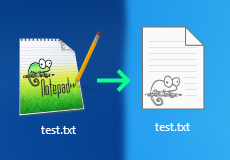
Prerequisite
Before running any of the following, you’ll need to make sure you have Notepad++
setup as the default application for opening any file (.txt, .html, .json, etc)How to install
Simply drag the
file.icoicon into the C:\Program Files\Notepad++\ directory.
Once that is done, just run thesetup.regfile to setup the registry key to
point to the new icon file.If your path to Notepad++ isn’t in the program files folder, you’ll need to
go about the setup slightly different.How to install manually
Make sure to store the
file.icofile anywhere that won’t get deleted. Once
done, make sure you take note of the path to the icon.Next you’ll want to open up regedit, which you can do by just opening run
with Win + R, and then typing regedit. Inside of regedit you’ll want to
navigate to the following directoryComputer\HKEY_CURRENT_USER\Software\Classes\Applications\notepad++.exe\Once inside, right click notepad++.exe and create a new key, and call it
DefaultIcon. Once done, click on the new folder/key, and on the right,
double click the(Default)option, and for ValueData, paste in your path
to thefile.ico.Once done you just need to restart explorer or wait until Windows naturally
refreshes the icon data.
Hello! It looks like you're interested in this conversation, but you don't have an account yet.
Getting fed up of having to scroll through the same posts each visit? When you register for an account, you'll always come back to exactly where you were before, and choose to be notified of new replies (either via email, or push notification). You'll also be able to save bookmarks and upvote posts to show your appreciation to other community members.
With your input, this post could be even better 💗
Register Login