User defined language - operator § not working
-
Hi,
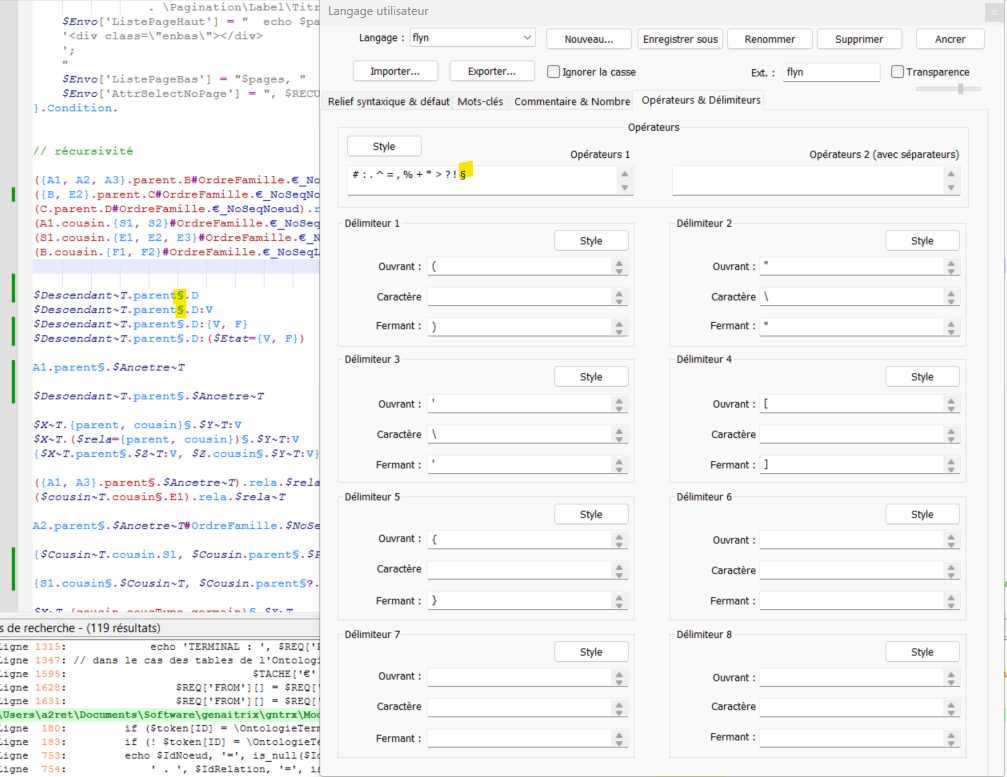
I am using the user defined language since a long time, on a personal language i’m developing named flyn.
Recently, i added a new operator to the language : §
But syntax high-lighting is not working on it (see screenshot).
I suspect it is because it’s a multi-byte UTF8 character.
Can anyone confirm ?
(and correct if possible)Cheers
Have a nice summer everyone. -
I suspect it is because it’s a multi-byte UTF8 character.
Can anyone confirm ?Correct.
Due to implementation details, UTF8 might work in the “separators required” operator 2 list, but it does not in the operators 1 list. (It’s because of the “forwards” vs “backwards” differences, as described here – under the hood, that means the non-separators-required doesn’t see it correctly).
(and correct if possible)
Not any time soon: UDL was not designed with multi-byte encodings in mind. (I tried looking into the poor UTF8 support in UDL a year or two ago, and got so lost, I haven’t tried to dive back in. And the developer has made it clear after a decade of ignored feature requests that UDL is ‘good enough’ in his opinion.)
If you didn’t need to cozy the § next to the text, then a workaround would be to move
§to the operator 2 list.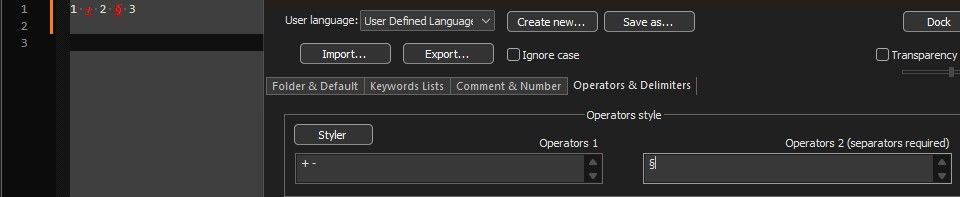
But because you want it to work on
parent§, that won’t work for you.Instead, I would suggest using EnhanceAnyLexer plugin, and setting the foreground color for the regex that matches the
§character. Here’s an example where I set the 0xBBGGRR (*) to 0xFF00FF, and match on the§. And this is showing it works
For a UDL named “flyn”, The EnhanceAnyLexer.ini would need to contain:
[flyn]
0xFF00FF = §
(using Plugins > EnhanceAnyLexer > Enhance This Lexer will open the config in the right place, and will create the section for your active language or UDL if that section isn’t already in the INI, and will move to that section if it is already in the INI)
This sets the regex matching
§to be magenta (blue and red at full intensity).(*: yes, the order is reversed from most RGB words, so BLUE is the upper two nybbles; thank you MS)
-
Hi @PeterJones
Thanks for the quick answer.
I does not work in the operator 2 list either (or may be i need to do something more than just put § there ?)It’s not that important, so i will keep the plugin solution for another time.
Thank you again.
Cheers -
@arnaud-derette said:
I does not work in the operator 2 list either (or may be i need to do something more than just put § there ?)Like I said, because you want the § to not have spaces, like in
parent§.D, it won’t work for you. § in operators 2 will only work if you can have spaces around the §


Hello! It looks like you're interested in this conversation, but you don't have an account yet.
Getting fed up of having to scroll through the same posts each visit? When you register for an account, you'll always come back to exactly where you were before, and choose to be notified of new replies (either via email, or push notification). You'll also be able to save bookmarks and upvote posts to show your appreciation to other community members.
With your input, this post could be even better 💗
Register Login