[ALPHA] Upcoming Plugin: HiddenLexers
-
This is a markdown variant, AFAIK . Markdown has many variants so may seem like your problem is a variant that suits your needs. ASCIIDoc IIRC is a lexer that is not exposed in Notepad++ so perhaps wanted? This needs some more detail to know if the interest is desired.
In interesting timing, I am actually in the middle of creating a HiddenLexer plugin (based on my old PythonScript solution) which will allow the plugin to activate lexers that Notepad++ doesn’t expose in the Languages menu.
For alpha testing with ASCIIDoc:
- Download zip of plugin DLL from here:
<LINK REMOVED>(link should work for at least a few days)(see updated location, below) and put the DLL asc:\program files\notepad++\plugins\HiddenLexers\HiddenLexers.dll(or equivalent) %AppData%\Notepad++\plugins\config\HiddenLexers\HiddenLexers.json
(the colors are reasonable in DarkModeDefault theme){ "extensions": { "adoc": "asciidoc" }, "lexers": { "asciidoc": { "0 SCE_ASCIIDOC_DEFAULT": { "fgColor": "", "bgColor": "", "fontStyle": "0" }, "1 SCE_ASCIIDOC_STRONG1": { "fgColor": "", "bgColor": "", "fontStyle": "1" }, "2 SCE_ASCIIDOC_STRONG2": { "fgColor": "", "bgColor": "", "fontStyle": "5" }, "3 SCE_ASCIIDOC_EM1": { "fgColor": "", "bgColor": "", "fontStyle": "2" }, "4 SCE_ASCIIDOC_EM2": { "fgColor": "", "bgColor": "", "fontStyle": "6" }, "5 SCE_ASCIIDOC_HEADER1": { "fgColor": "CC0000", "bgColor": "", "fontStyle": "1" }, "6 SCE_ASCIIDOC_HEADER2": { "fgColor": "CC3333", "bgColor": "4F4F4F", "fontStyle": "1" }, "7 SCE_ASCIIDOC_HEADER3": { "fgColor": "CC7777", "bgColor": "5F5F5F", "fontStyle": "1" }, "8 SCE_ASCIIDOC_HEADER4": { "fgColor": "CCbbbb", "bgColor": "6F6F6F", "fontStyle": "1" }, "9 SCE_ASCIIDOC_HEADER5": { "fgColor": "CCffff", "bgColor": "7F7F7F", "fontStyle": "1" }, "10 SCE_ASCIIDOC_HEADER6": { "fgColor": "FFFFFF", "bgColor": "8F8F8F", "fontStyle": "1" }, "11 SCE_ASCIIDOC_ULIST_ITEM": { "fgColor": "0000CC", "bgColor": "", "fontStyle": "0" }, "12 SCE_ASCIIDOC_OLIST_ITEM": { "fgColor": "0000CC", "bgColor": "", "fontStyle": "0" }, "13 SCE_ASCIIDOC_BLOCKQUOTE": { "fgColor": "00CC00", "bgColor": "", "fontStyle": "0" }, "14 SCE_ASCIIDOC_LINK": { "fgColor": "", "bgColor": "", "fontStyle": "4" }, "15 SCE_ASCIIDOC_CODEBK": { "fgColor": "00CC00", "bgColor": "", "fontStyle": "0" }, "16 SCE_ASCIIDOC_PASSBK": { "fgColor": "00CC00", "bgColor": "", "fontStyle": "0" }, "17 SCE_ASCIIDOC_COMMENT": { "fgColor": "00CC33", "bgColor": "", "fontStyle": "0" }, "18 SCE_ASCIIDOC_COMMENTBK": { "fgColor": "00CC33", "bgColor": "", "fontStyle": "0" }, "19 SCE_ASCIIDOC_LITERAL": { "fgColor": "CCCC00", "bgColor": "", "fontStyle": "0" }, "20 SCE_ASCIIDOC_LITERALBK": { "fgColor": "CCCC00", "bgColor": "", "fontStyle": "0" }, "21 SCE_ASCIIDOC_ATTRIB": { "fgColor": "CC00CC", "bgColor": "", "fontStyle": "0" }, "22 SCE_ASCIIDOC_ATTRIBVAL": { "fgColor": "CC00CC", "bgColor": "7F7F7F", "fontStyle": "0" }, "23 SCE_ASCIIDOC_MACRO": { "fgColor": "FFFF00", "bgColor": "", "fontStyle": "7" }, "options": {}, "keywords": [ "", "", "", "", "", "", "", "", "" ] } } }
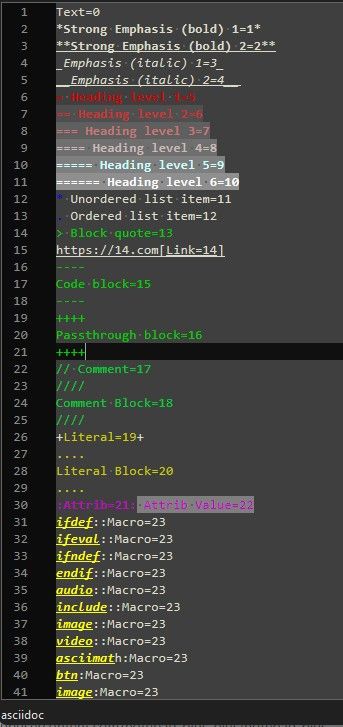
The plugin isn’t ready for prime time yet, but for alpha testing, I was able to get that to automatically colorize the lexilla test asciidoc file
AllStyles.adocThere’s no documentation for the plugin yet, nor an ABOUT box, nor any way to force it to re-read the JSON (those are all TODO). But as a proof of concept…
- Download zip of plugin DLL from here:
-
@PeterJones I have tried the HiddenLexer plugin and I am impressed. I tried to add another lexer though failing to style for some unknown reason. When the plugin progresses from the Alpha state then may try again. The “Hello Notepad++” works too though Notepad++ does not seem to respond back with a “Hello Plugin” :). The plugin has some good potential to access the other 1/3 of lexers that Lexilla provides. The plugin is looking good so far with the setup of AsciiDoc. I checked the history and the AsciiDoc lexer was added and released in December of 2021. This is probably the first time that I have seen AsciiDoc working as I have no previous experience with using the format.
-
I tried to add another lexer though failing to style for some unknown reason. When the plugin progresses from the Alpha state then may try again
Open an issue in my repo, with the config json and a test file showing it not working…
-
@PeterJones The
mysqllexer has no real use with default style so was not seeing results though as developing the json some more then it started showing good progress. Perseverance wins in the end. Just need to get familiar with what’s required and I remembered that I am awful with styling colours. -
NOTE: I split this out from the Using Notepad++ to Organize Game Guides and Documentation because it distracts from the original conversation, and is really about something separate from that discussion.
-
Updated artifacts: https://github.com/pryrt/NppPlugin-HiddenLexers/actions/runs/31041591210 (again, limited time availability, only for alpha testing)
- Got rid of the “Hello” actions. ;-)
- Added About box
- Added Edit Config File to open the correct JSON file
- Added Reread Config to reload the settings from the JSON
- when you are editing the JSON in Notepad++, when you save that file, it should automatically reread the config. (you will have to activate the tab with the example file to see the update in highlighting)
This build should make it much easier for incremental changes to the JSON, without having to reload Notepad++ every time. :-)
Also, now I’ve updated the README at https://github.com/pryrt/NppPlugin-HiddenLexers
Call For Testers
It seems to be basically working at this point. If @mpheath and others could give it a test, that would be appreciated. I don’t personally need this plugin, as I don’t have any hidden lexers I want to activate, so I don’t know if I’ve missed anything critical or obvious. But from my tests with STATA (one of the languages that the original
HiddenLexers.pyhandled) andASCIIDoc(per the start of this conversation), I think it’s working reasonably.I know that Lexilla has various config-variables for some of the lexers. If not having config variables available is a deal breaker for you, let me know which lexer you need it for, and give an example file and JSON to show me why that option is critical, and I can prioritize getting it added before I do the v1.0 release. Otherwise, the lexilla-options will probably not be included until a future version. -
I was able to find an example lexer that had an option that I could see the effect of, so was able to confirm that I seemed to be processing correctly.
v0.0.1.1-dev
- add
optionsprocessing
example JSON:
{
  "extensions": {
    "md": "markdown",
    "markdown": "markdown"
  },
  "lexers": {
    "markdown": {
        "0  SCE_MARKDOWN_DEFAULT"    : { "fgColor": "", "bgColor": "", "fontStyle": "0" },
        "1  SCE_MARKDOWN_LINE_BEGIN" : { "fgColor": "DADADA", "bgColor": "", "fontStyle": "0" },
        "2  SCE_MARKDOWN_STRONG1"    : { "fgColor": "EECCAA", "bgColor": "", "fontStyle": "1" },
        "3  SCE_MARKDOWN_STRONG2"    : { "fgColor": "EECCAA", "bgColor": "4F4F4F", "fontStyle": "1" },
        "4  SCE_MARKDOWN_EM1"        : { "fgColor": "AADDFF", "bgColor": "", "fontStyle": "2" },
        "5  SCE_MARKDOWN_EM2"        : { "fgColor": "AADDFF", "bgColor": "4F4F4F", "fontStyle": "2" },
        "6  SCE_MARKDOWN_HEADER1"    : { "fgColor": "FFFFFF", "bgColor": "8F8F8F", "fontStyle": "1" },
        "7  SCE_MARKDOWN_HEADER2"    : { "fgColor": "CCffff", "bgColor": "7F7F7F", "fontStyle": "1" },
        "8  SCE_MARKDOWN_HEADER3"    : { "fgColor": "CCbbbb", "bgColor": "6F6F6F", "fontStyle": "1" },
        "9  SCE_MARKDOWN_HEADER4"    : { "fgColor": "CC7777", "bgColor": "5F5F5F", "fontStyle": "1" },
        "10 SCE_MARKDOWN_HEADER5"    : { "fgColor": "CC3333", "bgColor": "4F4F4F", "fontStyle": "1" },
        "11 SCE_MARKDOWN_HEADER6"    : { "fgColor": "CC0000", "bgColor": "3F3F3F", "fontStyle": "1" },
        "12 SCE_MARKDOWN_PRECHAR"    : { "fgColor": "5F5F5F", "bgColor": "4F4F4F", "fontStyle": "0" },
        "13 SCE_MARKDOWN_ULIST_ITEM" : { "fgColor": "0000CC", "bgColor": "4F4F4F", "fontStyle": "0" },
        "14 SCE_MARKDOWN_OLIST_ITEM" : { "fgColor": "0000CC", "bgColor": "4F4F4F", "fontStyle": "0" },
        "15 SCE_MARKDOWN_BLOCKQUOTE" : { "fgColor": "00CC00", "bgColor": "4F4F4F", "fontStyle": "0" },
        "16 SCE_MARKDOWN_STRIKEOUT"  : { "fgColor": "6F6F6F", "bgColor": "", "fontStyle": "0" },
        "17 SCE_MARKDOWN_HRULE"      : { "fgColor": "FFFFFF", "bgColor": "0020C0", "fontStyle": "0" },
        "18 SCE_MARKDOWN_LINK"       : { "fgColor": "8F8FFF", "bgColor": "", "fontStyle": "4" },
        "19 SCE_MARKDOWN_CODE"       : { "fgColor": "FFFF00", "bgColor": "6F6F6F", "fontStyle": "0" },
        "20 SCE_MARKDOWN_CODE2"      : { "fgColor": "FFFF00", "bgColor": "6F6F6F", "fontStyle": "0" },
        "21 SCE_MARKDOWN_CODEBK"     : { "fgColor": "FFFF00", "bgColor": "6F6F6F", "fontStyle": "0" },
        "options": { "lexer.markdown.header.eolfill": "1" },
        "keywords": [ "", "", "", "", "", "", "", "", "" ]
    }
  }
}
I verified the functionality using AllStyles.md from the lexilla test suite in N++ codebase; I can change from
"1"to"0"and watch the header lines change:- “1”:
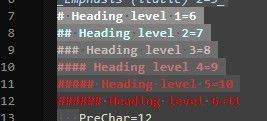
- “0”:
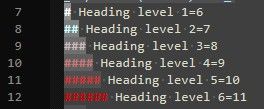
So I believe that options are implemented now.
Also, this one is in a release tag, so you can either find the artifacts as before, or you can download a normal PluginsAdmin-style zipfile which can be unzipped and the DLL installed, as with any normal manual plugin installation.
- add


Hello! It looks like you're interested in this conversation, but you don't have an account yet.
Getting fed up of having to scroll through the same posts each visit? When you register for an account, you'll always come back to exactly where you were before, and choose to be notified of new replies (either via email, or push notification). You'll also be able to save bookmarks and upvote posts to show your appreciation to other community members.
With your input, this post could be even better 💗
Register Login