[BETA] Upcoming Plugin: HiddenLexers
-
This is a markdown variant, AFAIK . Markdown has many variants so may seem like your problem is a variant that suits your needs. ASCIIDoc IIRC is a lexer that is not exposed in Notepad++ so perhaps wanted? This needs some more detail to know if the interest is desired.
In interesting timing, I am actually in the middle of creating a HiddenLexer plugin (based on my old PythonScript solution) which will allow the plugin to activate lexers that Notepad++ doesn’t expose in the Languages menu.
For alpha testing with ASCIIDoc:
- Download zip of plugin DLL from here:
<LINK REMOVED>(link should work for at least a few days)(see updated location, below) and put the DLL asc:\program files\notepad++\plugins\HiddenLexers\HiddenLexers.dll(or equivalent) %AppData%\Notepad++\plugins\config\HiddenLexers\HiddenLexers.json
(the colors are reasonable in DarkModeDefault theme){ "extensions": { "adoc": "asciidoc" }, "lexers": { "asciidoc": { "0 SCE_ASCIIDOC_DEFAULT": { "fgColor": "", "bgColor": "", "fontStyle": "0" }, "1 SCE_ASCIIDOC_STRONG1": { "fgColor": "", "bgColor": "", "fontStyle": "1" }, "2 SCE_ASCIIDOC_STRONG2": { "fgColor": "", "bgColor": "", "fontStyle": "5" }, "3 SCE_ASCIIDOC_EM1": { "fgColor": "", "bgColor": "", "fontStyle": "2" }, "4 SCE_ASCIIDOC_EM2": { "fgColor": "", "bgColor": "", "fontStyle": "6" }, "5 SCE_ASCIIDOC_HEADER1": { "fgColor": "CC0000", "bgColor": "", "fontStyle": "1" }, "6 SCE_ASCIIDOC_HEADER2": { "fgColor": "CC3333", "bgColor": "4F4F4F", "fontStyle": "1" }, "7 SCE_ASCIIDOC_HEADER3": { "fgColor": "CC7777", "bgColor": "5F5F5F", "fontStyle": "1" }, "8 SCE_ASCIIDOC_HEADER4": { "fgColor": "CCbbbb", "bgColor": "6F6F6F", "fontStyle": "1" }, "9 SCE_ASCIIDOC_HEADER5": { "fgColor": "CCffff", "bgColor": "7F7F7F", "fontStyle": "1" }, "10 SCE_ASCIIDOC_HEADER6": { "fgColor": "FFFFFF", "bgColor": "8F8F8F", "fontStyle": "1" }, "11 SCE_ASCIIDOC_ULIST_ITEM": { "fgColor": "0000CC", "bgColor": "", "fontStyle": "0" }, "12 SCE_ASCIIDOC_OLIST_ITEM": { "fgColor": "0000CC", "bgColor": "", "fontStyle": "0" }, "13 SCE_ASCIIDOC_BLOCKQUOTE": { "fgColor": "00CC00", "bgColor": "", "fontStyle": "0" }, "14 SCE_ASCIIDOC_LINK": { "fgColor": "", "bgColor": "", "fontStyle": "4" }, "15 SCE_ASCIIDOC_CODEBK": { "fgColor": "00CC00", "bgColor": "", "fontStyle": "0" }, "16 SCE_ASCIIDOC_PASSBK": { "fgColor": "00CC00", "bgColor": "", "fontStyle": "0" }, "17 SCE_ASCIIDOC_COMMENT": { "fgColor": "00CC33", "bgColor": "", "fontStyle": "0" }, "18 SCE_ASCIIDOC_COMMENTBK": { "fgColor": "00CC33", "bgColor": "", "fontStyle": "0" }, "19 SCE_ASCIIDOC_LITERAL": { "fgColor": "CCCC00", "bgColor": "", "fontStyle": "0" }, "20 SCE_ASCIIDOC_LITERALBK": { "fgColor": "CCCC00", "bgColor": "", "fontStyle": "0" }, "21 SCE_ASCIIDOC_ATTRIB": { "fgColor": "CC00CC", "bgColor": "", "fontStyle": "0" }, "22 SCE_ASCIIDOC_ATTRIBVAL": { "fgColor": "CC00CC", "bgColor": "7F7F7F", "fontStyle": "0" }, "23 SCE_ASCIIDOC_MACRO": { "fgColor": "FFFF00", "bgColor": "", "fontStyle": "7" }, "options": {}, "keywords": [ "", "", "", "", "", "", "", "", "" ] } } }
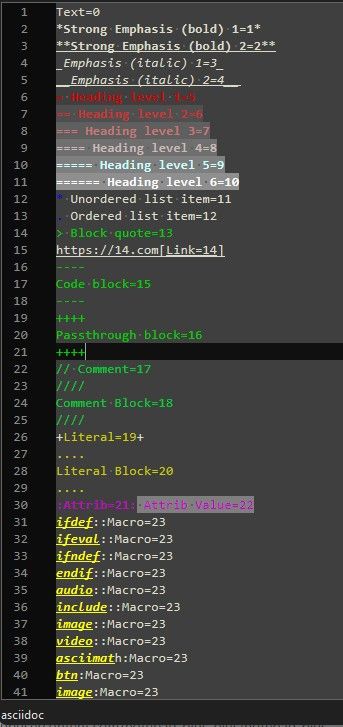
The plugin isn’t ready for prime time yet, but for alpha testing, I was able to get that to automatically colorize the lexilla test asciidoc file
AllStyles.adocThere’s no documentation for the plugin yet, nor an ABOUT box, nor any way to force it to re-read the JSON (those are all TODO). But as a proof of concept…
- Download zip of plugin DLL from here:
-
@PeterJones I have tried the HiddenLexer plugin and I am impressed. I tried to add another lexer though failing to style for some unknown reason. When the plugin progresses from the Alpha state then may try again. The “Hello Notepad++” works too though Notepad++ does not seem to respond back with a “Hello Plugin” :). The plugin has some good potential to access the other 1/3 of lexers that Lexilla provides. The plugin is looking good so far with the setup of AsciiDoc. I checked the history and the AsciiDoc lexer was added and released in December of 2021. This is probably the first time that I have seen AsciiDoc working as I have no previous experience with using the format.
-
I tried to add another lexer though failing to style for some unknown reason. When the plugin progresses from the Alpha state then may try again
Open an issue in my repo, with the config json and a test file showing it not working…
-
@PeterJones The
mysqllexer has no real use with default style so was not seeing results though as developing the json some more then it started showing good progress. Perseverance wins in the end. Just need to get familiar with what’s required and I remembered that I am awful with styling colours. -
NOTE: I split this out from the Using Notepad++ to Organize Game Guides and Documentation because it distracts from the original conversation, and is really about something separate from that discussion.
-
Updated artifacts: https://github.com/pryrt/NppPlugin-HiddenLexers/actions/runs/31041591210 (again, limited time availability, only for alpha testing)
- Got rid of the “Hello” actions. ;-)
- Added About box
- Added Edit Config File to open the correct JSON file
- Added Reread Config to reload the settings from the JSON
- when you are editing the JSON in Notepad++, when you save that file, it should automatically reread the config. (you will have to activate the tab with the example file to see the update in highlighting)
This build should make it much easier for incremental changes to the JSON, without having to reload Notepad++ every time. :-)
Also, now I’ve updated the README at https://github.com/pryrt/NppPlugin-HiddenLexers
Call For Testers
It seems to be basically working at this point. If @mpheath and others could give it a test, that would be appreciated. I don’t personally need this plugin, as I don’t have any hidden lexers I want to activate, so I don’t know if I’ve missed anything critical or obvious. But from my tests with STATA (one of the languages that the original
HiddenLexers.pyhandled) andASCIIDoc(per the start of this conversation), I think it’s working reasonably.I know that Lexilla has various config-variables for some of the lexers. If not having config variables available is a deal breaker for you, let me know which lexer you need it for, and give an example file and JSON to show me why that option is critical, and I can prioritize getting it added before I do the v1.0 release. Otherwise, the lexilla-options will probably not be included until a future version. -
I was able to find an example lexer that had an option that I could see the effect of, so was able to confirm that I seemed to be processing correctly.
v0.0.1.1-dev
- add
optionsprocessing
example JSON:
{
  "extensions": {
    "md": "markdown",
    "markdown": "markdown"
  },
  "lexers": {
    "markdown": {
        "0  SCE_MARKDOWN_DEFAULT"    : { "fgColor": "", "bgColor": "", "fontStyle": "0" },
        "1  SCE_MARKDOWN_LINE_BEGIN" : { "fgColor": "DADADA", "bgColor": "", "fontStyle": "0" },
        "2  SCE_MARKDOWN_STRONG1"    : { "fgColor": "EECCAA", "bgColor": "", "fontStyle": "1" },
        "3  SCE_MARKDOWN_STRONG2"    : { "fgColor": "EECCAA", "bgColor": "4F4F4F", "fontStyle": "1" },
        "4  SCE_MARKDOWN_EM1"        : { "fgColor": "AADDFF", "bgColor": "", "fontStyle": "2" },
        "5  SCE_MARKDOWN_EM2"        : { "fgColor": "AADDFF", "bgColor": "4F4F4F", "fontStyle": "2" },
        "6  SCE_MARKDOWN_HEADER1"    : { "fgColor": "FFFFFF", "bgColor": "8F8F8F", "fontStyle": "1" },
        "7  SCE_MARKDOWN_HEADER2"    : { "fgColor": "CCffff", "bgColor": "7F7F7F", "fontStyle": "1" },
        "8  SCE_MARKDOWN_HEADER3"    : { "fgColor": "CCbbbb", "bgColor": "6F6F6F", "fontStyle": "1" },
        "9  SCE_MARKDOWN_HEADER4"    : { "fgColor": "CC7777", "bgColor": "5F5F5F", "fontStyle": "1" },
        "10 SCE_MARKDOWN_HEADER5"    : { "fgColor": "CC3333", "bgColor": "4F4F4F", "fontStyle": "1" },
        "11 SCE_MARKDOWN_HEADER6"    : { "fgColor": "CC0000", "bgColor": "3F3F3F", "fontStyle": "1" },
        "12 SCE_MARKDOWN_PRECHAR"    : { "fgColor": "5F5F5F", "bgColor": "4F4F4F", "fontStyle": "0" },
        "13 SCE_MARKDOWN_ULIST_ITEM" : { "fgColor": "0000CC", "bgColor": "4F4F4F", "fontStyle": "0" },
        "14 SCE_MARKDOWN_OLIST_ITEM" : { "fgColor": "0000CC", "bgColor": "4F4F4F", "fontStyle": "0" },
        "15 SCE_MARKDOWN_BLOCKQUOTE" : { "fgColor": "00CC00", "bgColor": "4F4F4F", "fontStyle": "0" },
        "16 SCE_MARKDOWN_STRIKEOUT"  : { "fgColor": "6F6F6F", "bgColor": "", "fontStyle": "0" },
        "17 SCE_MARKDOWN_HRULE"      : { "fgColor": "FFFFFF", "bgColor": "0020C0", "fontStyle": "0" },
        "18 SCE_MARKDOWN_LINK"       : { "fgColor": "8F8FFF", "bgColor": "", "fontStyle": "4" },
        "19 SCE_MARKDOWN_CODE"       : { "fgColor": "FFFF00", "bgColor": "6F6F6F", "fontStyle": "0" },
        "20 SCE_MARKDOWN_CODE2"      : { "fgColor": "FFFF00", "bgColor": "6F6F6F", "fontStyle": "0" },
        "21 SCE_MARKDOWN_CODEBK"     : { "fgColor": "FFFF00", "bgColor": "6F6F6F", "fontStyle": "0" },
        "options": { "lexer.markdown.header.eolfill": "1" },
        "keywords": [ "", "", "", "", "", "", "", "", "" ]
    }
  }
}
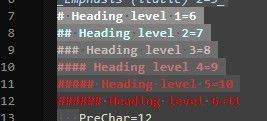
I verified the functionality using AllStyles.md from the lexilla test suite in N++ codebase; I can change from
"1"to"0"and watch the header lines change:- “1”:
- “0”:
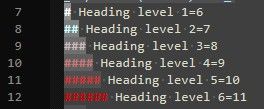
So I believe that options are implemented now.
Also, this one is in a release tag, so you can either find the artifacts as before, or you can download a normal PluginsAdmin-style zipfile which can be unzipped and the DLL installed, as with any normal manual plugin installation.
- add
-
@PeterJones You have enabled the lexer property of
lexer.markdown.header.eolfillthough the styles are not using it as I see in the images. For clarity, I am focussing oneolfilledon the style id rather then the property itself so could an extra attribute not available currently.Here is a example in SciTE on the level 1 header:

As the styling shows:
{6}# Tools
{1}
{0}Lua scripts that can be executed by dofile.{1}


{7}## Ideas
{1}
there is nothing preventing style id
6to fill the whole line with the background colour if theeolfilledstyle is used.I added this to SciTE’s
Option -> Open User Options File# SCE_MARKDOWN_HEADER1: "#" - Level-one header style.markdown.6=fore:#FF7766,bold,back:#700000,eolfilledThe json file could have
eolFilledattribute setting like thefontStyleattribute so is applied for the style id. -
@PeterJones You have enabled the lexer property of
lexer.markdown.header.eolfillthough the styles are not using it as I see in the images.Well, it partially used it, in that the style went to the end of the header text instead of just the end of the
###symbols.The json file could have
eolFilledattribute setting like thefontStyleattribute so is applied for the style id.I didn’t know/remember that SCI_STYLESETEOLFILLED existed until your post made me go look for it. I will have to add that attribute to the style info in the JSON
-
@PeterJones I just did an edit before you replied. The property does change the processing of headers the eolfilled though on the style itself is absent.
-
- Add the
"eolFilled": "1"attribute to the JSON (expected values: not supplied,"","0","1"). This will allow lexers that support the SCI_STYLESETEOLFILLED style to fill the styling to the end of the window instead of the end of the text.
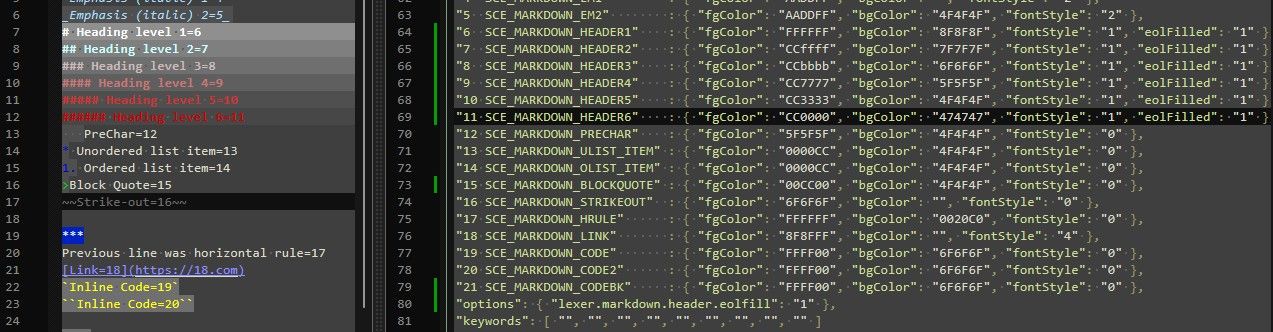
"6 SCE_MARKDOWN_HEADER1" : { "fgColor": "FFFFFF", "bgColor": "8F8F8F", "fontStyle": "1", "eolFilled": "1" }, "7 SCE_MARKDOWN_HEADER2" : { "fgColor": "CCffff", "bgColor": "7F7F7F", "fontStyle": "1", "eolFilled": "1" }, "8 SCE_MARKDOWN_HEADER3" : { "fgColor": "CCbbbb", "bgColor": "6F6F6F", "fontStyle": "1", "eolFilled": "1" }, "9 SCE_MARKDOWN_HEADER4" : { "fgColor": "CC7777", "bgColor": "5F5F5F", "fontStyle": "1", "eolFilled": "1" }, "10 SCE_MARKDOWN_HEADER5" : { "fgColor": "CC3333", "bgColor": "4F4F4F", "fontStyle": "1", "eolFilled": "1" }, "11 SCE_MARKDOWN_HEADER6" : { "fgColor": "CC0000", "bgColor": "474747", "fontStyle": "1", "eolFilled": "1" }, - Add the
-
@mpheath ,
I am curious: do you think it’s enough to warrant trying to get v1 in Plugins Admin for the upcoming v8.9.8 RC? Or should I give more time for more people to test? (Or do you think it’s really worth publishing at all?)
(And secondary question: for getting the styler output from SciTE, are you just running TestLexers.exe from a N++ or just-scintilla build? or is there another way of generating that? I have my PythonScript styleDebugger script for doing it inside N++, but was curious if there was an easy way to do it directly from SciTE)
-
@mpheath ,
I am curious: do you think it’s enough to warrant trying to get v1 in Plugins Admin for the upcoming v8.9.8 RC? Or should I give more time for more people to test? (Or do you think it’s really worth publishing at all?)
Rushing anything can lead to a buggy release. You may want to make sure decisions like file format with the json … is good which is important. If OK, then release. I cannot come up with anything that prevents it. I do not see anyone desperate for a rushed release so you choose.
(And secondary question: for getting the styler output from SciTE, are you just running TestLexers.exe from a N++ or just-scintilla build? or is there another way of generating that? I have my PythonScript styleDebugger script for doing it inside N++, but was curious if there was an easy way to do it directly from SciTE)
I do it from Notepad++ with PythonScript, SciTE with Lua or if want to do it the hard way, with
TestLexers.exe.TestLexers.exeshould be used for actual Lexilla lexer changes as it does additional things like checking CRLF/LF modes … so is official for Lexilla contributions. From SciTE, I use a Lua script to output the data to the console pane. In my previous comment where I posted the styling information was printed from a Lua function that uses CharAt and StyleIndexAt to know where to insert the{N}style ids.I did a quick hack as my script has MsgBoxes and other incompatable code for an uncustomized SciTE.
File: printStyles.lua in same directory as SciTE:
-- about: Print Style IDs for the current document.

do
    local lastID = -1
    local text = ''
    local startPos = 0
    local endPos = editor.Length

    -- Set to selection positions.
    if editor.SelectionEnd > editor.SelectionStart then
        startPos = editor.SelectionStart
        endPos = editor.SelectionEnd
    end

    -- Process each char.
    for i = startPos, endPos do
        local ch = editor.CharAt[i]

        if ch < 0 then
            ch = ch + 256
        end

        local character = string.char(ch)
        local styleId = editor.StyleIndexAt[i]

        if styleId ~= lastID then
            text = text .. '{' .. tostring(styleId) .. '}'
        end

        text = text .. character

        lastID = styleId
    end

    -- Output the reformatted text.
    if text ~= '' then
        print(text)
    end
end
and add to the User Options File:
# 01 PrintDocStyles similar to TestLexers.exe
command.name.1.*.*=PrintDocStyles
command.1.*.*=dofile $(SciteDefaultHome)\printStyles.lua
command.subsystem.1.*.*=3
command.save.before.1.*.*=2
or if using Sc1, can just add it to the Global Options File to save in same directory as the Sc1 executable file.
In the SciTE Tools menu drop down, should then show an item named
PrintDocStylesor press Ctrl+1 keys to run the function. -
@PeterJones Looking through the
readme.md. Perhaps could make it easier for users to have a properties list for the lexer options, like possibly fromPossibly, a little bit of your regex tricks could rearrange to get the list of options into a file for users to view.
SciTE Doc has a good lexer property listing:
https://scintilla.org/SciTEDoc.html#property-xml.auto.close.tags
which is where the source of information can be viewed in HTML.Getting all the information to insert into the json file is the challenge.
I just thought of the Nim lexer. Notepad++ still uses the deprecated Nimrod lexer though I do not use Nim. You can see some of the hackery I had to do to recognize the Nim lexer from the Nimrod lexer here with PythonScript. Nim users who want an improved Nim lexer can access it with the HiddenLexers plugin. So benefits exist for those with the interest in the hidden lexers.
-
Since it’s essentially working at this point, I’ve renamed the Topic to “BETA”
@mpheath , I have updated the README at https://github.com/pryrt/NppPlugin-HiddenLexers to enumerate available options
I think I’ll be patient, and give the beta test a while longer, so won’t try to rush to release it before N++ v8.9.8’s PluginsAdmin list is finalized.


Hello! It looks like you're interested in this conversation, but you don't have an account yet.
Getting fed up of having to scroll through the same posts each visit? When you register for an account, you'll always come back to exactly where you were before, and choose to be notified of new replies (either via email, or push notification). You'll also be able to save bookmarks and upvote posts to show your appreciation to other community members.
With your input, this post could be even better 💗
Register Login