Notepad++.exe blocked from Right-click edit - txt, m3u etc.
-
Since a recent update (?) I am no longer able to right-click and edit files! I can double-click on txt files OK, but no other file types can be opened. notepad.exe can open these files. I did have to turn off Protected Folder access to address a previous issue - unable to save to User/Documents. I have notepad++.exe set to Run As Administrator.
I’m out of troubleshooting steps!
-
Since a recent update
Too bad you didn’t give us your ?-menu’s Debug Info, so we could know which version you are on, truly (and don’t say “the most recent” – here’s why) and other important information for helping you with your problem
I am no longer able to right-click and edit files
What do you see when you right click on a
.txtor.m3ufile? What about if youShift+RightClickinstead?I did have to turn off Protected Folder access to address a previous issue - unable to save to User/Documents
Since this is your first post in the Community Forum, we have no idea what your previous issue is,
or what exactly you mean by “turn off Protected Folder access”. But I can think of no reason why “turn off Protected Folder access” would have anything to do with files in your own user documents folder.So I think wherever you did get a “solution” for that, you were probably served a heaping pile of AI nonsense that’s messed up other things for you.I have notepad++.exe set to Run As Administrator.
Windows doesn’t allow opening files from a non-elevated Explorer window (or your main desktop) into a Run-As-Administrator app, so that Windows OS rule is the likely culprit.
If you stop having Notepad++ set to “Run As Administrator”, it’s likely that Open With and the Edit With Notepad++ entry that is installed when you do a normal Notepad++ installation (through the Shell Extension, described here in the User Manual) will work as expected. (Though it does somewhat surprise me that double-click will open Notepad++ correctly, unless it’s opening a non-Admin version of Notepad++ for that.)
-
I did a quick search after I posted, and Windows does have a “Controlled folder access” setting in the Settings > Windows Security > Virus & thread protection > Ransomware protection settings, but it’s turned off by default in Windows. If you had turned that on at some point, and you had set it to protect your Documents hierarchy, then it might have been good advice to turn off the “Controlled folder access” – so I struck that part of my previous answer. (At least one result indicates that the Windows feature is problematic / poorly implemented.)
But turning that off would not have required setting
notepad++.exeto “run as admin”. So the rest of my answer still stands: you almost definitely do not want to run Notepad++ as Admin unless you know why you’re doing it. (And no, an AI LLM GPT Hallucination is not “knowing why”) -
@PeterJones Thanks for replying so quickly. Please excuse my novice post.
To respond with debug data first:
Notepad++ v8.9.7 (64-bit)
Build time: Jul 14 2026 - 01:26:22
Scintilla/Lexilla included: 5.6.4/5.5.1
Boost Regex included: 1_90
pugixml included: 1.16
nlohmann JSON included: 3.12.0
Path: C:\Program Files\Notepad++\notepad++.exe
Command Line:
Admin mode: ON
Local Conf mode: OFF
Cloud Config: OFF
WinGUp: present
disableNppAutoUpdate.xml: absent
Periodic Backup: ON
Placeholders: OFF
Scintilla Rendering Mode: SC_TECHNOLOGY_DIRECTWRITE (1)
Multi-instance Mode: monoInst
asNotepad: OFF
File Status Auto-Detection: cdEnabledNew (for current file/tab only)
Dark Mode: OFF
Display Info:
primary monitor: 1920x1080, scaling 100%
visible monitors count: 1
installed Display Class adapters:
0000: Description - NVIDIA Quadro P2200
0000: DriverVersion - 32.0.15.8270
OS Name: Windows 11 Pro (64-bit)
OS Version: 25H2
OS Build: 26220.9022
Current ANSI codepage: 1252
Plugins:
mimeTools (3.1)
NppConverter (4.7)
NppExport (0.4) -
Admin mode: ON
As I said, turn off Admin Mode. Windows context menu cannot open into an Admin N++ if the explorer it’s coming from is not also Admin mode.
-
@PeterJones Right click: Edit with Notepad++ | clicking does nothing.
No, I did not use Ai… I had a Windoes Security error re: saving to Documents, so I approached the Right-click issue from that standpoint.
Run this program as an administrator (on the exe, not the shortcut) greyed out. Investigating.
-
@J-Mark-Barfield said:
Right click: Edit with Notepad++ | clicking does nothing.I wanted to know what was in the menu – I was trying to diagnose whether something had gone wrong with the Shell Extension, and whether that was what you meant by “blocked”. But since you could see and click on it, that was obviously not the case, so we’ll move on.
Run this program as an administrator (on the exe, not the shortcut) greyed out.
If you are seeing that option greyed out while enabled, like this:
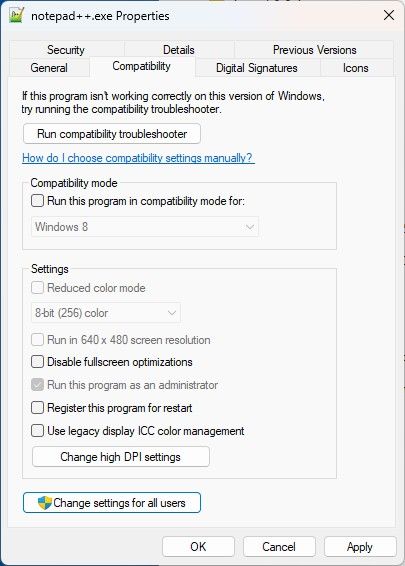
then you have to click Change settings for all users, where it shouldn’t be greyed out:
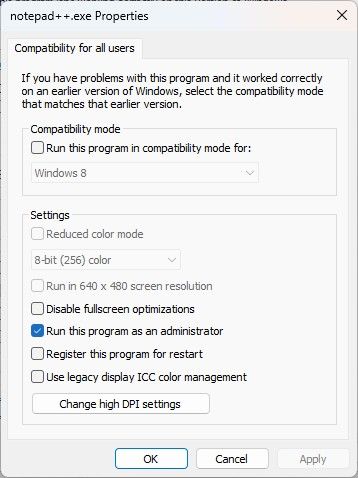
When you uncheckmark it there, then OK, the all-users dialog will close and the original Properties will update to not greyed out and it will be uncheckmarked, too:
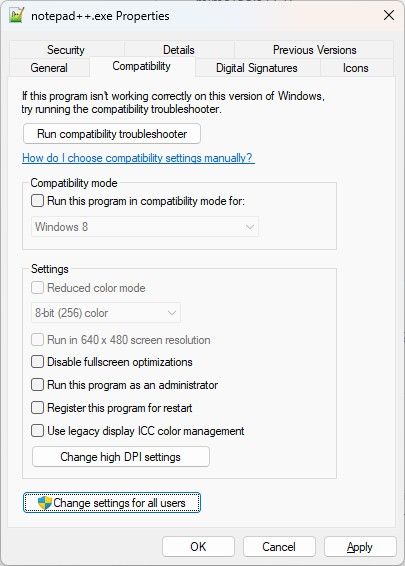
Now Notepad++ should stop running as Admin.
-
@PeterJones Thanks Peter. That step did not work until I ran this regedit first (after closing the notepad++.exe background task): C:\Users\insertnamehere>set __COMPAT_LAYER=RunAsInvoker C:\Program Files\Notepad++\notepad++.exe. Then I was able to complete the steps above.
Thanks for your guidance.
-
- that was not a “regedit”, that was a normal command-line command
- all those two commands did was run an instance of notepad++.exe without RunAsAdmin privileges, even before you made the change to the executable compatibility settings
- it was completely unnecessary
- all you had to do was exit Notepad++ application completely (so it wasn’t running), then do the steps I explained to get
notepad++.exeto not run as admin, and then the next time you ran Notepad++ (either using your shortcut or double clicking on the exe or running the exe from the command line normally or double clicking on a text file or right clicking and choosing Edit with Notepad++) would have run Notepad++ not as admin- if you didn’t exit Notepad++ first, then the still running Notepad++ instance would still be running as Admin. Changing the exe properties while the exe is running doesn’t magically drop the running Notepad++ out of Admin mode. And thus your right click would not have worked, because the running Notepad++ was still in Admin mode.
- all you did by doing those extra commands was
- close the Notepad++ that was running as admin
- open a new instance that wasn’t running as admin
- change the exe properties so that it wouldn’t run as admin next time
- all you had to do was exit Notepad++ application completely (so it wasn’t running), then do the steps I explained to get
(I understand that you got it working, so you don’t really care at this point. But I don’t want future people to read this discussion, and come to the wrong conclusion that they need to do your extra steps. Those steps were completely unnecessary.)

Hello! It looks like you're interested in this conversation, but you don't have an account yet.
Getting fed up of having to scroll through the same posts each visit? When you register for an account, you'll always come back to exactly where you were before, and choose to be notified of new replies (either via email, or push notification). You'll also be able to save bookmarks and upvote posts to show your appreciation to other community members.
With your input, this post could be even better 💗
Register Login