Is there a serious reason why a "user-defined language" cannot specify the encoding?
-
I frequently use Notepad++ to edit source code for a very old target system (a PCS) that strictly requires the “OEM-US” character encoding. Some time ago, I created a “User Defined Language” (UDL) for this purpose, and (almost) everything works perfectly. However, I have to manually switch the automatically detected encoding to “OEM-US” every time. It would be great if there were an option in the UDL XML file to specify a particular character encoding so that it is applied automatically when using the UDL.
-
I think the most likely reason (whether or not you think it’s “serious” enough) is that no one has asked for that feature, and the developer didn’t think of it himself yet.
If it was just a UDL issue, I would probably say, “You should put in the feature request, but unfortunately, there have been no new features in UDL for over a decade, with a lot of really good feature requests that would be more fundamental to making UDL work better, so it’s doubtful it would be implemented any time soon.”
However, based on this Issue about NFO files and OEM-US/CP437 encoding, it looks like there might be other people interested, even in non-UDL circumstances. So I wonder if the better feature request might be the more generic request, something like
[FEATURE REQUEST] Allow setting preferred encoding on a per-language basis.However, there does currently exist a workaround: the AutoCodepage plugin can be used to set default encoding on a per-extension basis. While it might be nice to have it built in, the plugin currently provides the feature. Steps to get it to work:
- Have a UDL. In my example, I call it
MyUDLand I give it the Ext.:smd, so all files ending in.smdwill be treated as that UDL. (I pickedsmdfrom the letters in your username) - Install the plugin
- Plugins > AutoCodepage > Settings
- Set Group Name =
MyUDL - Set Code page to start =
OEM 437: US - Leave Expected language blank (because that dropdown doesn’t include UDL in the list)
- Click the + button under the left panel
- make sure
MyUDLis highlighted in the upper left panel of the dialog - Set New filename extension(s) =
SMD- whether you type in lowercase or uppercase, it ends up uppercase
- the plugin automatically adds the
.prefix when you + the extension - you could type another extension and + add it if your UDL has multiple possible extensions
- Click the + button under the right panel
- The dialog should look like:
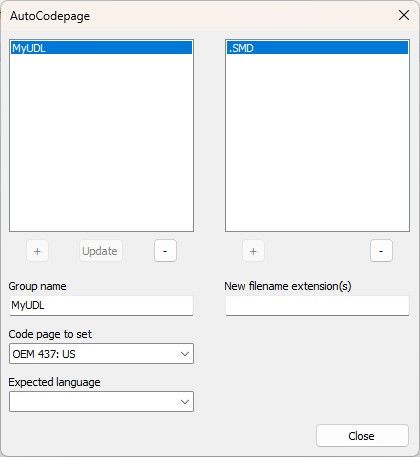
- Close the dialog
- side notes:
- It took me a few times to figure out the right sequence, because the plugin’s documentation is a bit sparse, which is why I was explicit as to the right order.
- If you want to add another group – like an
MS-DOS NFOgroup with the same codepage, but defaulting to theNFOlanguage – you would have to follow similar steps of typing the name, setting the encoding and language, then doing the + – even though it looks like you are editing the MyUDL, as soon as you click + instead of Modify, it will create the new entry instead of modifying the old entry; you then make sure the new entry is selected, and addNFOto its extension list.
- Set Group Name =
- Create a new file, and immediate right-click the tab and name it
blah.smd- Notepad++ will automatically apply the UDL, since the UDL extension is set to
smd - AutoCodepage will automatically apply the OEM-US encoding
- Notepad++ will automatically apply the UDL, since the UDL extension is set to
- Open an existing
blah.smdfile- Notepad++ will automatically apply the UDL, since the UDL extension is set to
smd - AutoCodepage will automatically apply the OEM-US encoding
- Notepad++ will automatically apply the UDL, since the UDL extension is set to
The nice thing about this plugin is that it applies that encoding when you first name, or save-and-name a file, and when you open the file from disk.
I believe this should meet your needs, even if no one ever requests or implements the feature in native Notepad++.
- Have a UDL. In my example, I call it
-
@PeterJones,
many thanks to Your reply. This workaround works perfectly. I searched for this workaround (because I expected that anyone wouls have the same needs) but wasn’t successful - searching for a solution to a problem can be a frustrating experience if you don’t use the right search term(s) — which, of course, you don’t know yet at that stage…

Hello! It looks like you're interested in this conversation, but you don't have an account yet.
Getting fed up of having to scroll through the same posts each visit? When you register for an account, you'll always come back to exactly where you were before, and choose to be notified of new replies (either via email, or push notification). You'll also be able to save bookmarks and upvote posts to show your appreciation to other community members.
With your input, this post could be even better 💗
Register Login