Notepad++ release 8.9.8
-
Thanks for the tips.
None of the .exe files had the blocks.
I ran the update manually and how finally the Plugins Admin option has shown up.
I was wondering whether there was some change in nppPluginList.dll that might have been incompatible with my OS (Windows 7). But it seems everything is OK for now.
-
Scenario: Company computer, Windows 11 24H2 OS build 26100.9106.
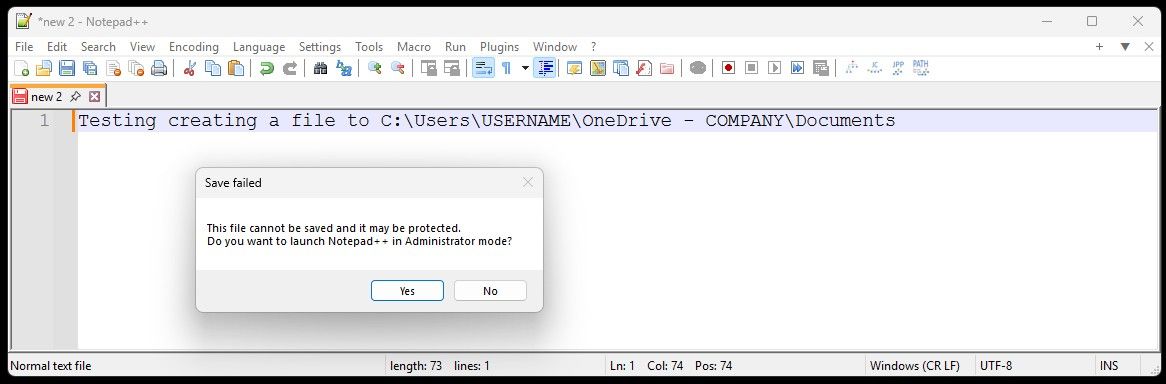
I can´t save files to C:\Users\USERNAME\OneDrive - COMPANY\Documents after updating - worked before without any problems with older versions.Error popup: “This file cannot be saved and it may be protected. Do you want to launch Notead++ in Administrator mode?” (see screenshot below)
Windows Security kicks in saying “Protected folder access blocked” - blocked by “Controlled folder access”.What works:
I can use standard Notepad to save files to that location.
From notepad++ I can save to location C:\Users\USERNAME\OneDrive - COMPANY\Desktop.Does Notepad 8.9.8 needs to be allowed in Windows on protected folders?
-
-
Your issue doesn’t belong to this thread.
-
In this case, Windows already told you all you need to know - most likely your company set that restriction via a domain policy for this specific folder in question, so you must go to the Windows Settings > Privacy & security > Windows Security > Virus & threat protection > Ransomware protection > Manage ransomware protection, and set the notepad++.exe app to be allowed there.
after updating - worked before without any problems with older versions.
Maybe your previous N++ version was older than v8.8.7, where the N++ digital signature changed (new certificate).
What works:
I can use standard Notepad to save files to that location.Yes. All the Microsoft own binaries (digitally signed by MS) are allowed by default.
-
-
-
Run a Macro Multiple Times
This change basically crippled 8.9.8 for me. Creating an ad-hoc macro and running it against every line in the file is one of my most-used features of N++.
The way I learned about the change was that it prevented me from running a macro multiple times because there was supposedly a problem with my shortcuts.xml file that I needed to fix. So, I manually edited the file. After that, it prevented me from running a macro multiple times because I had edited the file.
How do I fix this? My current solution has been to go back to 8.9.7.
-
Use the Run > Validate shortcuts.xml, as described in the user manual.
https://npp-user-manual.org/docs/macros/#macro-security -
@donho I began seeing this message pop up
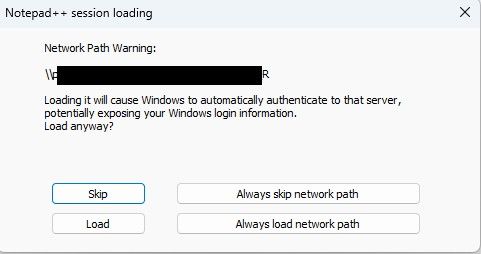
Why is it suddenly concerned about my network path? And why would it expose my login information, and to who if im in a trusted network from a trusted PC?
This prompt pops up on every file I open inside my WSL2 vm. It made using Notepad ++ so frustrating that I downgraded back to 8.9.7.
Additionally, clicking always skip or always load doesn’t stop this from re-triggering when closing and opening the same file. I don’t know if that was the intended purpose of those buttons though.
-
As @xomx said in this Issue#18315 comment, he was not able to reproduce the problem (*). Since there is an issue (even though it’s currently closed), would you be able to go to that issue, and give an exact sequence of steps (from the initial launch of Notepad++ through to the second and third time that the warning pops up even with having answered Always load …), including your full ?-menu > Debug Info, and the session.xml that is being loaded (you can change paths in the session to things like
c:\path\to\file1.jsonand\\hostname\sharename\path\to\file2.cppif your filenames or paths hold information that you need to redact.Another important question: if instead of your normal workflow, if you open Notepad++, click Always load…, then exit Notepad++ immediately and restart, does it save the answer?
If you have the ability, replying in [issue #18315](this Issue#18315 comment](https://github.com/notepad-plus-plus/notepad-plus-plus/issues/18315) might be best (IMO) at this point; but if you don’t have or cannot create an account for GitHub, you can reply here. (It just buries other things in the Release Announcement threads if it dives into debugging a specific problem.)
*: unsaid in that Issue: I had also tried to replicate it, and could not. As soon as I answer ALWAYS in a given instance of Notepad++, it stops pestering me, no matter how many times I reload a file from the network or from my local drive, or how many times I manually open a session file from the network or from my local drive. That’s why it’s so important to give the exact sequence of events you use to encounter the problem, with as many details as you can. Because until someone can replicate it, the problem likely cannot be found or fixed.
-
After using rustdesk-1.4.9-x86_64.exe to control a remote Windows 11 PC, then I opened a .txt file in Notepad++, but it appeared blank—I couldn’t see any text.
-




Hello! It looks like you're interested in this conversation, but you don't have an account yet.
Getting fed up of having to scroll through the same posts each visit? When you register for an account, you'll always come back to exactly where you were before, and choose to be notified of new replies (either via email, or push notification). You'll also be able to save bookmarks and upvote posts to show your appreciation to other community members.
With your input, this post could be even better 💗
Register Login