ASCII Sort Order
-
I have a need to sort lines in ASCII sort order. Is there a way to do this in Notepad++?
…leeNotepad++ v8.9 (64-bit)
Build time: Dec 27 2025 - 14:28:33
Scintilla/Lexilla included: 5.5.8/5.4.6
Boost Regex included: 1_85
TinyXML-2 included: 11.0.0
nlohmann JSON included: 3.12.0
Path: C:\Program Files\Notepad++\notepad++.exe
Command Line: “C:\Program Files\Notepad++\localization\english.xml”
Admin mode: OFF
Local Conf mode: OFF
Cloud Config: OFF
Periodic Backup: ON
Placeholders: OFF
Scintilla Rendering Mode: SC_TECHNOLOGY_DEFAULT (0)
Multi-instance Mode: monoInst
asNotepad: OFF
File Status Auto-Detection: cdEnabledNew (for current file/tab only)
Dark Mode: OFF
Display Info:
primary monitor: 1920x1080, scaling 100%
visible monitors count: 1
installed Display Class adapters:
0000: Description - AMD Radeon™ 860M Graphics
0000: DriverVersion - 32.0.22068.0
OS Name: Windows 11 Pro (64-bit)
OS Version: 25H2
OS Build: 26200.9168
Current ANSI codepage: 1252
Plugins:
ComparePlugin (2.0.2)
ComparePlus (2.2)
mimeTools (3.1)
NppConverter (4.7)
NppExport (0.4)
SessionMgr (1.4.4) -
By “ASCII” sort, I am assuming you mean A-Z comes before a-z. If so, that is known as “lexicographical” sort, which is one of the many sorting options in the Edit > Line Operations menu
-
@PeterJones, that much is true, but not true enough. ASCII sort order is the order in which the ASCII characters are coded from ASCII 32 (space) to ASCII 127 (~). This is the order I need:
! " # $ % & ’ ( ) * + , - . / digits : ; < = > ? @ ALPHA [ \ ] ^ _ ` alpha { | } ~…lee
-
Lexicographical sorts by codepoint. Which, in your limited terminology, could be considred “ASCII”: technically, that’s only “ASCII” if you are still using 7-bit encoding… which you aren’t, and which hasn’t been really used since before the 80s (even in the 80s, when they still used the label “ASCII”, it was actually an 8-bit encoding which overlapped with ASCII for the first 128 codepoints)
So if I start with the random order of the characters that you showed in your list on the left of the image, then apply lexicographical sorting will result in the order on the left, which is exactly what you want.
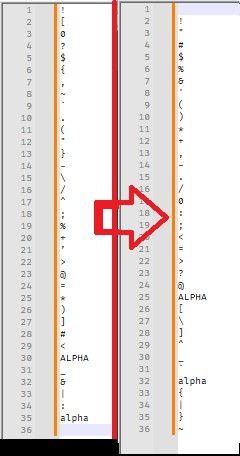
It saddens me that you assumed my answer was wrong, before trying it yourself and seeing that yes, indeed, it did exactly what you wanted.
update: fixed the image: the first time, it copied your ’ as the smartquote
’instead of the ASCII', so it sorted later (because smart-single-quote has a later codepoint than any character from the ASCII set). I didn’t notice until after I’d posted that it put the smart ’ at the end of the list; that was caused by a limitation of the forum, not of Notepad++'s sorting -
@PeterJones, for your information, I had indeed tried lexicographical sorting before posting. I see now that I had jumped to a false conclusion when I did not see ‘ " ’ immediately following ‘ ! ’, which, of course, it couldn’t, seeing as how there were no words with a leading ‘ " ’. Oh, and also for your information re “if you are still using 7-bit encoding… which you aren’t, and which hasn’t been really used since before the 80s”, I happen to be working on documentation for a system from the late 70s and early 80s. Sorry to have bothered you.
…lee
-
@PeterJones, for your information, I had indeed tried lexicographical sorting before posting. I see now that I had jumped to a false conclusion when I did not see ‘ " ’ immediately following ‘ ! ’, which, of course, it couldn’t, seeing as how there were no words with a leading ‘ " ’.
I’m sorry you missed that in your first experiment.
Oh, and also for your information re “if you are still using 7-bit encoding… which you aren’t, and which hasn’t been really used since before the 80s”, I happen to be working on documentation for a system from the late 70s and early 80s.
Continuing my nitpicking: If you are editing the file in Notepad++, then you are editing it on a modern Windows machine, and thus the documentation file is using either one of the windows “character sets” (which are 8-bit encodings, most of which use the equivalent of ASCII for the lower 128 codepoints and then their own unique set of characters for the upper 128 codepoints). But it is using, at minimum, 8-bit (256 position) encodings, which is definitionally not ASCII. Talking about an ASCII system, and using only characters that are available in ASCII, does not necessarily mean you are using ASCII (which is a 7-bit system). (In fact, you could document an ASCII system using an EBDIC encoding, if you desired to be so ironic.)
But my comment about the technicalities of ASCII was all nitpicking on my part, born out of frustration that you ignored my first answer because I didn’t bother explaining how the punctuation fit into the sorting. (If your original post had indicated that you cared how punctuation was sorted, I would have been more explicit.)
Sorry to have bothered you.
I am sorry that your initial experiment had lead you to a wrong conclusion.
And I am sorry that, when you used that wrong conclusion to answer me, I allowed myself to be triggered and switch into my nitpicking mode.
In general, it is in my nature to want to help people (that is the entire reason that I am a regular contributor here)… but when people ask for help, and then it appears they ignore or reject the effort that I went into helping them, I don’t always respond perfectly (I am only human, after all). So I am sorry for any rudeness, real and perceived, that came as a result of my bad reactions.
-
@PeterJones, Thank you for your considered (and considerate) engagement. I actually hesitated to respond with my comment about the 70s and 80s, pretty sure I would get what you gave, but I couldn’t resist—I’m old (83 next month).
Anyway, thanks again for putting up with me. …lee

Hello! It looks like you're interested in this conversation, but you don't have an account yet.
Getting fed up of having to scroll through the same posts each visit? When you register for an account, you'll always come back to exactly where you were before, and choose to be notified of new replies (either via email, or push notification). You'll also be able to save bookmarks and upvote posts to show your appreciation to other community members.
With your input, this post could be even better 💗
Register Login