Community
    • Login

    Notepad++ v8.9.9 Release Candidate

    Scheduled Pinned Locked Moved Announcements
    34 Posts 11 Posters 4.5k Views 5 Watching
    Loading More Posts
    • Oldest to Newest
    • Newest to Oldest
    • Most Votes
    Reply
    • Reply as topic
    Log in to reply
    This topic has been deleted. Only users with topic management privileges can see it.
    • MarkusBodenseeM Offline
      MarkusBodensee @astewart77
      last edited by

      @astewart77 said:

      1/11 - Reached end of page, continued from top
      

      Maybe it would be even better to remove the complete part >> - Reached end of page, continued from top <<

      The numbers x/xx clearly indicate the position/match in the file, so the information of this string is redundant. Make it as short as needed is the characteristic of incremental search.

      1 Reply Last reply Reply Quote 0
      • MarkusBodenseeM Offline
        MarkusBodensee @PeterJones
        last edited by

        @PeterJones said:
        I can confirm that the artifact from the new build does improve the position:

        85b93a2e-1f75-4e43-b518-6a510f401e85-image.jpeg

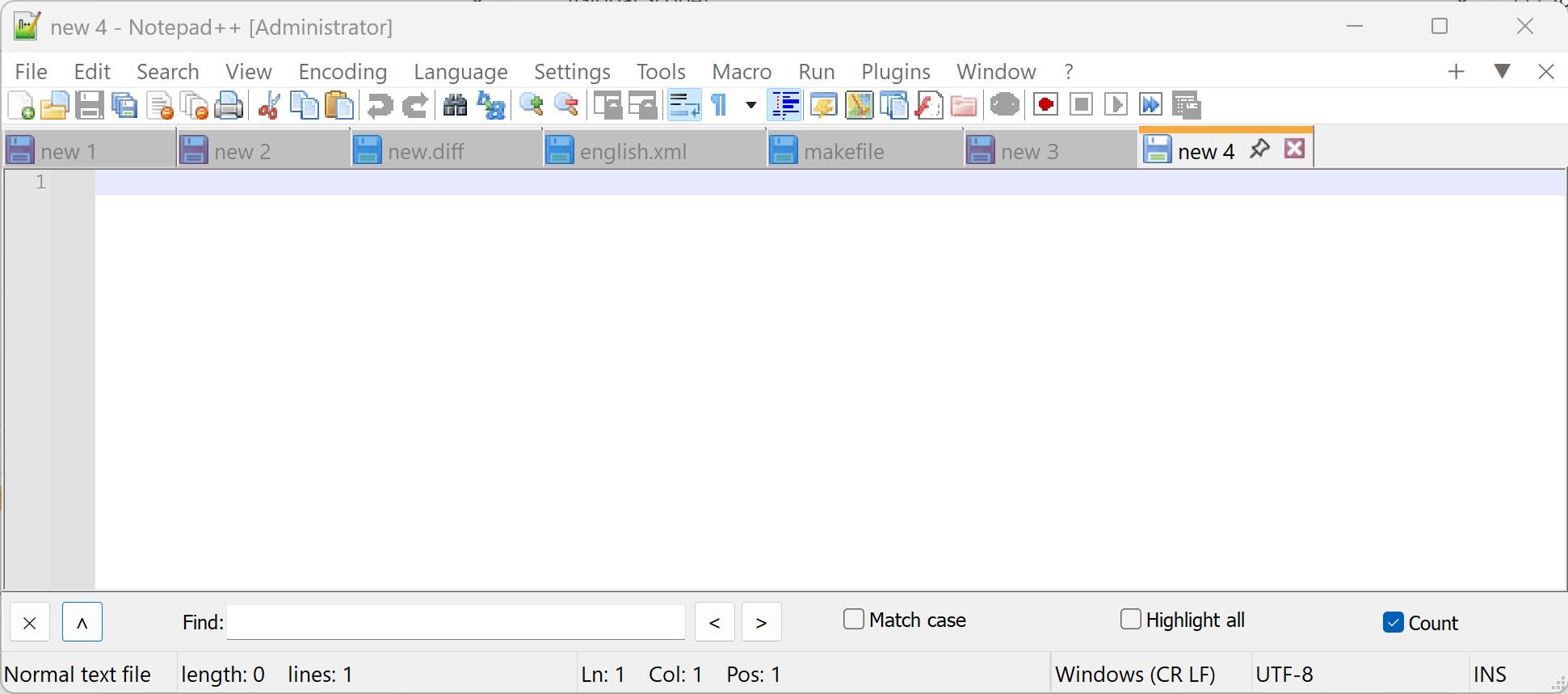
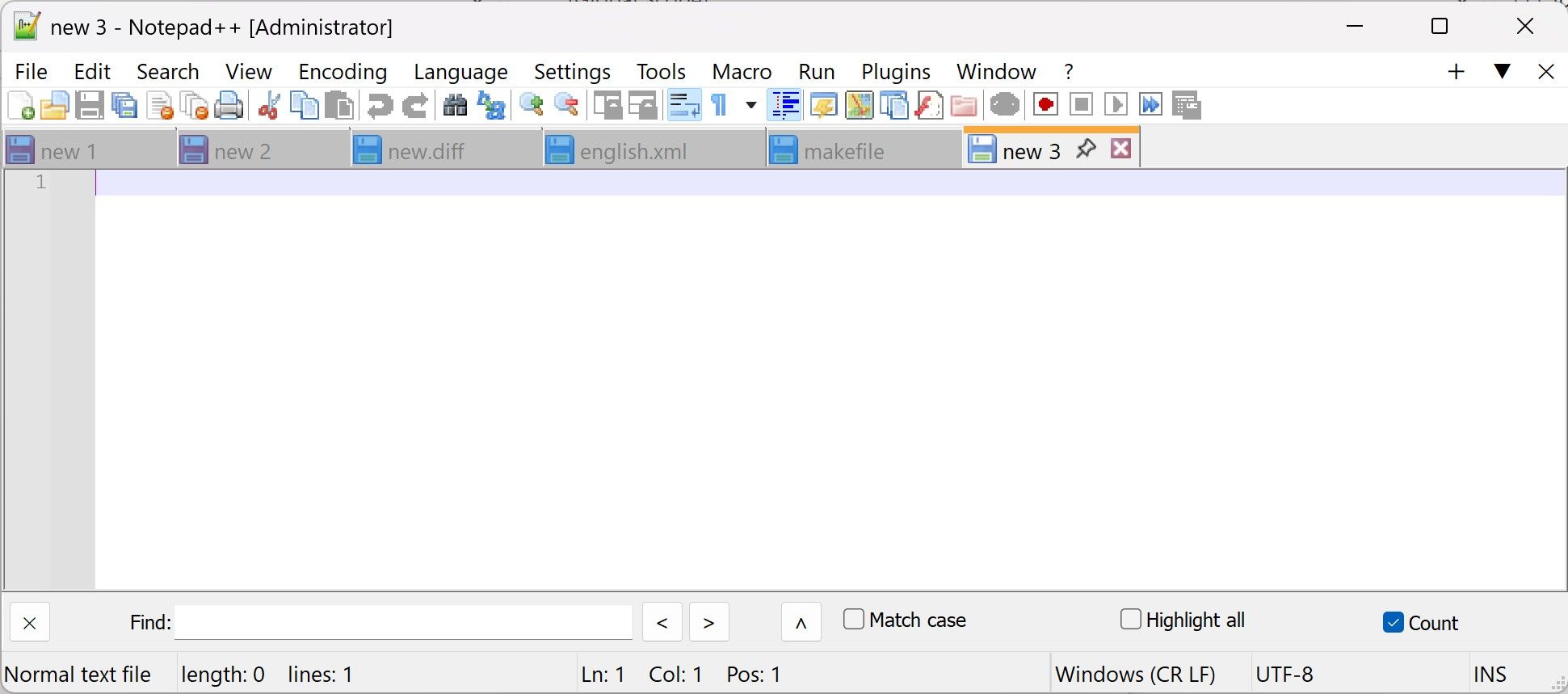
        It looks much better, but I am now asking myself, if it would be better to move the X button for close, and the up/down button to the right side of the incremental search bar. Normally the Close button is on right side of every window.

        So, close button at most right position, up/down botton at position left next to close button

        PeterJonesP 1 Reply Last reply Reply Quote 0
        • PeterJonesP Offline
          PeterJones @MarkusBodensee
          last edited by

          @MarkusBodensee said:

          close button at most right position, up/down botton at position left next to close button

          Personally, if I used that bar, that’s what I would prefer… But they would have to adjust with window width, not be at fixed positions

          donhoD 1 Reply Last reply Reply Quote 0
          • andrecool-68A Offline
            andrecool-68 @donho
            last edited by andrecool-68

            @donho said:

            The button position issue is fixed in the commit:
            https://github.com/notepad-plus-plus/notepad-plus-plus/commit/14e27a6caa5a2f2a3dfcbc8594d792d255c4991d

            Is it possible to get a link to the notepad++.exe file with the latest fixes?

            PeterJonesP 1 Reply Last reply Reply Quote 0
            • PeterJonesP Offline
              PeterJones @andrecool-68
              last edited by

              @andrecool-68 said:

              @donho said:

              The button position issue is fixed in the commit:
              https://github.com/notepad-plus-plus/notepad-plus-plus/commit/14e27a6caa5a2f2a3dfcbc8594d792d255c4991d

              Is it possible to get a link to the notepad++.exe file with the latest fixes?

              This is the CI Build for that commit. The artifacts (zipfiles of the exe) are at the bottom of that page.

              1 Reply Last reply Reply Quote 1
              • donhoD Offline
                donho @astewart77
                last edited by

                @astewart77

                Move to top still disappears.

                Please remove all plugins and test again.
                If it persists, then it could be an issue under Windows 7.

                astewart77A 1 Reply Last reply Reply Quote 0
                • astewart77A Offline
                  astewart77 @donho
                  last edited by

                  @donho said:

                  @astewart77

                  Move to top still disappears.

                  Please remove all plugins and test again.
                  If it persists, then it could be an issue under Windows 7.

                  It was a conflict with the NppMenuSearch plugin. It has a toolbar text widget that always sits at the right end of the toolbar and an option to lock the widget size. I should have noticed that the MenuSearch widget disappeared at the same time the Increment search bar disappeared. If it’s unlocked, everything works.

                  Ironically, I only started posting in this thread because NppMenuSearch couldn’t find any strings/labels for the new Increment preference.

                  1 Reply Last reply Reply Quote 1
                  • donhoD Offline
                    donho @donho
                    last edited by

                    FYI, RC2 is available:
                    https://github.com/donho/notepad-plus-plus/releases/tag/RC2

                    1 Reply Last reply Reply Quote 2
                    • andrecool-68A Offline
                      andrecool-68
                      last edited by andrecool-68

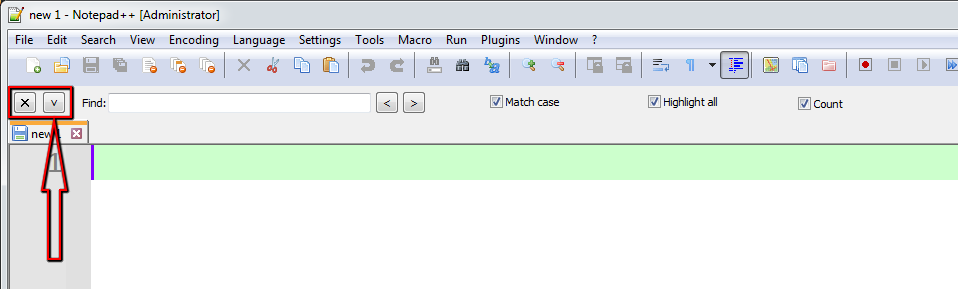
                      The new position of the up/down button is very inconvenient. (you constantly confuse it with the forward/backward search buttons)

                      The most convenient place for it is next to the button that closes this search panel. (that’s where it belongs!)
                      Снимок.PNG

                      1 Reply Last reply Reply Quote 2
                      • donhoD Offline
                        donho @PeterJones
                        last edited by donho

                        @PeterJones said:

                        close button at most right position, up/down botton at position left next to close button

                        Personally, if I used that bar, that’s what I would prefer… But they would have to adjust with window width, not be at fixed positions

                        It’s quite complex to implement such idea.
                        The best I can do is what @andrecool-68 has suggested:

                        A.

                        a196a81f-af4a-4b05-a768-b00569c8c48d-image.jpeg

                        or we can keep the current one:

                        B.

                        7b723320-34cf-4ed9-856c-5ceea8d44022-image.jpeg

                        ppl are welcome to vote.

                        CoisesC 1 Reply Last reply Reply Quote 1
                        • CoisesC Offline
                          Coises @donho
                          last edited by

                          @donho

                          D. Users will probably strongly prefer one position or the other, not want to change it frequently. Put it in the Preferences instead of on the bar.

                          S donhoD peter-fbP 3 Replies Last reply Reply Quote 3
                          • S Offline
                            schnurlos @Coises
                            last edited by

                            @Coises I think the idea of donho was to have either the A or B version implemented, not to have the possibility to switch

                            1 Reply Last reply Reply Quote 0
                            • donhoD Offline
                              donho @Coises
                              last edited by donho

                              @Coises

                              D. Users will probably strongly prefer one position or the other, not want to change it frequently. Put it in the Preferences instead of on the bar.

                              The advantage of the Up/Down arrow being on the bar itself, rather than as an option hidden in the dialog, is that users can discover/notice this new feture as soon as they use Incremental Search. Moreover, a simple arrow on the bar is easier to understand than a long explanatory sentence buried in another dialog.

                              1 Reply Last reply Reply Quote 3
                              • peter-fbP Offline
                                peter-fb @Coises
                                last edited by

                                @Coises said:

                                Put it in the Preferences instead of on the bar.

                                That would also be my suggestion. A setting that doesn’t get changed often should live in Settings… > Preferences. On the bar, it just clutters it up.

                                1 Reply Last reply Reply Quote 2
                                • andrecool-68A Offline
                                  andrecool-68
                                  last edited by

                                  @donho Is it possible to add a button (for the search bar) to clear the text field?

                                  1 Reply Last reply Reply Quote 0
                                  • donhoD donho unpinned this topic on
                                  • T Offline
                                    tm8544
                                    last edited by

                                    There is a regression in Notepad++ 8.9.9.
                                    I saw it already in 8.9.8.1, but I could not pinpoint it at that time.

                                    I can reproduce it this way:

                                    1. Open file
                                    2. Edit file, don’t save it yet
                                    3. Use Compare plugin, diff since last save (Ctrl+Alt+D)
                                    4. Close the ‘Last Save’ window
                                      -> Notepad++ is not responding

                                    if I skip phase 4, there is no problem.

                                    PeterJonesP 1 Reply Last reply Reply Quote 0
                                    • guy038G Offline
                                      guy038
                                      last edited by

                                      Hello, @tm8544 and All,

                                      Did you try with the new release link : https://community.notepad-plus-plus.org/topic/27707/notepad-release-8.9.9


                                      Personally, If I do your STR method, after closing the change.log ** Last Save tab, ( your step 4 ), the compare process is simply cancelled and Notepad++ is still responding !?

                                      Notepad++ v8.9.9   (64-bit)
                                      Build time: Nov  6 2026 - 16:19:53
                                      Scintilla/Lexilla included: 5.6.9/5.5.5
                                      Boost Regex included: 1_92
                                      pugixml included: 1.16
                                      nlohmann JSON included: 3.12.0
                                      Path: D:\899_x64\notepad++.exe
                                      Command Line: 
                                      Admin mode: OFF
                                      Local Conf mode: ON
                                      Cloud Config: OFF
                                      WinGUp: present
                                      disableNppAutoUpdate.xml: present
                                      Periodic Backup: OFF
                                      Placeholders: OFF
                                      Scintilla Rendering Mode: SC_TECHNOLOGY_DIRECTWRITE (1)
                                      Multi-instance Mode: monoInst
                                      asNotepad: OFF
                                      File Status Auto-Detection: cdEnabled4CurrentFile
                                      Dark Mode: OFF
                                      Display Info:
                                          primary monitor: 1920x1080, scaling 125%
                                          visible monitors count: 1
                                          installed Display Class adapters: 
                                              0001: Description - Intel(R) Iris(R) Xe Graphics
                                              0001: DriverVersion - 32.0.101.7088
                                      OS Name: Windows 11 Pro (64-bit)
                                      OS Version: 25H2
                                      OS Build: 26200.7462
                                      Current ANSI codepage: 1252
                                      Plugins: 
                                          MultiReplace (6.2.0.38)
                                          Search++ (0.8)
                                          ColumnsPlusPlus (1.3.3)
                                          ComparePlus (3)
                                          Compose (1.1.1)
                                          NppConverter (4.7)
                                          NppExport (0.4)
                                          mimeTools (3.2)
                                      

                                      Best Regards,

                                      guy038

                                      1 Reply Last reply Reply Quote 0
                                      • PeterJonesP Offline
                                        PeterJones @tm8544
                                        last edited by

                                        @tm8544 said:

                                        There is a regression in Notepad++ 8.9.9.
                                        I saw it already in 8.9.8.1, but I could not pinpoint it at that time.

                                        “Regression” means a bug introduced in this version that wasn’t present in the previous version. So if you saw it in the previous version, then it’s not a regression, just a bug.

                                        1. Use Compare plugin, diff since last save (Ctrl+Alt+D)

                                        This sounds a lot like this report, which the plugin author is now looking into and tracking in that plugin’s issue tracker. Plugin authors are responsible for investigating bugs/crashes that are caused when using features of their plugins, as they are the only ones who can determine whether the problem is on their end or on Notepad++'s end; bugs/crashes in a plugin should be reported directly to the plugin author.

                                        1 Reply Last reply Reply Quote 3

                                        Hello! It looks like you're interested in this conversation, but you don't have an account yet.

                                        Getting fed up of having to scroll through the same posts each visit? When you register for an account, you'll always come back to exactly where you were before, and choose to be notified of new replies (either via email, or push notification). You'll also be able to save bookmarks and upvote posts to show your appreciation to other community members.

                                        With your input, this post could be even better 💗

                                        Register Login
                                        • First post
                                          Last post
                                        The Community of users of the Notepad++ text editor.
                                        Powered by NodeBB | Contributors