Notepad++ v8.9.9 Release Candidate
-
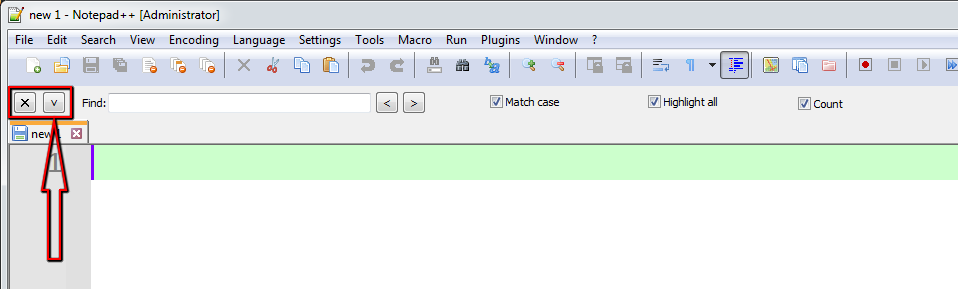
The new position of the up/down button is very inconvenient. (you constantly confuse it with the forward/backward search buttons)
The most convenient place for it is next to the button that closes this search panel. (that’s where it belongs!)
-
close button at most right position, up/down botton at position left next to close button
Personally, if I used that bar, that’s what I would prefer… But they would have to adjust with window width, not be at fixed positions
It’s quite complex to implement such idea.
The best I can do is what @andrecool-68 has suggested:A.
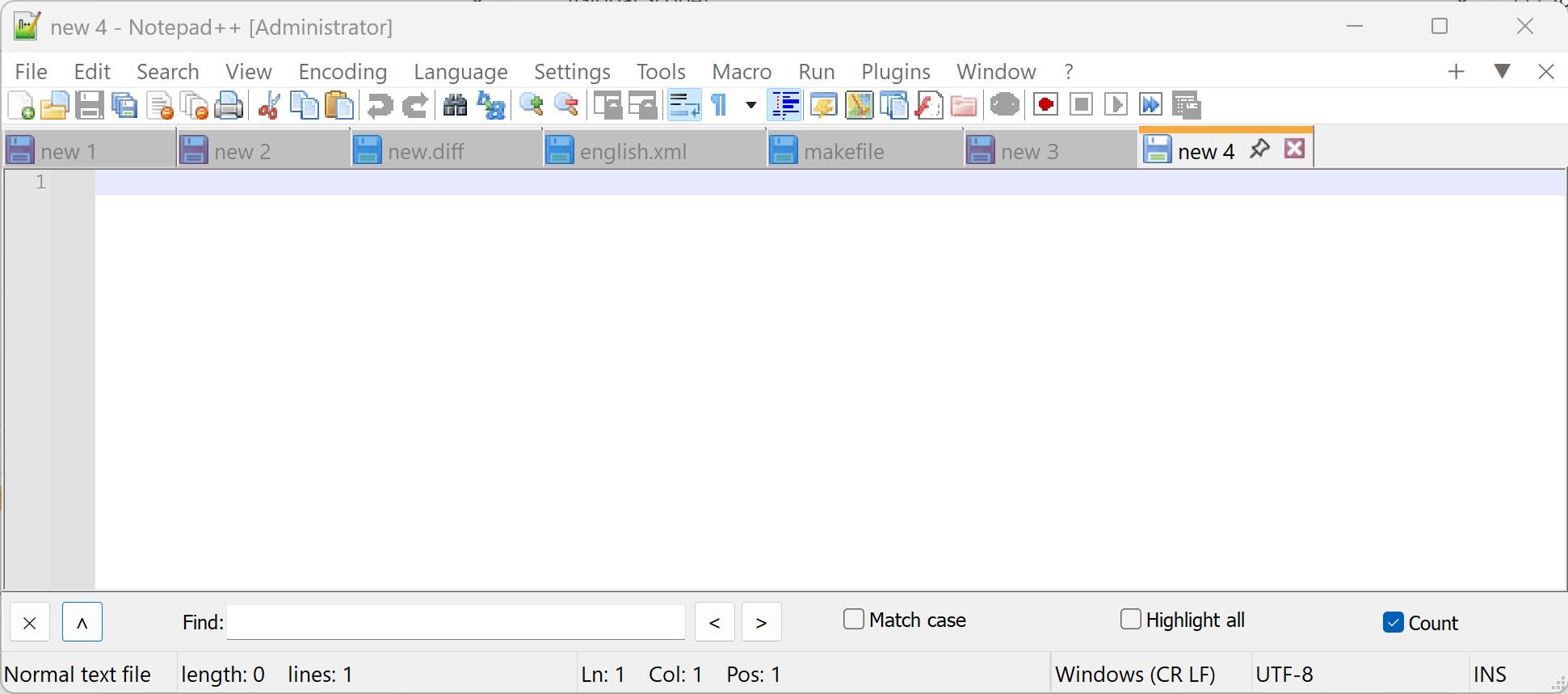
or we can keep the current one:
B.
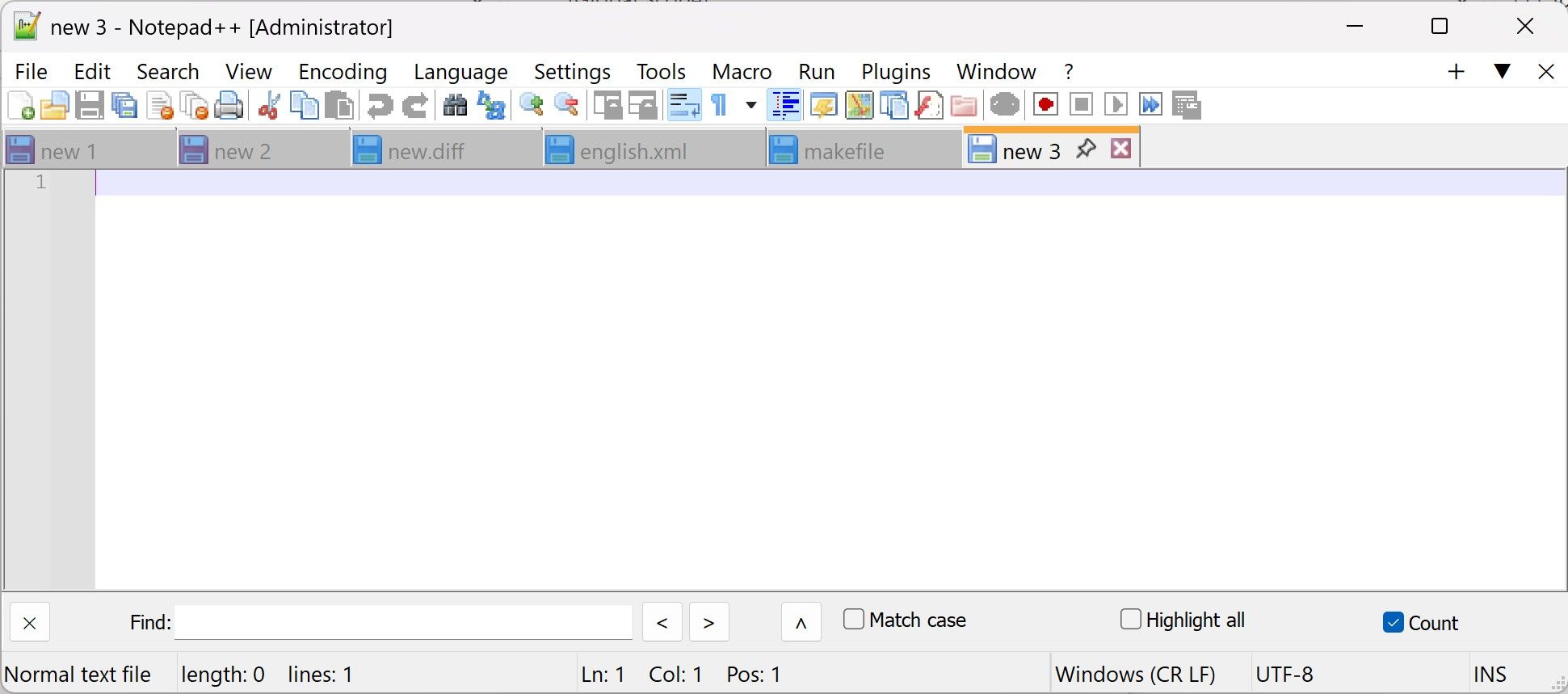
ppl are welcome to vote.
-
D. Users will probably strongly prefer one position or the other, not want to change it frequently. Put it in the Preferences instead of on the bar.
-
@Coises I think the idea of donho was to have either the A or B version implemented, not to have the possibility to switch
-
D. Users will probably strongly prefer one position or the other, not want to change it frequently. Put it in the Preferences instead of on the bar.
The advantage of the Up/Down arrow being on the bar itself, rather than as an option hidden in the dialog, is that users can discover/notice this new feture as soon as they use Incremental Search. Moreover, a simple arrow on the bar is easier to understand than a long explanatory sentence buried in another dialog.
-
-
@donho Is it possible to add a button (for the search bar) to clear the text field?
-
D donho unpinned this topic on
-
There is a regression in Notepad++ 8.9.9.
I saw it already in 8.9.8.1, but I could not pinpoint it at that time.I can reproduce it this way:
- Open file
- Edit file, don’t save it yet
- Use Compare plugin, diff since last save (Ctrl+Alt+D)
- Close the ‘Last Save’ window
-> Notepad++ is not responding
if I skip phase 4, there is no problem.
-
Hello, @tm8544 and All,
Did you try with the new release link : https://community.notepad-plus-plus.org/topic/27707/notepad-release-8.9.9
Personally, If I do your STR method, after closing the
change.log ** Last Savetab, ( your step 4 ), the compare process is simply cancelled and Notepad++ is still responding !?Notepad++ v8.9.9 (64-bit) Build time: Nov 6 2026 - 16:19:53 Scintilla/Lexilla included: 5.6.9/5.5.5 Boost Regex included: 1_92 pugixml included: 1.16 nlohmann JSON included: 3.12.0 Path: D:\899_x64\notepad++.exe Command Line: Admin mode: OFF Local Conf mode: ON Cloud Config: OFF WinGUp: present disableNppAutoUpdate.xml: present Periodic Backup: OFF Placeholders: OFF Scintilla Rendering Mode: SC_TECHNOLOGY_DIRECTWRITE (1) Multi-instance Mode: monoInst asNotepad: OFF File Status Auto-Detection: cdEnabled4CurrentFile Dark Mode: OFF Display Info: primary monitor: 1920x1080, scaling 125% visible monitors count: 1 installed Display Class adapters: 0001: Description - Intel(R) Iris(R) Xe Graphics 0001: DriverVersion - 32.0.101.7088 OS Name: Windows 11 Pro (64-bit) OS Version: 25H2 OS Build: 26200.7462 Current ANSI codepage: 1252 Plugins: MultiReplace (6.2.0.38) Search++ (0.8) ColumnsPlusPlus (1.3.3) ComparePlus (3) Compose (1.1.1) NppConverter (4.7) NppExport (0.4) mimeTools (3.2)Best Regards,
guy038
-
There is a regression in Notepad++ 8.9.9.
I saw it already in 8.9.8.1, but I could not pinpoint it at that time.“Regression” means a bug introduced in this version that wasn’t present in the previous version. So if you saw it in the previous version, then it’s not a regression, just a bug.
- Use Compare plugin, diff since last save (Ctrl+Alt+D)
This sounds a lot like this report, which the plugin author is now looking into and tracking in that plugin’s issue tracker. Plugin authors are responsible for investigating bugs/crashes that are caused when using features of their plugins, as they are the only ones who can determine whether the problem is on their end or on Notepad++'s end; bugs/crashes in a plugin should be reported directly to the plugin author.




Hello! It looks like you're interested in this conversation, but you don't have an account yet.
Getting fed up of having to scroll through the same posts each visit? When you register for an account, you'll always come back to exactly where you were before, and choose to be notified of new replies (either via email, or push notification). You'll also be able to save bookmarks and upvote posts to show your appreciation to other community members.
With your input, this post could be even better 💗
Register Login