Duplicate context menu entries
-
About 6 months ago, after a NP++ update, I started seeing TWO context menu entries for “Edit with Notepad++”:
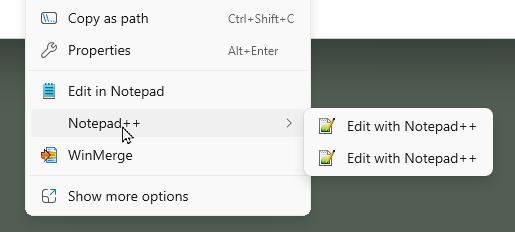
I just uninstalled and reinstalled the most recent NP++ and they’re back.
How do I get back to having a single entry in the main Explorer context menu? My OS is Win11 23H2.
[yes, I know I should probably move up to a more recent build, but that’s going to be an all-day affair given I have to image the boot disk for disaster recovery given Microsoft’s history with major updates… because having to rebuild my system from scratch is about 12-16 hours work]
Side question: I searched the registry, where Win10 stored context menu items, but can’t find the items now displayed in the Win11 primary menu… I assume they’re using a different mechanism. Where is this configuration stored?
Hello! It looks like you're interested in this conversation, but you don't have an account yet.
Getting fed up of having to scroll through the same posts each visit? When you register for an account, you'll always come back to exactly where you were before, and choose to be notified of new replies (either via email, or push notification). You'll also be able to save bookmarks and upvote posts to show your appreciation to other community members.
With your input, this post could be even better 💗
Register Login