Duplicate context menu entries
-
About 6 months ago, after a NP++ update, I started seeing TWO context menu entries for “Edit with Notepad++”:
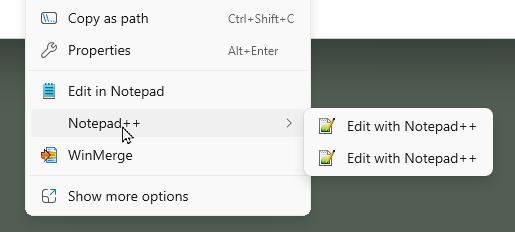
I just uninstalled and reinstalled the most recent NP++ and they’re back.
How do I get back to having a single entry in the main Explorer context menu? My OS is Win11 23H2.
[yes, I know I should probably move up to a more recent build, but that’s going to be an all-day affair given I have to image the boot disk for disaster recovery given Microsoft’s history with major updates… because having to rebuild my system from scratch is about 12-16 hours work]
Side question: I searched the registry, where Win10 stored context menu items, but can’t find the items now displayed in the Win11 primary menu… I assume they’re using a different mechanism. Where is this configuration stored?
-
I’d check whether both entries are coming from separate Notepad++ shell extensions or leftover registry entries from the previous installation. Since reinstalling didn’t fix it, comparing the registered context-menu handlers might help identify where the duplicate is being added.
-
-
@steeve-wick That would work if the entries were in the second level (Windows10-style after “Show More Options”), but top-level context menu entries don’t seem to be stored in the registry any more, and I’ve never been able to figure out where they live.
-
@PeterJones Perfect, thank you! The suggestion in issue 79 did the trick.
-
I’ve never been able to figure out where they live.
For Notepad++, they are in the NppShell.dll. Hence my pointing to the NppShell issue. The two links I provided explain that, because the
Publisherfield in the AppManifest changed, Windows hashes them different, and Windows doesn’t remove the “old” if the hashes don’t match (so one app doesn’t delete another app’s context menu entries).Explanation: Windows wanted signed DLLs to control such things, rather than any apps that can figure out how to write to the HKCU in the registry being able to manipulate what apps the user accesses through the normal right click context menu. Thus, those hooks now reside in the DLL, not in the registry, so you cannot find those hooks by searching the registry.

Hello! It looks like you're interested in this conversation, but you don't have an account yet.
Getting fed up of having to scroll through the same posts each visit? When you register for an account, you'll always come back to exactly where you were before, and choose to be notified of new replies (either via email, or push notification). You'll also be able to save bookmarks and upvote posts to show your appreciation to other community members.
With your input, this post could be even better 💗
Register Login