Why do the HTML tag plugin command IDs change with each update of Notepad++
-
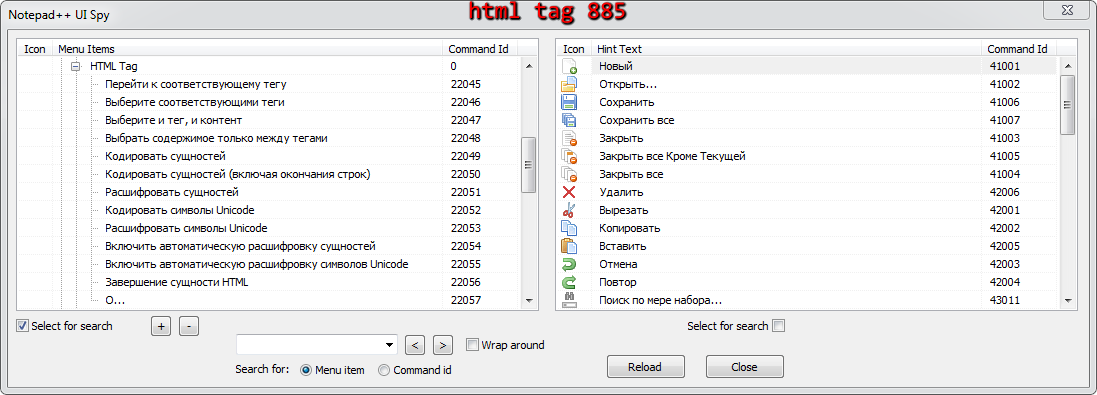
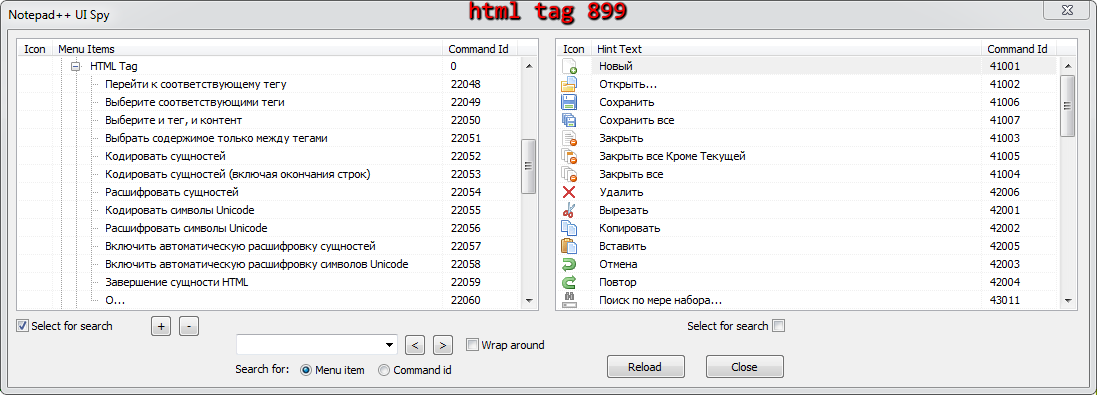
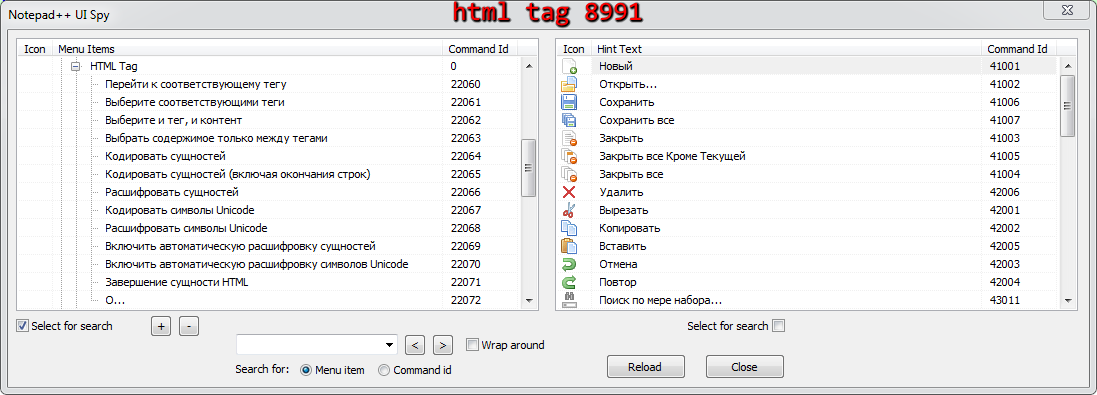
The version of the HTML tag plugin is the same, but the command IDs constantly change with each update of Notepad++.
This is clearly visible through the NppUISpy plugin.
With each update of Notepad++, I restore all the plugins I need from a backup along with the plugin settings.
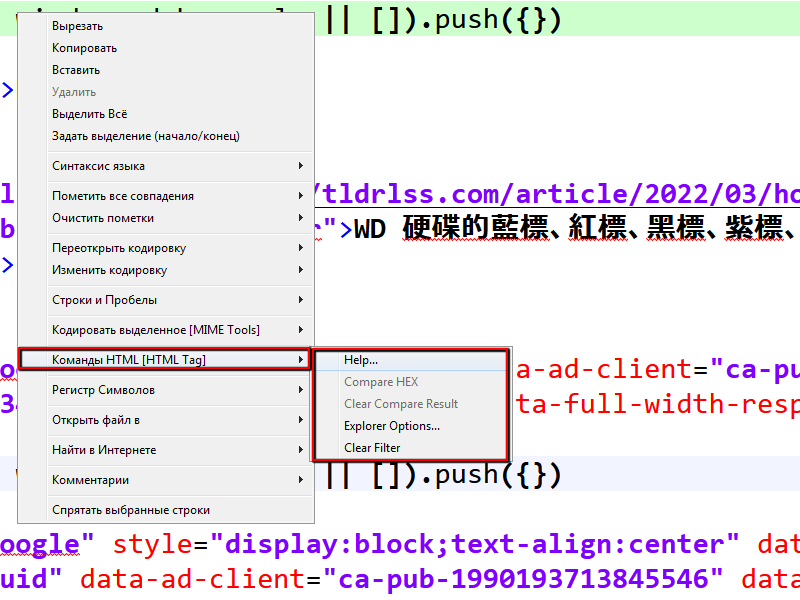
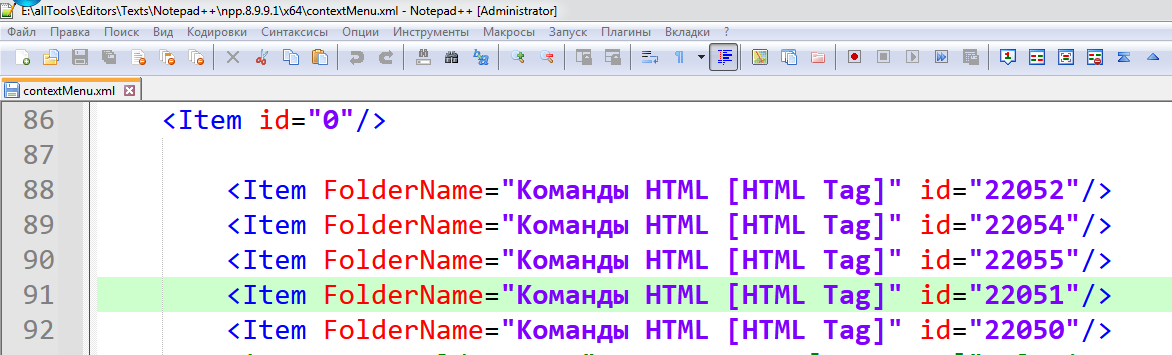
And I noticed that in my internal context menu of Notepad++, the lines related to the HTML tag plugin constantly change with each new version, and I constantly have to edit these lines.
-
The version of the HTML tag plugin is the same, but the command IDs constantly change with each update of Notepad++.
Notepad++ assigns the plugin command-ID’s dynamically every time it loads. I do not think it even guarantees that it will always assign them in the same order, even if nothing changes, but in general, I’ve found that as long as none of the plugins are changing the number of menu entries they use, then the numbers tend to stay the same.
If any of the plugins that come before HTML tags in Notepad++'s internal loading have changed the number of menu commands they have, or if Notepad++ changes the order that plugins are loaded (*) , then anything that comes after them will be renumbered appropriately.
if any of the plugins are no longer compatible, they would drop out of the list, so wouldn’t be in the numbering. If you update any of the plugins with Plugins Admin, they could change the number of menu entries, thus renumbering subsequent ones.
*: I thought it sorted alphabetically when loading, but I cannot guarantee that; if uses the default non-sorted order that Windows uses in the filesystem, then you would have little control over that. Maybe always copying the plugin subdirectories over in the same order would help, but I cannot guarantee that.
With each update of Notepad++, I restore all the plugins I need from a backup along with the plugin settings.
Plugins don’t save those numbers in their settings. Notepad++ dynamically allocates them.
And I noticed that in my internal context menu of Notepad++, the lines related to the HTML tag plugin constantly change with each new version, and I constantly have to edit these lines.
Macros can only use command-ID, so if you have macros, then because it’s a “hack” (Notepad++ macro recording ignores plugin commands, and we use a hack to add them by the current command ID manually).
But for the context menu (contextMenu.xml), you are not limited to Command ID. And, in fact, the documented way of adding plugin entries to the context menu is by name, not by command ID:
-
To add a plugin command, you need to provide the plugin’s menu item name (as it appears in the Plugins menu) as the value of the PluginEntryName attribute and the command’s menu item name (as it appears in the plugin’s sub-menu) as the value of the PluginCommandItemName attribute. (Note: Context menu entries will only work for entries immediately under the plugin name; entries deeper than that, like Plugins > Super Plugin Name > Submenu Here > I Want This Command, will not work.)
- For example:
<Item PluginEntryName="MIME Tools" PluginCommandItemName="Base64 Encode" />will add a context-menu entry that calls Plugins > MIME Tools > Base64 Encode
- For example:
So you can copy the following as the “template” to use:
<Item PluginEntryName="MIME Tools" PluginCommandItemName="Base64 Encode" />So for yours, it would need to be (replacing XYZ with the name
<Item PluginEntryName="HTML Tag" PluginCommandItemName="XYZ" />With your plugin commands being translated, I hope that your UTF-8-encodedcontextMenu.xmltext will be properly inputted, to compare against the internal stored name for the menu command. I cannot guarantee that, so if you’re having trouble, you might want to see if using an English translation works right… if you can prove that it works for English, but that with the matching text in the XML for your translation it doesn’t work, then that should probably be submitted as a bug.
update: crossed out the last paragraph. Reading the next paragraph of the manual:
Note that the menu names and menu item names (whether built-in or plugin names) that you use in the should be in English, not in a translated language. The Shortcut Mapper can help you find the English name of plugin commands; simply switch to English localization for the raw name of built-in commands; or you can look at the english.xml that shipped with your distribution.
It is possible that the “English” requirement affects plugin commands as well. I am not 100% sure.
-
-
@PeterJones
And I do not translate the command strings of this plugin into Russian in the contextMenu.xml file, I just write the plugin command ID there. This plugin has its own multilingual language INI file created by the plugin author. -
I just write the plugin command ID there.
Right. But Notepad++ expects you to use the name of the command there, as documented, so that you don’t have to worry about changing CommandID.
if you choose to do it with CommandID, you will have to deal with the fact that CommandID is not guaranteed consistent for plugin commands.
-
if you choose to do it with CommandID, you will have to deal with the fact that CommandID is not guaranteed consistent for plugin commands.
Do you mean which option:
<Item FolderName="Команды HTML [HTML Tag]" PluginEntryName="HTML Tag" PluginCommandItemName="Select tag and contents" ItemNameAs="Выделить тег вместе с содержимым"/> <Item FolderName="Команды HTML [HTML Tag]" PluginEntryName="HTML Tag" PluginCommandItemName="Select tag contents only" ItemNameAs="Выделить только содержимого тегов"/> <Item FolderName="Команды HTML [HTML Tag]" PluginEntryName="HTML Tag" PluginCommandItemName="Find matching tag" ItemNameAs="Перейти к парной скобке"/> -
if you choose to do it with CommandID, you will have to deal with the fact that CommandID is not guaranteed consistent for plugin commands.
Do you mean which option:
I tried either
<Item FolderName="AndreCool" PluginEntryName="HTML Tag" PluginCommandItemName="Find matching tag" />or
<Item FolderName="AndreCool" PluginEntryName="HTML Tag" PluginCommandItemName="Перейти к соответствующему тегу" />And the second worked for me when I had set it to Localization = Russian. (The first only works when Localization = English)
So, apparently, for plugin commands, you need the PluginCommandItemName value to match exactly what shows up in your menu, rather than always being the English. I will clarify that in the user manual.
-
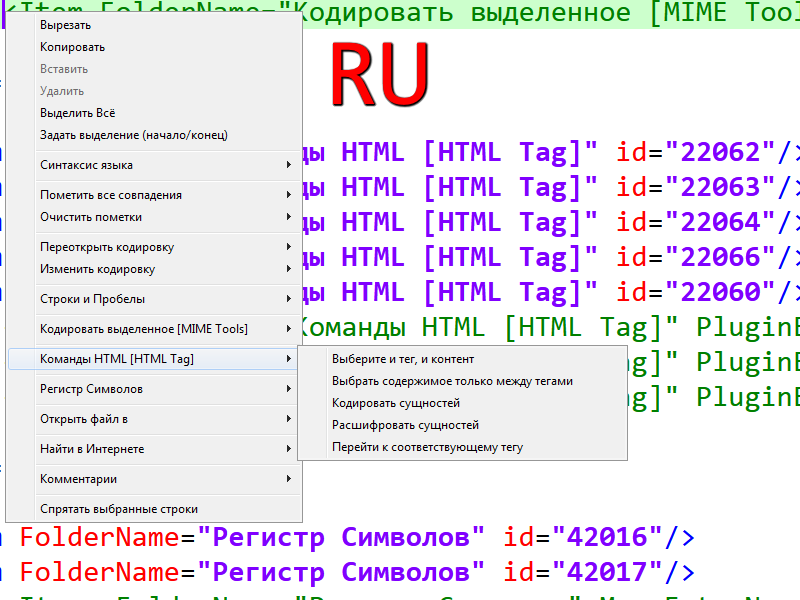
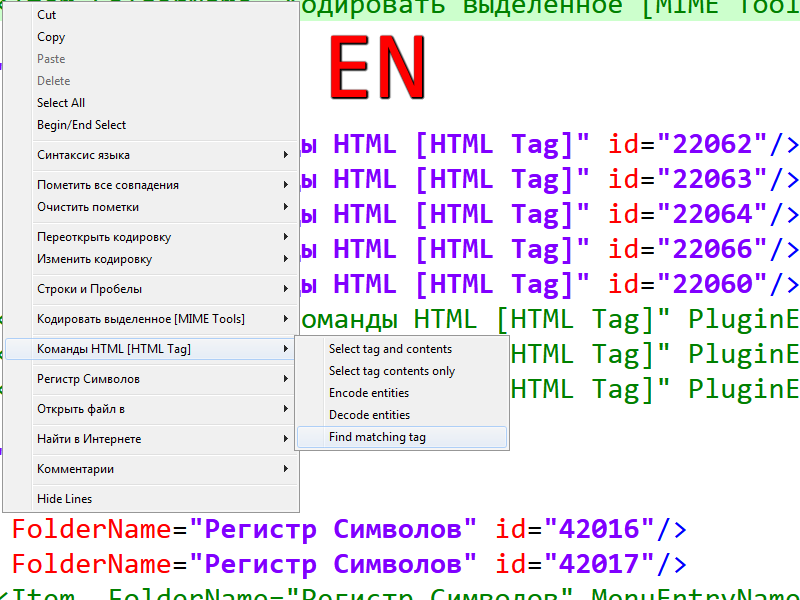
If you have the constant IDs of this plugin, everything works perfectly, and when switching the language in Notepad++, the context menu also automatically changes to the Notepad++ language.
-
If you have the constant IDs of this plugin, everything works perfectly, and when switching the language in Notepad++, the context menu also automatically changes to the Notepad++ language.
“if”. But they aren’t. And because there is no way that plugins can guarantee specific commandID for Notepad++ menus, and there’s no way for Notepad++ to assign a “constant” ID, that’s not going to happen. (Notepad++ cannot know how many plugins exist in the world, nor how many menu commands each will use; the plugin interface is public, so anyone could write their own private plugin. So Notepad++ cannot allocate fixed commandIDs. I cannot see a way around that which would work in all circumstances.)
If you have a plugin like this whose commands translate, you can put in both the English and the Localized version:
		<Item FolderName="AndreCool" PluginEntryName="HTML Tag" PluginCommandItemName="Перейти к соответствующему тегу" />
		<Item FolderName="AndreCool" PluginEntryName="HTML Tag" PluginCommandItemName="Find matching tag" />
then whichever localization is picked, that one will be in the menu
Or, if you want to stick with just having one commandID-based entry per command, then you will have to live with the fact that the commandID can change when you update a plugin, install a plugin, or possibly even when all you do is update to a new version of Notepad++


Hello! It looks like you're interested in this conversation, but you don't have an account yet.
Getting fed up of having to scroll through the same posts each visit? When you register for an account, you'll always come back to exactly where you were before, and choose to be notified of new replies (either via email, or push notification). You'll also be able to save bookmarks and upvote posts to show your appreciation to other community members.
With your input, this post could be even better 💗
Register Login