Display many Files in Filelist of Notepad++, but not open
-
Hello.
I would like to display many files (*.PRG) in the Notepad++ file list, but not open them immediately. I only want the file to open when I double-click on it. Is this possible? Can anyone help me?
Best regards, Alfred -
I assume you mean you have the File > Open dialog window active, and you want to filter to only see
*.prg. You do it the same way you do with any Open dialog in Windows, type in the filter.For example, if your directory starts with 3
*.txtand 3*.prg:
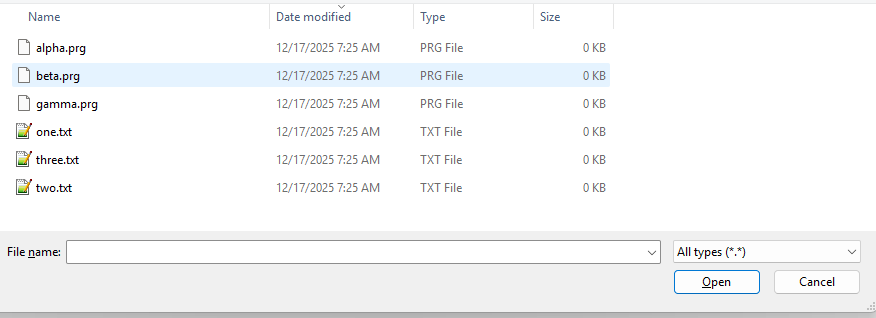
Then you can show only the
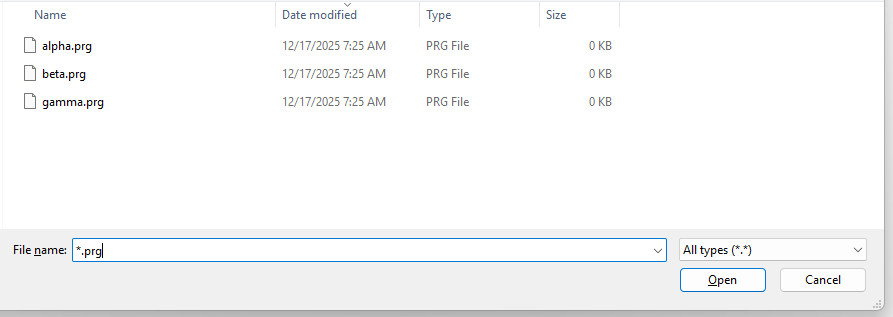
*.prgby typing*.prgin the File Name box, and then hitting ENTER in the box to get it to apply the filter:
Alternately, if one of the built-in languages has
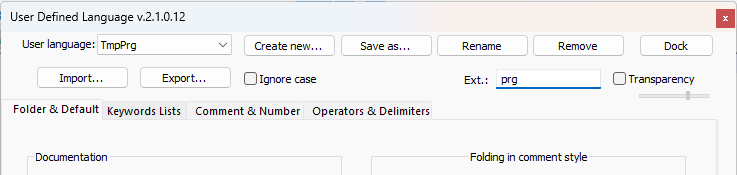
prgin its default extensions (or you set the user ext for that language to includeprg), then the filter pulldown on the right will have it. Or, if it doesn’t match any of the builtin languages, you can define a User Defined Language (UDL) that uses that extension. For example, I created a dummy UDL that I set its name toTmpPrgand gave it theprgextension, as shown here:
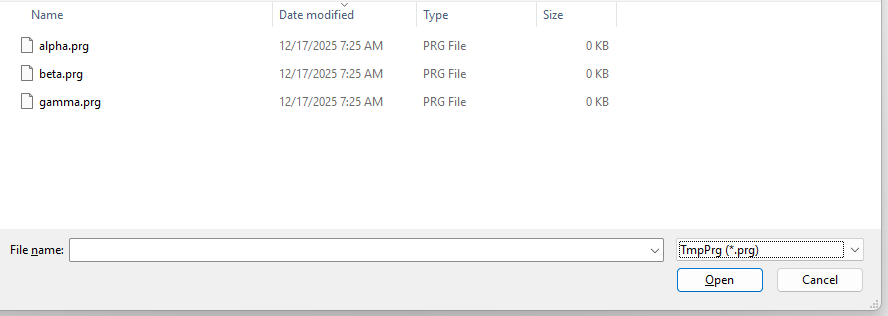
Then if I do File > Open, I can pull down the filter dropdown:
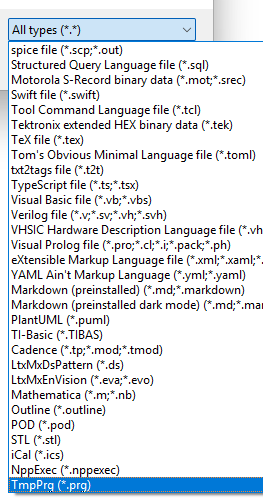
After I select theTmpProg (*.prg)from that list, then Windows automatically applies that filter for me:
-
@PeterJones
No, I mean that I start Notepad++ with the parameter *.PRG. All files, approx. 300, are then listed on the left in the Notepad++ file window and opened immediately. I don’t want the files to open automatically after starting Notepad++, but only the file that I select later by double-clicking. I don’t always need to change all source files, only certain files. -
@Alfred-Janssen said in Display many Files in Filelist of Notepad++, but not open:
No, I mean that I start Notepad++ with the parameter *.PRG. All files, approx. 300, are then listed on the left in the Notepad++ file window and opened immediately.
That’s what that syntax means, yes.
but only the file that I select later by double-clicking. I don’t always need to change all source files, only certain files.
Sounds like you want something more like the Folder as Workspace feature, which allows you to have a panel in Notepad++ which lists all the files in a given folder, and then you double-click the file from the Folder as Workspace panel to open that particular file:
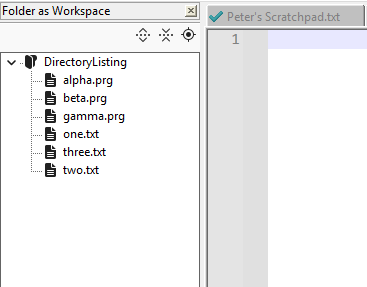
View > Folder as Workspace to see the panel, then right click in the empty and Add to be able to pick the directory you want to see the listing of. (Or use the
-openFoldersAsWorkspacecommand-line option if Notepad++ isn’t already running)But, as you can see from the screenshot, the Folder as Workspace doesn’t allow you to filter. I don’t know whether that’s a problem for your directory or not.
There is also the Project Panels feature, which is similar, but you pick exactly what files you want in a project; but project panels do not show a “live” version of the directory structure (they are meant to be able to organize files regardless of where they are on your disk, rather than being a 1:1 correspondance to your drive), so if you created a new PRG file in the OS, the Project Panel wouldn’t automatically add it.
-
@PeterJones said in Display many Files in Filelist of Notepad++, but not open:
View > Folder as Workspace to see the panel, then right click in the empty and Add to be able to pick the directory you want to see the listing of. (Or use the -openFoldersAsWorkspace command-line option if Notepad++ isn’t already running)
But, as you can see from the screenshot, the Folder as Workspace doesn’t allow you to filter. I don’t know whether that’s a problem for your directory or not.
There is also the Project Panels feature, which is similar, but you pick exactly what files you want in a project; but project panels do not show a “live” version of the directory structure (they are meant to be able to organize files regardless of where they are on your disk, rather than being a 1:1 correspondance to your drive), so if you created a new PRG file in the OS, the Project Panel wouldn’t automatically add it.
Folder as Workspace is not good for me, it is to many Files are deplayed. I want only *.PRG-Files.
Here is the start from Notepad++: “C:\Program Files\Notepad++\notepad++.exe” *.prg
-
@Alfred-Janssen said in Display many Files in Filelist of Notepad++, but not open:
“C:\Program Files\Notepad++\notepad++.exe” *.prg
That syntax tells Notepad++ to open all the *.prg files. If you don’t want Notepad++ to open all those files, then don’t use that syntax.
Folder as Workspace is not good for me, it is to many Files are deplayed.
If Folder as Workspace doesn’t work for you, then the exact feature you want does not exist natively in Notepad++
If you don’t change what
*.prgfiles exist (or don’t change them often), then you could show just those in a Project Panel – but again, it won’t have live update, so I am guessing you won’t like it, either.Alternatively, just use the File > Open when you want to open a specific file: with the filtering that I showed (either typing in
*.prgor using a UDL to have a pulldown filter available), it will allow you to just pick the files you want.I don’t know the features of the Explorer Plugin (because I don’t use it), but it might be able to filter; you might want to check out the documentation for that plugin.
-
@PeterJones
Too bad, but okay.
Thank you very much for your help.But I wonder why all files have to be opened after starting Notepad++. It takes a very long time. All i want is to see a list of *.PRG files so you can select the file you want to change from this list and then change it.
-
But I wonder why all files have to be opened after starting Notepad++.
Because that’s what that syntax says. The same thing happens with Windows built-in notepad.exe text editor: it opens the files you pass on the command-line. Changing the meaning of such syntax would annoy 99.99% of the Notepad++ user base. If you don’t want a program to open a list of files, don’t tell that program to open a list of files.
All i want is to see a list of *.PRG files so you can select the file you want to change from this list and then change it.
The ability to filter files in the Folder as Workspace panel has been requested before, such as issue #16167, but not yet implemented.
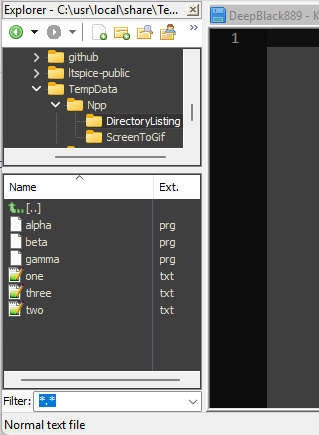
BTW: I just downloaded the Explorer plugin in a portable copy. It does have a filter feature.
- Plugins > Plugins Admin, checkmark
Explorerand click Install - When N++ restarts, go to Plugins > Explorer > Explorer… to get the Explorer panel showing
- Navigate to your directory, such as:
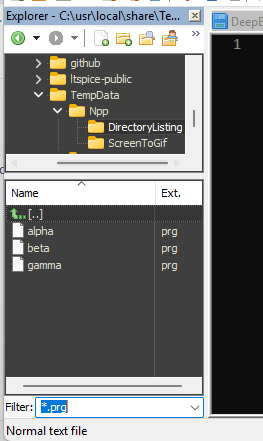
- In the Filter box, enter
*.prg, and it will filter just for the *.prg files:
- Plugins > Plugins Admin, checkmark
-
@PeterJones
Thank you for this idea, i try this plugin and test it.Greetings, Alfred
-
@PeterJones
Looks good, thanks.
Can i a set the default Codepage for all Files and not only for new Files? -
You can search this forum for any post with “codepage” in it. I did just now and 2 recent posts, by @PeterJones are:
here
and
hereTerry
-
@Terry-R
Thanks for letting me know.


Hello! It looks like you're interested in this conversation, but you don't have an account yet.
Getting fed up of having to scroll through the same posts each visit? When you register for an account, you'll always come back to exactly where you were before, and choose to be notified of new replies (either via email, or push notification). You'll also be able to save bookmarks and upvote posts to show your appreciation to other community members.
With your input, this post could be even better 💗
Register Login