Search++: A work in progress
-
Hello, @coises an All,
Regarding the two behaviors of the Replace command :
-
First, I suppose that a special mark/sign/icon in the
Search++title zone, to clearly identify the current behavior of theReplaceaction, would be welcome ! -
Then, the user will choose its desired behavior, simply using the
Ctrl + Jshortcut. -
And forget my idea of a new setting ! In this specific case, the user will begin using the alternate
Replacebehavior first then, after some tries, he would toogle to the usualReplacebehavior !
Now, do we need the additional sub-menu in order to occasionally use the opposite
Replacebehavior, without changing the default settings, as you expressed ?To my mind, after using this opposite behavior ( so, of course, changing the default behavior ), the user would just have to hit the
Ctrl + Jshortcut again to restore the previous default !In addition, I probably forget some edge cases and, anyway, it’s your plugin, not my baby !
BR
guy038
-
-
@guy038 said in Search++: A work in progress:
Regarding the two behaviors of the Replace command :
- First, I suppose that a special mark/sign/icon in the
Search++title zone, to clearly identify the current behavior of theReplaceaction, would be welcome !
It is indicated by the icon on the Replace button. Is there some reason that isn’t enough?
Now, do we need the additional sub-menu in order to occasionally use the opposite
Replacebehavior, without changing the default settings, as you expressed ?I agree that the “opposite jump behavior” sub-menu isn’t strictly necessary, but I don’t think it does any harm, either. To my mind, the commands on that menu are still commands that “belong to” the Replace button. If anything, it’s the Jump to next match after Replace option on the Tools menu that strikes me as logically redundant; but I wanted something to which I could assign that Ctrl+J shortcut for easy switching.
If user experience indicates that the sub-menu creates more confusion than convenience, I’ll remove it.
- First, I suppose that a special mark/sign/icon in the
-
Hello, @coises,
When I said :
- First, I suppose that a special mark/sign/icon in the
Search++title zone, to clearly identify the current behavior of theReplaceaction, would be welcome !
You answered me :
It is indicated by the icon on the Replace button . Is there some reason that isn’t enough?
 🡪   replace then jump to a new match forward
 🡨   replace then jump to a new match backward
 🡪❚  replace and highlight replacement; next click finds a new match forward
 ❚🡨  replace and highlight replacement; next click finds a new match backward
You’re certainly younger than me and/or have very good eyes ! I did notice that symbol at right of the
Replacebutton but, it seems a bit tiny !Best Regards,
guy038
P.S. :
Perhaps it would be a good idea to specify, in the manual, that :
-
All sections concerning
regular expressionsandformulaswork correctly when theregexbutton is selected ! -
When the
ICUbutton is selected, you could also point out that the important features, below, are NOT supported :-
The
\Kconstruction -
All the
Backtracking Controlverbs, like(*SKIP)or(*F) -
All the symbolic names, except for
[[:ascii.]] -
The invalid
UTF-8characters, like[[.x80.]]or[[.xff.]] -
The
\land\usyntaxes as shorthand of[[:lowercase letter:]]and[[:uppercase letter:]]( which are the[[:upper:]]and[[:lower:]]equivalents when theRegexbutton is selected ! )
-
- First, I suppose that a special mark/sign/icon in the
-
@guy038 said in Search++: A work in progress:
When I said :
- First, I suppose that a special mark/sign/icon in the
Search++title zone, to clearly identify the current behavior of theReplaceaction, would be welcome !
You answered me :
It is indicated by the icon on the Replace button . Is there some reason that isn’t enough?
 🡪   replace then jump to a new match forward
 🡨   replace then jump to a new match backward
 🡪❚  replace and highlight replacement; next click finds a new match forward
 ❚🡨  replace and highlight replacement; next click finds a new match backward
You’re certainly younger than me and/or have very good eyes ! I did notice that symbol at right of the
Replacebutton but, it seems a bit tiny !Thank you for the observation. I consider those symbols important in general (not just for this specific case) because they remind you if you’ve click-selected one of the alternatives from the drop-down menus. Before Search++ can be considered ready for a first “stable” release, I have to make sure they are clearly legible. (I used symbols instead of words because the buttons would have to be much bigger to show the full command names as used in the drop-down menus, and that in turn would make the minimum useful size of the dialog much bigger.)
I’m 68 — I don’t know if that’s younger than you. It’s surely not that my eyes are that good. One of the main things I wanted to accomplish in Search++ was using Scintilla controls for the find and replace text, partly because I’m so tired of struggling to read what I’ve typed into those boxes in Notepad++ and Columns++ searches. (The other main reason was to avoid the complications that arise with line endings and “invisible” characters in the standard Windows controls.)
So I think it’s either that I can see the difference in the two symbols because I know what I’m looking for — after all, I don’t have any trouble with the buttons and check boxes in standard search dialogs, and their font is the same as the one in the find and replace boxes — or they aren’t displaying the same on all systems. (Or both.)
For development purposes, to keep things simple, I’ve used Unicode characters for the symbols on the buttons. That has somewhat limited my choice of symbols, as well as given me no control over the size and weight (aside from finding a different symbol). It could also be the case that they display differently on different systems. Which all means that using Unicode symbol characters is a bad way to do this. At some point I will need to replace them using a different method that will be more complex, but will give me more control.
Are you using a high-dpi monitor, by any chance? At present I do not have one available for testing. I have read various information from Microsoft about it, but information without actual practice tends to turn into gibberish… at this point I don’t think I can adequately predict how this will look on high dpi.
Perhaps it would be a good idea to specify, in the manual, that :
-
All sections concerning
regular expressionsandformulaswork correctly when theregexbutton is selected ! -
When the
ICUbutton is selected, you could also point out that the important features, below, are NOT supported :-
The
\Kconstruction -
All the
Backtracking Controlverbs, like(*SKIP)or(*F) -
All the symbolic names, except for
[[:ascii.]] -
The invalid
UTF-8characters, like[[.x80.]]or[[.xff.]]
-
Indeed, my documentation says very little about the ICU search at present. At some point before a first “stable” release I will either document the ICU search more thoroughly or “hide” it so users won’t stumble on it and be confused by it.
- The
\land\usyntaxes as shorthand of[[:lowercase letter:]]and[[:uppercase letter:]]( which are the[[:upper:]]and[[:lower:]]equivalents when theRegexbutton is selected ! )
A minor note: this is a point in which Search++ Regex differs from Columns++ as a result of changes I made to use ICU as the source of information for Unicode properties instead of the mechanism I cobbled together in Columns++.
In Columns++, \l and [[:lower:]] are equivalent to [[:lowercase letter:]] (or [[:Ll:]], or \p{Ll}) — 2,283 matches in your Total_Chars.txt file.
In Search++ Regex, \l and [[:lower:]] are equivalent to (?-i)[[:lower:]] in ICU — 2,595 matches in Total_Chars.txt.
You can still use [[:lowercase letter:]] (or [[:Ll:]], or \p{Ll}) in Search++ Regex to match the same 2,283 characters as (?-i)[[:lowercase letter:]] in ICU.
Unlike ICU, both Columns++ and Search++ Regex ignore case insensitivity when matching named character classes (including the \l and \u shorthands).
- First, I suppose that a special mark/sign/icon in the
-
Hi, @coises,
Well, I’m 74. Now, with my glasses I have nearly
20/20vision in my left eye but only3/10in my right eye, due to a vascular problem in the retina that I had about10years ago :-((No, I don’t have an high-dpi monitor and here is a snapshot of the
Replacebutton, in exact size :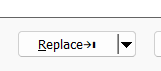
Of course, if I look at the button, I’m able to notice the mark
→❙, after the word Replace, but I may miss it sometimes !
Thank you, to point out the specificities and differences about the character classes regarding
Columns ++andSearch ++,So, here is a summary on this topic :
•==============================•=============•================•=========================================================================•
|               Regex          |  Columns++  | Search++ Regex |                              Search++ ICU                               |
•==============================•=============•================•==============•==========================================================•
|  (?-i)\l                     |    2,283    |      2,595     |         1    |  Letter l                                                |
|  (?-i)[[:lower:]]            |    2,283    |      2,595     |     2,595    |  = (?-i)\p{Ll} + (?-i)\p{Other Lowercase} = 2,283 + 312  |
|                              |             |                |              |                                                          |
|  (?-i)\p{Ll}                 |    2,283    |      2,283     |     2,283    |                                                          |
|  (?-i)[[:lowercase letter:]] |    2,283    |      2,283     |     2,283    |                                                          |
|  (?-i)[[:Ll:]]               |    2,283    |      2,283     |     2,283    |                                                          |
•------------------------------•-------------•----------------•--------------•----------------------------------------------------------•
|  (?-i)\u                     |    1,886    |      2,006     |    Invalid   |  ???                                                     |
|  (?-i)[[:upper:]]            |    1,886    |      2,006     |     2,006    |  = (?-i)\p{Lu} + (?-i)\p{Other Uppercase} = 1,886 + 120  |
|                              |             |                |              |                                                          |
|  (?-i)\p{Lu}                 |    1,886    |      1,886     |     1,886    |                                                          |
|  (?-i)[[:Uppercase letter:]] |    1,886    |      1,886     |     1,886    |                                                          |
|  (?-i)[[:Lu:]]               |    1,886    |      1,886     |     1,886    |                                                          |
•==============================•=============•================•==============•==========================================================•
|  (?i)\l                      |    2,283    |      2,595     |         2    |  Letters L and l                                         |
|  (?i)[[:lower:]]             |    2,283    |      2,595     |     4,082    |                                                          |
|                              |             |                |              |                                                          |
|  (?i)\p{Ll}                  |    2,283    |      2,283     |     3,729    |                                                          |
|  (?i)[[:lowercase letter:]]  |    2,283    |      2,283     |     3,729    |                                                          |
|  (?i)[[:Ll:]]                |    2,283    |      2,283     |     3,729    |                                                          |
•------------------------------•-------------•----------------•--------------•----------------------------------------------------------•
|  (?i)\u                      |    1,886    |      2,006     |    Invalid   |  ???                                                     |
|  (?i)[[:upper:]]             |    1,886    |      2,006     |     3,484    |                                                          |
|                              |             |                |              |                                                          |
|  (?i)\p{Lu}                  |    1,886    |      1,886     |     3,322    |                                                          |
|  (?i)[[:Uppercase letter:]]  |    1,886    |      1,886     |     3,322    |                                                          |
|  (?i)[[:Lu:]]                |    1,886    |      1,886     |     3,322    |                                                          |
•==============================•=============•================•==============•==========================================================•
Note that all the properties, below, are used internally by the Unicode Cconsortium for generating other properties and are not intended to be used stand-alone. These properties only contribute to real properties so there’s no direct support for these properties in
ICUand they all return theInvalid regular expressionmessage !\p{Jamo_Short_Name} \p{JSN} \p{Other Alphabetic} \p{OAlpha} \p{Other Default Ignorable Code Point} \p{ODI} \p{Other Grapheme Extend} \p{OGr Ext} \p{Other ID Continue} \p{OIDC} \p{Other ID Start} \p{OIDS} \p{Other Lowercase} \p{OLower} \p{Other Math} \p{OMath} \p{Other Uppercase} \p{OUpper}You can verify the number of characters, in these categories, from the files https://www.unicode.org/Public/UCD/latest/ucd/PropList.txt and https://www.unicode.org/Public/UCD/latest/ucd/Jamo.txt
Best regards
guy038
-
@guy038 said in Search++: A work in progress:
No, I don’t have an high-dpi monitor and here is a snapshot of the
Replacebutton, in exact size :The proportion is a bit different on my system:

so it seems the display does differ from system to system. I will find a way to make those icons more recognizable and obvious… I just don’t know when.
-
@Coises
It works great for me in this version.I especially like the Remove Marks option and how well it works together with the bookmarks. That combination feels very natural in the workflow now.
For the moment I would not suggest any changes, it already feels quite solid for how I use it.
Thanks for the good work you did for my requests! -
C Coises referenced this topic on
-
Hello, @coises and All,
I almost finished to study all the
ICUsyntax mainly focused on Unicode properties and, so far, all the results seem coherent ;-))
However, I noticed something strange about the property
Numeric_ValueTo this purpose, refer to https://www.unicode.org/Public/UCD/latest/ucd/extracted/DerivedNumericValues.txt
For any number which has a finite number of decimal places, like
0.1875or0.4, located after the equal sign, in the\p{Numeric_Value=....}syntax, the returned result is always correct. For example,\p{Numeric_Value=0.25}or\p{nv=0.25}returns14matches, as you may verify in theUnicodefileHowever, for any number which has an infinite number of decimal places, like
0.333333333333or0.142857142857, located after the equal sign, in the\p{Numeric_Value=....}syntax, the returned result is always0instead of an integer> 0In addition, the special value
\p{Numeric_Value=NaN}should return323,567, against myTotal_chars.txtfile, instead of the value0!
Is there any chance that you truncated the decimal part in
Search ++or something like that ?Best Regards,
guy038
-
@guy038 said in Search++: A work in progress:
Is there any chance that you truncated the decimal part in Search ++ or something like that ?
No. I did not mess with the ICU search at all; the string entered in the Find box is exactly what ICU’s regular expression engine gets.
I see that \p{nv=0.3333333333333333} (or any greater number of 3s) returns six matches. Likewise, \p{nv=0.66666666666666667} returns seven matches, but fewer 6s returns none.
Since the ICU4C function u_getNumericValue(UChar32 c) returns a double, I would guess that matching is dependent on the precise quirks of double-precision floating point format.
In addition, the special value \p{Numeric_Value=NaN} should return 323,567, against my Total_chars.txt file, instead of the value 0 !
There might not be anything you can enter that will be translated as Not-a-Number. I note that \p{Numeric_Type=None} does return 323,567 matches.
-
Hello, @coises and All,
Ah… OK. Thank you very much for your insight ! So, it seems that :
-
When all digits, after the decimal dot, are identical, you need to put, at least,
16digits -
When digits, after the decimal dot, may be different, you need to put, at least,
17digits
Thus, this list of all these rational numbers :
    1/12     \p{Numeric_Value=0.08333333333333333}    or    \p{nv=0.08333333333333333}    =     1
    1/9      \p{Numeric_Value=0.1111111111111111}     or    \p{nv=0.1111111111111111}     =     1
    1/7      \p{Numeric_Value=0.14285714285714285}    or    \p{nv=0.14285714285714285}    =     1
    1/6      \p{Numeric_Value=0.16666666666666666}    or    \p{nv=0.16666666666666666}    =     4
    1/3      \p{Numeric_Value=0.3333333333333333}     or    \p{nv=0.3333333333333333}     =     6
    5/12     \p{Numeric_Value=0.41666666666666666}    or    \p{nv=0.41666666666666666}    =     1
    7/12     \p{Numeric_Value=0.58333333333333333}    or    \p{nv=0.58333333333333333}    =     1
    2/3      \p{Numeric_Value=0.6666666666666666}     or    \p{nv=0.6666666666666666}     =     7
    5/6      \p{Numeric_Value=0.83333333333333333}    or    \p{nv=0.83333333333333333}    =     3
    11/12    \p{Numeric_Value=0.91666666666666666}    or    \p{nv=0.91666666666666666}    =     1
Now, I didn’t even notice that the
\p{Numeric_Type=None}does give that expected number, which added to all the other values, returns the total amount of characters of theTotal_Chars.txtfile which is325 590!BR
guy038
-
-
Search++ version 0.5.4 is available:
- Fix bookmarks and Show command not working with ICU search engine.
- Fix unwanted control character inserted when focus is in the Find or Replace box and a keyboard shortcut is used to activate a Tools menu command that opens a dialog.
- Use a custom font for button symbols. (Those are the symbols that change when you shift+click one of the drop-down menus to change the button click command, to remind you at a glance what the current command extent and scope are.) Hopefully these are easier to read on different systems. Feedback is encouraged if the button symbols are hard to read or do not look right. This is a first attempt. Changes will probably follow in subsequent releases.
This should fix bookmarks (and also the Show command) not working with ICU, and the unexpected insertion of control characters when using Ctrl+Shift+E and Ctrl+Shift+Y.
The big change here (what took me so long) is using a custom font for the symbols on the buttons. How to make that work was… not obvious. Let me know if they are easier to read—and if they are enough easier to read. There is a tough space constraint on those buttons, but I really want to avoid making them any larger if at all possible. This was my first time trying to make a font of any sort. I’m sure the designs of those symbols can be refined a bit (or a lot).
-
Hello, @coises, @Lachlanmax and All,
Waoou ! This new
0.54version ofSearch++is almost perfect ! I do hope that @Lachlanmax will have the same feeling than me, regarding theDark Modedisplaying, that I don’t use personally !-
The
BookmarksandShowcommands, inICUmode, work correctly. -
The possible insertion of control chars, within the
FindandReplacehas gone away ! -
The symbols, written on the different buttons, are much more intuitive and easily allow us to control what we’re doing. I particularly like the
Open Documentsscope andDocuments in this viewscope symbols ! -
As implemented in the previous version, when focus is on
Search++, aCtrl + Jaction toggles fromJump to next matchtoDo not jump to next match. But now, it’s really more obvious to get the difference between the two symbols when looking at right of theReplacebutton !
One remark :
- For the
Selectionscope, the symbol does not really look like a true letter S, unlike theMarked Textscope, which clearly displays the symbol M !
Refer the snapshot, below, with the Whole document scope on left of
Findbutton, the Selection symbol on left of theCountbutton and the Marked Text symbol on left of theFind allbutton :
The Selection scope seems less easy to identify , at first sight, isn’t it ?
May be, could you choose, for example, the
1F142Unicode character which is the SQUARED LATIN CAPITAL LETTER S :🅂and, in the same way, the1F13Ccharacter which is the he SQUARED LATIN CAPITAL LETTER M :🄼?To this purpose, refer to https://www.unicode.org/charts/PDF/U1F100.pdf
Now, a very simple bug to fix :
When the
ICUis selected, if you try to do a simple Replace operation,Search++displays the expected messageCommand not implementedand, of course, no replacement occurs.Oddly, if you click on the
Replace Allbutton, the plugin displays the messageReplaced xx matches in ...wherexxrepresents the number of matches detected in current document ! But, luckily, no global replacement is performed, as well. I suppose that the identical messageCommand not implementedshould be triggered, isn’t it ?BTW, if the replacement process was allowed, in
ICUmode, it seems that it would allow more than9back-references but would not accept anyconditionalreplacement !I also noted that the
recursionfeature is not allowed with theICUregex engine !Best Regards
guy038
P.S. :
-
I tried to double-click on the font file
Search++-Private-Symbols.otfand I was able to recognize all the symbols used by your plugin ! -
In this version, in addition to the
Search++-Private-Symbols.otffile, you also added aSearch++.pdbfile, which is quite large, indeed ! What is it used for ?
-
-
@guy038 said in Search++: A work in progress:
-
The symbols, written on the different buttons, are much more intuitive and easily allow us to control what we’re doing. I particularly like the
Open Documentsscope andDocuments in this viewscope symbols ! -
As implemented in the previous version, when focus is on
Search++, aCtrl + Jaction toggles fromJump to next matchtoDo not jump to next match. But now, it’s really more obvious to get the difference between the two symbols when looking at right of theReplacebutton !
Good! I was hoping these symbols would be more consistently easy to read across different systems. Thank you for confirming that it looks better on yours.
- For the
Selectionscope, the symbol does not really look like a true letter S, unlike theMarked Textscope, which clearly displays the symbol M !
I see your point. I’m not happy with using letters instead of graphic representations, but so far I have not been successful at inventing “pictures” of selected and marked text that render well as characters in a font. I will keep trying and, failing anything better, at least make a more identifiable “S” for selection.
Now, a very simple bug to fix :
When the
ICUis selected, if you try to do a simple Replace operation,Search++displays the expected messageCommand not implementedand, of course, no replacement occurs.Oddly, if you click on the
Replace Allbutton, the plugin displays the messageReplaced xx matches in ...wherexxrepresents the number of matches detected in current document ! But, luckily, no global replacement is performed, as well. I suppose that the identical messageCommand not implementedshould be triggered, isn’t it ?Yes, it should show “Command not implemented.” I’ll fix that.
- In this version, in addition to the
Search++-Private-Symbols.otffile, you also added aSearch++.pdbfile, which is quite large, indeed ! What is it used for ?
Visual Studio uses *.pdb files to support debugging. I included it in the x64 zip file by mistake. I’ve replaced the Search++-0.5.4-x64.zip artifact in the release with one that doesn’t contain that file. Thank you for catching that.
-
-
Hi, @coises and All,
Ah…, many thanks, in avance, for resolving bugs and trying to take into account my suggestions !
Regarding the
Search++.pdbfile, I can, of course, try to re-download thex64archive. But can I, without any problem, simply delete this present file in mySearch++folder ?BR
guy038
-
@guy038 said in Search++: A work in progress:
Regarding the Search++.pdb file, I can, of course, try to re-download the x64 archive. But can I, without any problem, simply delete this present file in the Search++ folder ?
Yes.
-
Hello, @coises and All,
Sorry to disturb you again, but would it be possible to, either :
- Increase the width of the caret
OR
- Allow, like in native N++, the modification of its width, in your
Settingsdialog
Personally, I use the value
3in Caret Settings in Notepad++ and yours seems really tiny. So, it rather difficult to notice the caret location at first sight, in the Find dialog !I must admit that I probably get used to this maximum value for the caret and that, now, any smaller size bothers me a bit !
Best Regards,
guy038
-
@guy038 said in Search++: A work in progress:
Sorry to disturb you again, but would it be possible to, either :
- Increase the width of the caret
OR
- Allow, like in native N++, the modification of its width, in your
Settingsdialog
I will add that to the list of things I copy from the the active document window when I initialize my Scintilla controls, and look for other similar settings (like the blink rate) that I missed. Not everything is simple to copy, but those are.
Thank you for pointing that out.
-
Hello, @coises and All,
I finally succeeded to get an almost exhaustive list of all the Unicode properties recognized by the
ICUregex engine of theSearch++plugin !As its file size is adbout
213 Kb, I’m about to share this simple text file, namedICU.txt, on myDrive Accounthttps://drive.google.com/file/d/15n8ttdX0hNxIazlRkToZn2XsINus5IOW/view?usp=sharing
Of course, this is my first attempt, which probably will need some modifications !
Best Regards,
guy038
-
@guy038 said in Search++: A work in progress:
I finally succeeded to get an almost exhaustive list of all the Unicode properties recognized by the
ICUregex engine of theSearch++plugin !https://drive.google.com/file/d/1litn6Ggjk-nRc8UOuxYS-5iO10_J-Z_2/view?usp=sharing
Edit to match updated quoted post: the link is now
https://drive.google.com/file/d/15n8ttdX0hNxIazlRkToZn2XsINus5IOW/view?usp=sharing
That clearly entailed a lot of work!
When I get closer to a “real” release, I will ask your permission to include some or all of that information as an appendix in the documentation for Search++.
-
Hi, @coises,
That’s really kind of you to ask for my permission.But, considering all the times you’ve listened to me, the least I can do is, of course, give you my full permission to use this file ;-))
Just note that I noticed, at the very end of the
ICU.txtfile, a small section that I used to verify if the\p{...}syntaxes were written correctlyAs this part should not be part of the file, I modified the current file which, of course, changed the sharing link ! And I’ve just updated this link in my previous post !
Best Regards,
guy038


Hello! It looks like you're interested in this conversation, but you don't have an account yet.
Getting fed up of having to scroll through the same posts each visit? When you register for an account, you'll always come back to exactly where you were before, and choose to be notified of new replies (either via email, or push notification). You'll also be able to save bookmarks and upvote posts to show your appreciation to other community members.
With your input, this post could be even better 💗
Register Login