UDL: set multicharacters delimitators/keywords that also accept escaping characters to neglet
-
Hello everyone,
I’m trying to extend the (La)Tex markup language by adding some custom commands. To do so, I created a new user-defined language in the UDL window.
I already managed to have it recognised my “sectioning” style (comments +“%#%“to start a section and “%##%” to end it) and other features.
Now I would like to recognize (and possibly fold) the “\if*” - “\else” - “\fi” parts (introduced with package “ifthen”).
If I manually set ALL the possibles “\if*” / “@if*” flags manually (folding style 2), it works, but if I try to generalize it by adding “\if*” to folding style 1, it recognise everything, including the definition of new custom “\if*” (”\newif\if*”) and try to fold it too much.
My idea was then to try to set the “\if*” command as an opening operator, “\fi” as closing one and “\newif” as an escape sequence, but UDL seems to recognise only single escape characters.
What am I doing wrong? Is there a way to fix it? How?
Thanks in advance,
Jacopo -
\if*means "literal backslash\followed by literaliffollowed by literal asterisk*– so it’s not going to match unless there’s a literal asterisk character.*is not a wildcard that means “anything” in the UDL definitions.But if you just use
\ifin the no-spaces-required (folding in code 1 style), it will allow you to have\iffollowed by anything, and it will still fold (though, admittedly, it won’t color the stuff after the portion that’s specified in the folding OPEN)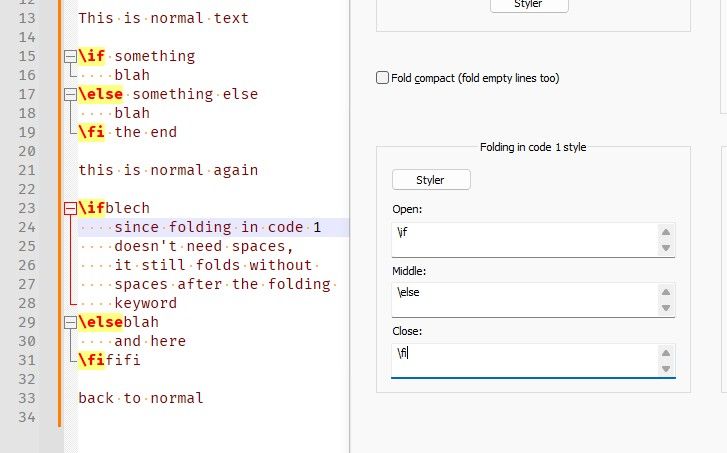
My idea was then to try to set the “\if*” command as an opening operator, “\fi” as closing one and “\newif” as an escape sequence
There aren’t escape sequences in the folding, so have you switched to a delimiter rather than folding? If you have
\ifin both folding and in the delimiter section, the folding will “win” (Notepad++ parses things in a specific order, so if it recognizes it as a folding sequence, it won’t get a chance to see if it’s a delimiter).And
*doesn’t mean “wildcard”, even in the delimiters.But I don’t think you want delimiters, because that will highlight everything from the OPEN to the CLOSE of the delimiter as being part of that… Delimiters are for things like
"blah blah blah"and'something goes here' and(one, two, three)`, so that everything from the open to the close it treated as a single unit. I would assume that you don’t want everything within the if-fi to be treated similar to a string.UDL seems to recognise only single escape characters.
Not true. The escape is a sequence that goes before a CLOSE to make it not close, so you have to use it as such.
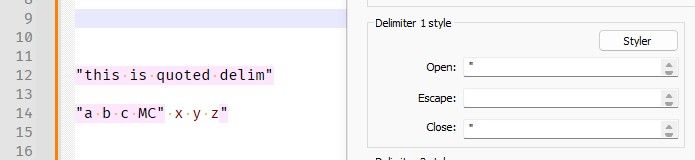
For example, if you have OPEN and CLOSE for delimiter as
"double-quote marks, then normally"a b c MC" x y z"would stop the string at the"after the MC:
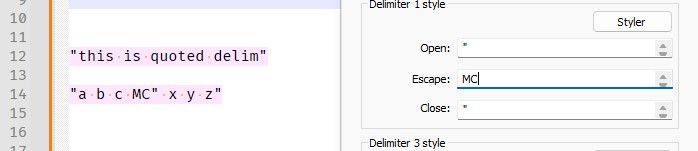
… but if you use the ESCAPE value of MC (which is obviously multi-character), then if that escape goes right before the quote, then the escaped quote won’t be treated as a CLOSE token, and the string will go all the way to the
z"at the end:
-
new custom “\if*” (”\newif\if*”)
Hmm, re-reading, I am wondering if I have misunderstood. Maybe the asterisk really is a literal part of your syntax. And you weren’t treating it as a wildcard, because
\newifdoesn’t match the pattern implied by you thinking of asterisk as a wildcard.Maybe if you showed a small snipped of code (use the
</>button in the toolbar to give a place between ``` to paste something like quote-delimiter-MCescape example, or my if/else/fi example:``` "this is quoted delim" "a b c MC" x y z" ``` or ``` \if something blah \else something else blah \fi the end ```And also show a screenshot (you can just paste the screenshot directly into your reply from your Windows clipboard), which shows the syntax-highlighted text in N++ plus the relevant portion of the UDL dialog (similar to my screenshot), it would help with understanding.
-
@PeterJones Thanks for your suggestions.
Just to clarify: the * was a wildcard character that I added only in the question (ok, I tried to use it also in the UDL, but I quickly realized that it didn’t work).
I will now try to add some code with some examples of what should be detected and what should not (I will use LaTex comment character % to comment and flag what I wnat to detect and what I do not want):% Start of example one \ifnum 2=1 % standard default if; SHOULD be detected % Do something \else % Do something else \fi % Start of example 2 \ifcsname c@chapter\endcsname % another standard/default if; SHOULD be detected % Do something \fi % Start of example 3 \newif\ifcustomswitch % custom switch/flag declaration; should NOT be detected \ifcustomswitch % custom switch check; SHOULD be detected % do something \fi % Start of example 4 \newif\if@customswitch % another custom switch/flag declaration (yeah, sometimes we can use the @ character); should NOT be detected \if@customswitch % custom switch check; SHOULD be detected \fi % Start of example 5 \fill \filename \find % these are all commands that start with "\fi" but do not end the "\if*"/"\fi" part; they should NOT be detected(please note how there is no space between “\if” and the name of the switch/flag, but there should be a space after “\fi”)
-
I am still not sure what you want for FOLDING and what you want for KEYWORD and what you want for DELIMITER and what you don’t want detected at all.
But at this point, I’m guessing that what you want is too complicated for the simplistic keyword/token matching used for UDL. For FOLDING, it’s designed to either match spaces-not-needed so the open/mid/closing all don’t require spaces, or to match spaces-required so the open/mid/closing all do require spaces; it is not meant to mix, so that the open doesn’t require spaces but the close does.
The easiest workaround is what you already know: enumerate them all. I don’t think you’re going to find a better solution.

Hello! It looks like you're interested in this conversation, but you don't have an account yet.
Getting fed up of having to scroll through the same posts each visit? When you register for an account, you'll always come back to exactly where you were before, and choose to be notified of new replies (either via email, or push notification). You'll also be able to save bookmarks and upvote posts to show your appreciation to other community members.
With your input, this post could be even better 💗
Register Login