Trying to get python script and testfx.
-
I have version 4.2. Was told to go to “Plugins/plugin manager”. I don’t even see plugin manager.
-
@kehagen said in Trying to get python script and testfx.:
I have version 4.2
Of what? v4.2 of Notepad++? Really? That’s ancient. Notepad++ is up to v7.8.1. Looking back through the history, v6.2.3 (the oldest version downloadable from the official downloads page) was released in December of 2012: seven years ago now!
I happened to have downloaded copies of 4.0 and 6.0 before the Notepad++ website moved hosts and purged most of the old versions; I can see that 4.0 didn’t come with Plugin Manager but 6.0 did. (4.0 came with TextFX; the ANSI (non-Unicode) version of 6.0 came with TextFX as well).
You’re going to find, even if you had a Plugin Manager for a version that old, that likely the versions of those plugins now available would not work with a Notepad++ that old.
Do you have a reason for not upgrading to a recent Notepad++? v7.6.3 (from Jan 2019) and newer come with a builtin Plugins > Plugins Admin rather than using the old externally-maintained “Plugin Manager”. If you grab the 32-bit version of Notepad++, the Plugins Admin will be able to install the TextFX plugin.
However, there are some known issues with certain features of PythonScript in the newest Notepad++ v7.8.x. Many things still work; but there are a few features (including notifications/callbacks) which might not work for you with 7.8; in which case, Notepad++ v7.7.1 should work for you.
For your circumstances, I highly recommend installing the 32-bit x86 installer of v7.7.1, then using Plugins Admin to install TextFX; then follow this Guide for installing PythonScript. (The name of that guide mentions v7.6.3 and v7.6.4, but it’s still a valid guide as of v7.7.1 and v7.8.1.)
-
This post is deleted! -
@PeterJones said in Trying to get python script and testfx.:
then follow this Guide
It should be noted that the Guide is starting to show its age: the PythonScript plugin has moved a few versions beyond the v1.3 linked there. https://github.com/bruderstein/PythonScript/releases/ will allow you to pick from various releases.
For Notepad++ v7.7.1, it appears the recommended PythonScript is v1.4.0. For Notepad++ v7.8.1, it looks like PythonScript v1.5.2 is your best bet.
-
I guess the recommended ps version for npp >= 7.7 should be 1.5.2
as this version has scintilla updates, introduced by npp 7.7, as well. -
@Ekopalypse said in Trying to get python script and testfx.:
as this version has scintilla updates, introduced by npp 7.7, as well.
Hmm, the reason I said the other is because the release notes say on 1.5.0 and beyond, “N++ 7.8 is needed to be able to load the python2.7 dll from plugin dir”… which implies to me that 1.5.x won’t work on NPP 7.7.1. I haven’t tried it yet, but that’s why I was making that recommendation.
if someone can prove me wrong, that’s great.
-
gimme a sec
-
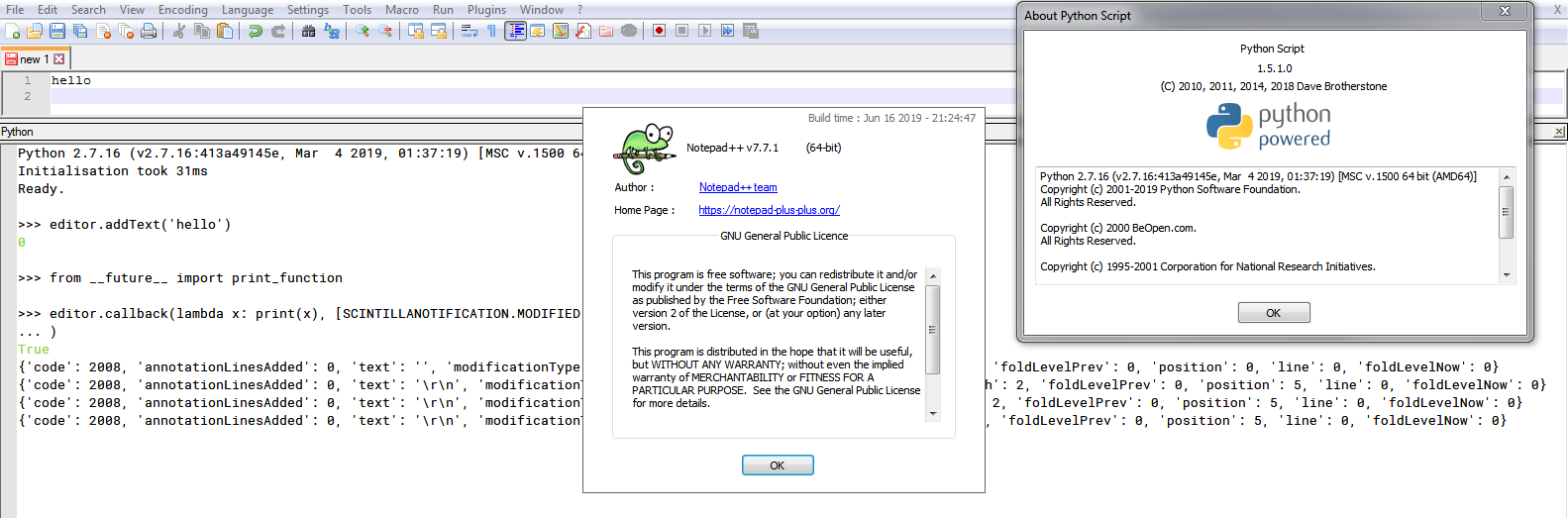
It works BUT the python27.dll must be copied to the directory where notepad++.exe is.
-
Okay, thanks for the confirmation.
So, going back to the OP’s issue: what are the correct install instructions for NPP v7.7.1 or NPP v7.8.1 with PythonScript v1.5.2?
-
For both npp versions
- create PythonScript folder under plugins directory
Npp >= 7.8
- download PythonScript 1.5.2 zip and extract it to newly created PythonScript folder -> done.
Npp >= 7.7 and < 7.8
- download PythonScript 1.5.2 zip and extract it to newly created PythonScript folder
- move Python27.dll from PythonScript folder to notepad++.exe directory.
-> Done.



Hello! It looks like you're interested in this conversation, but you don't have an account yet.
Getting fed up of having to scroll through the same posts each visit? When you register for an account, you'll always come back to exactly where you were before, and choose to be notified of new replies (either via email, or push notification). You'll also be able to save bookmarks and upvote posts to show your appreciation to other community members.
With your input, this post could be even better 💗
Register Login