icon (disk) on non active tab
-
After changing content of current displayed text, the icon (disk) on tab change color from blue to red telling this file is changed. Moving to a different file a new tab is activated, the old one is disactivated and its icon (disk) color becomes a kind of dark blue, to close to other unchanged files color icon.
Is it possible to change the icon to better mark the changed file for non active tabs? -
Yea, it is rather bad, isn’t it.
Who even knows what a floppy disk is anymore?There’s a ticket for changing the tab bar icons, here:
https://github.com/notepad-plus-plus/notepad-plus-plus/issues/8068
But AFAICT there’s not been action on it.
It appears to propose a shape+color approach, instead of just the current color change approach for the various file types (normal, readonly, edited, monitored).There’s a hint in that ticket about using something called Resource Hacker to improve the situation, maybe I’ll look into that and post back here, as I would like to have better tab icons myself.
-
So, here’s a procedure for “hacking” Notepad++ in order to get better-looking and easier-to-differentiate tab bar icons.
First, get what is needed, and put everything together in a temporary folder somewhere:
-
Obtain “Resource Hacker” from http://angusj.com/resourcehacker/
I chose the ZIP install, but whatever your pleasure.
Really what you need in this step isResourceHacker.exe -
Get some replacement icons, by downloading:
http://www.famfamfam.com/lab/icons/silk/famfamfam_silk_icons_v013.zip
Extract these files only:accept.png,lock.png,pencil.png -
Use an online conversion tool to convert all 3 of the .png files to .ico files
One that I found simple to use was: https://icoconvert.com/
Name the resulting .ico files this way:accept.ico,lock.ico,pencil.ico -
Also add to this collection of files a copy of your usual
notepad++.exefile.
Next, and also in the same folder, create
hack_npp_icons.txtwith the following content:[FILENAMES] Open=notepad++.exe Save=notepad++_hacked_icons.exe Log=con [COMMANDS] -modify accept.ico,ICONGROUP,501,1033 -modify pencil.ico,ICONGROUP,502,1033 -modify lock.ico,ICONGROUP,503,1033Now, obtain a CMD.exe window in your temporary folder (not going to do a lot of hand-holding here) and run the following command:
ResourceHacker.exe -script hack_npp_icons.txtIf all goes well, you should end up with no error messages and a new file called
notepad++_hacked_icons.exein your folder.Copy the hacked exe back to the folder you copied your original
notepad++.exefrom.Now test-run the hacked exe (after closing any running instance of N++ of course).
It should start and any tabs on the tab bar should now have the alternative icons:
-
A “pencil” icon for modified but unsaved files:
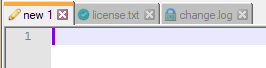
-
A “green checkbutton” icon for saved files:
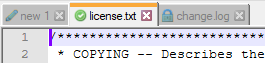
-
A “lock” icon for readonly files:

-


Hello! It looks like you're interested in this conversation, but you don't have an account yet.
Getting fed up of having to scroll through the same posts each visit? When you register for an account, you'll always come back to exactly where you were before, and choose to be notified of new replies (either via email, or push notification). You'll also be able to save bookmarks and upvote posts to show your appreciation to other community members.
With your input, this post could be even better 💗
Register Login