Community
    • Login

    Find, Replace, and Count

    Scheduled Pinned Locked Moved General Discussion
    26 Posts 3 Posters 3.4k Views 1 Watching
    Loading More Posts
    • Oldest to Newest
    • Newest to Oldest
    • Most Votes
    Reply
    • Reply as topic
    Log in to reply
    This topic has been deleted. Only users with topic management privileges can see it.
    • EkopalypseE Offline
      Ekopalypse @Javier Rivas
      last edited by

      @Javier-Rivas

      not natively but with using PythonScript plugin
      and techniques described here you can achieve it.
      Let us know if you wanna go this road.

      Javier RivasJ 2 Replies Last reply Reply Quote 2
      • Javier RivasJ Offline
        Javier Rivas @Ekopalypse
        last edited by

        @Ekopalypse Yes, I don’t mind that at all, how would I get started with this

        EkopalypseE 1 Reply Last reply Reply Quote 0
        • Javier RivasJ Offline
          Javier Rivas @Ekopalypse
          last edited by

          @Ekopalypse I read over it, but I am a bit confused on how to set this up. What goes where, saved in what, I did install Pythons Script Plugin and the Python.exe

          1 Reply Last reply Reply Quote 0
          • EkopalypseE Offline
            Ekopalypse @Javier Rivas
            last edited by

            You only need python script plugin, it contains the python library.

            Create a new script by using plugin->pythonscript->new script
            give it a meaningful name and save it.
            Put the following content into it.

            from Npp import editor
            
            add_this = 1000000 - 60
            
            def add_60(m):
                global add_this
                add_this += 60
                return add_this
            
            editor.replace('FZ', add_60)
            

            Save it. Done.
            Execute it via plugin->pythonscript->scripts->NAME_YOU_CHOSE

            Javier RivasJ 1 Reply Last reply Reply Quote 3
            • EkopalypseE Offline
              Ekopalypse
              last edited by Ekopalypse

              If you need it more often you can assign a keyboard shortcut
              or create a toolbar icon by using the configuration menu from pythonscript plugin menu and shortcut mapper.

              Javier RivasJ 1 Reply Last reply Reply Quote 1
              • Javier RivasJ Offline
                Javier Rivas @Ekopalypse
                last edited by

                @Ekopalypse Yes, I would be using a lot, and I follow the steps and I don’t see how to choose the name I saved it as

                OK, I found how to add short cuts, but can’t find my saved name under your steps

                1 Reply Last reply Reply Quote 0
                • Javier RivasJ Offline
                  Javier Rivas @Ekopalypse
                  last edited by

                  @Ekopalypse all I see is Sample and Startup

                  1 Reply Last reply Reply Quote 0
                  • EkopalypseE Offline
                    Ekopalypse
                    last edited by Ekopalypse

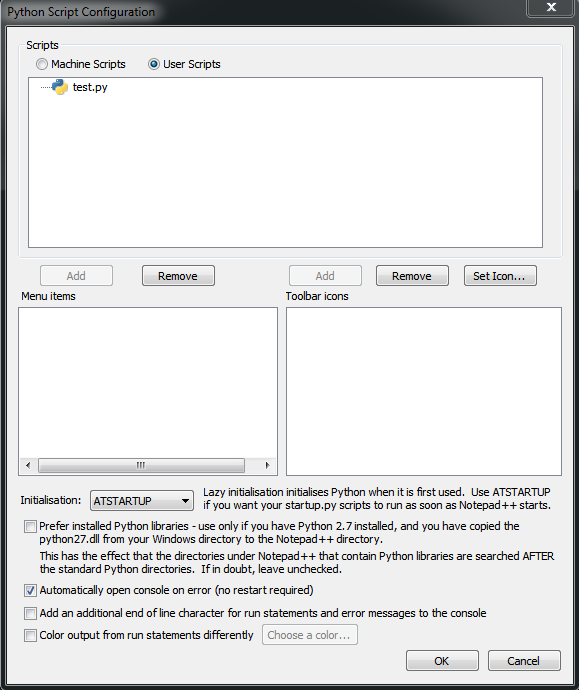
                    did you click on User Scripts?

                    1a6e1eb9-e6de-4960-9e2d-f495452be7ac-image.png

                    and before you can assign a shortcut or see the icon in the toolbar, you have to restart npp, because npp reads/retrieves this information only at startup.

                    Javier RivasJ 1 Reply Last reply Reply Quote 0
                    • Javier RivasJ Offline
                      Javier Rivas @Ekopalypse
                      last edited by

                      @Ekopalypse Yes

                      EkopalypseE 1 Reply Last reply Reply Quote 0
                      • EkopalypseE Offline
                        Ekopalypse @Javier Rivas
                        last edited by

                        @Javier-Rivas

                        Yes? It works now or still not seeing it?

                        Javier RivasJ 1 Reply Last reply Reply Quote 0
                        • Javier RivasJ Offline
                          Javier Rivas @Ekopalypse
                          last edited by

                          @Ekopalypse sorry, don’t see it, and yes I click on user

                          EkopalypseE 1 Reply Last reply Reply Quote 0
                          • EkopalypseE Offline
                            Ekopalypse @Javier Rivas
                            last edited by

                            @Javier-Rivas

                            Can you post your debug info which is available from the ? menu?

                            Javier RivasJ 1 Reply Last reply Reply Quote 0
                            • Javier RivasJ Offline
                              Javier Rivas @Ekopalypse
                              last edited by

                              @Ekopalypse Notepad++ v7.9.1 (64-bit)
                              Build time : Nov 2 2020 - 01:07:46
                              Path : C:\Program Files\Notepad++\notepad++.exe
                              Admin mode : OFF
                              Local Conf mode : OFF
                              OS Name : Windows 10 Pro (64-bit)
                              OS Version : 2004
                              OS Build : 19041.746
                              Current ANSI codepage : 1252
                              Plugins : ComparePlugin.dll MarkdownViewerPlusPlus.dll mimeTools.dll NppConverter.dll NppExport.dll NppMarkdownPanel.dll NppToolBucket.dll PythonScript.dll _CustomizeToolbar.dll

                              EkopalypseE 1 Reply Last reply Reply Quote 0
                              • EkopalypseE Offline
                                Ekopalypse @Javier Rivas
                                last edited by Ekopalypse

                                @Javier-Rivas said in Find, Replace, and Count:

                                Local Conf mode : OFF

                                means that the scripts will be saved in
                                %APPDATA%\notepad++\plugins\config\pythonscript\scripts

                                You can copy and past this into an explorer and it should get you there. Do you see your script there?

                                1 Reply Last reply Reply Quote 0
                                • EkopalypseE Offline
                                  Ekopalypse
                                  last edited by

                                  Could it be that you named your script without the .py extension?

                                  Javier RivasJ Alan KilbornA 2 Replies Last reply Reply Quote 0
                                  • Javier RivasJ Offline
                                    Javier Rivas @Ekopalypse
                                    last edited by Javier Rivas

                                    @Ekopalypse Yes, I got it now, I have to add the .py to it did not know that
                                    Thank you very much I have my shortcut and it worked perfectly

                                    I thought just name it and save

                                    EkopalypseE 1 Reply Last reply Reply Quote 1
                                    • EkopalypseE Offline
                                      Ekopalypse @Javier Rivas
                                      last edited by

                                      @Javier-Rivas said in Find, Replace, and Count:

                                      I thought just name it and save

                                      I was sloppy there, sorry.

                                      Javier RivasJ 1 Reply Last reply Reply Quote 0
                                      • Javier RivasJ Offline
                                        Javier Rivas @Ekopalypse
                                        last edited by

                                        @Ekopalypse Hey so is there a way to edit what was saved in notepad++, because as weeks go by I would have to edit the script and add a new timestamp to it, the 100000 represents a timestamp so it was just an example, everything else works great

                                        EkopalypseE 1 Reply Last reply Reply Quote 0
                                        • EkopalypseE Offline
                                          Ekopalypse @Javier Rivas
                                          last edited by

                                          @Javier-Rivas

                                          Yes of course, press CTRL and click the script.
                                          Works as long as you do NOT assign a CTRL+KEY shortcut.

                                          EkopalypseE 1 Reply Last reply Reply Quote 1
                                          • EkopalypseE Offline
                                            Ekopalypse @Ekopalypse
                                            last edited by

                                            @Ekopalypse

                                            By the way, is the timestamp calculable?

                                            Javier RivasJ 1 Reply Last reply Reply Quote 0

                                            Hello! It looks like you're interested in this conversation, but you don't have an account yet.

                                            Getting fed up of having to scroll through the same posts each visit? When you register for an account, you'll always come back to exactly where you were before, and choose to be notified of new replies (either via email, or push notification). You'll also be able to save bookmarks and upvote posts to show your appreciation to other community members.

                                            With your input, this post could be even better 💗

                                            Register Login
                                            • First post
                                              Last post
                                            The Community of users of the Notepad++ text editor.
                                            Powered by NodeBB | Contributors