document jumps out of sight because shorter than scrollbar thinks
-
Longtime Notepad++ user, but first time on 64-bit or on Win10 (Pro x64). Wordwrap on. Version 7.9.5
Maddening issue I never experienced before:With the cursor at the end of the document, even if the document takes up just a fraction of the window, the window’s scroll bar shows it taking up more that the whole window. In other words, the scroll bar only takes up part of the vertical real estate between the arrows.
So I find the screen frequently jumping down so I can’t see what I’ve already typed. Which is just not necessary when the document only takes up a fraction of one window.
Please tell me how I can resolve this.
(It doesn’t happen on the default Notepad app.)
-
Do you have the following Settings => Preferences… enabled (checked):
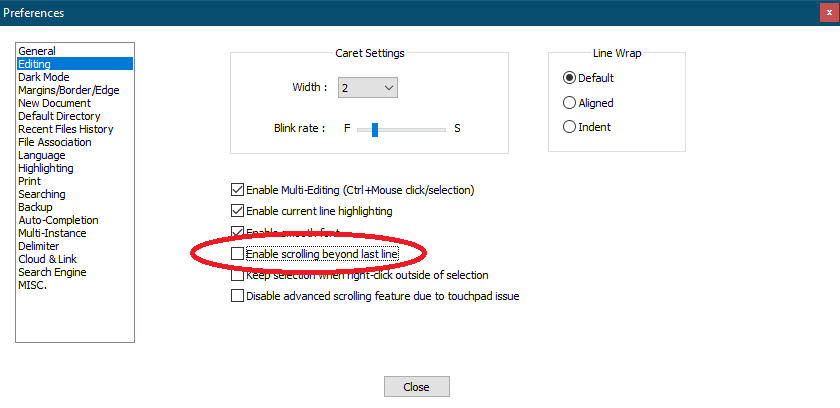
Try unchecking it like my setup.
Cheers.
-
A visual of the problem would help a lot. However it sounds vaguely similar to this posting. Is that like your issue?
If so then currently we don’t have a solution. Although if you read this and other posts the display driver update seems to fix temporarily.
Terry
-
@Michael-Vincent That solved it, thank you a billion times!!!
@Terry-R Wow, thank goodness I don’t have THAT problem, how bizarre!


Hello! It looks like you're interested in this conversation, but you don't have an account yet.
Getting fed up of having to scroll through the same posts each visit? When you register for an account, you'll always come back to exactly where you were before, and choose to be notified of new replies (either via email, or push notification). You'll also be able to save bookmarks and upvote posts to show your appreciation to other community members.
With your input, this post could be even better 💗
Register Login