Function list not working
-
Hi,
the function list is not working for me an I can’t understand why not. No error message, only empty function list.
The local conf mode is ON.I have added this to the overrideMap.xml:
<association id= "pml.xml" userDefinedLangName="PML"/>this is my pml.xml (in …/Notepad++/functionlist
<?xml version="1.0" encoding="UTF-8" ?>
<NotepadPlus>
    <functionList>
        <parsers>
			<parser
				displayName="PML"
				id         ="pml_function"
				commentExpr="(--$*)"
			>
                <function
                mainExpr="^define method"
                displayMode="$functionName$">
                <functionName>
                    <nameExpr expr=".*"/>
                </functionName>
				</function>
            </parser>
        </parsers>
    </functionList>
</NotepadPlus>
After some tests I reduce the regex to simple expression to see something :-(
Here is an example of my PML code( for AVEVA programming language)Here is an example of my pml code:
define method .goto()
	!Selection = !this.elements.Selection()
	if !Selection.empty() then
		!!alert.error('Noting selected!')
		return
	elseif !Selection.size() gt 1 then
		!!alert.error('More then 1 Element selected. Goto is not possible')
		return
	endif
	!!CE = !Selection[1].dbref()

endmethod
The method goto should be in the function list
I hope someone can help me that I can see something in the function list, that I finalize the regex expr. Unfortunately I am not familiar with regex :-(, but I want to learn
Greetings, Peter -
To get a working function list you also need to define a User Defined Language (UDL), i.e. a user defined lexer for syntax highlighting. Have a look at the Notepad++ manual to learn how to do that.
-
Of course, I have forgotten, I have already. This PML.xml is in the …Notepad++\userDefineLangs and it works fine
<NotepadPlus> <UserLang name="PML" ext="pmldat pmlfrm pmlfnc pmlobj pmlmac pml mac pmlcmd" udlVersion="2.1"> <Settings> <Global caseIgnored="no" allowFoldOfComments="no" foldCompact="no" forcePureLC="0" decimalSeparator="0" /> <Prefix Keywords1="yes" Keywords2="no" Keywords3="no" Keywords4="no" Keywords5="no" Keywords6="no" Keywords7="no" Keywords8="no" /> </Settings> <KeywordLists> ... -
@p-r ,
You don’t say specifically which version of Notepad++ you have, but since you mention
overrideMap.xml, then I assume you are using Notepad++ v7.9.2 or newer. If this is correct, then you are not using the right syntax in the.../Notepad++/functionList/pml.xmlfile: there shouldn’t be a<parsers>...</parsers>wrapper around the<parser...>...</parser>. See the official references in the Online User Manual:- https://npp-user-manual.org/docs/function-list/
- https://npp-user-manual.org/docs/config-files/#function-list
When I remove that extra tag from the XML and reload Notepad++, it works for me:
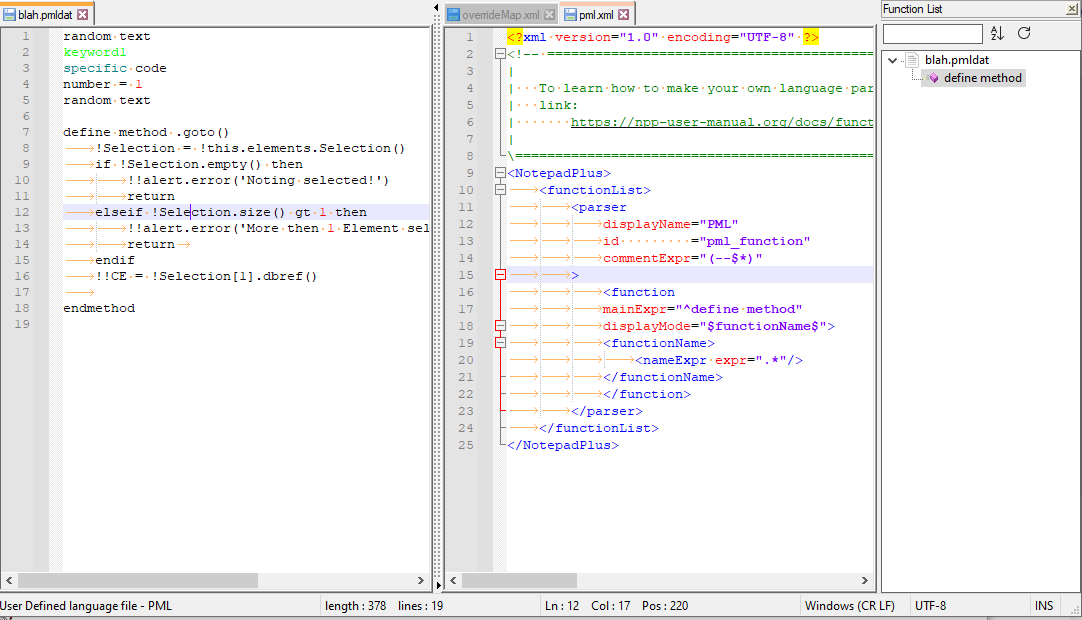
<?xml version="1.0" encoding="UTF-8" ?>
<!-- ==========================================================================\
|
|   To learn how to make your own language parser, please check the following
|   link:
|       https://npp-user-manual.org/docs/function-list/
|
\=========================================================================== -->
<NotepadPlus>
	<functionList>
		<parser
			displayName="PML"
			id         ="pml_function"
			commentExpr="(--$*)"
		>
			<function
			mainExpr="^define method"
			displayMode="$functionName$">
			<functionName>
				<nameExpr expr=".*"/>
			</functionName>
			</function>
		</parser>
	</functionList>
</NotepadPlus>
Well, it “works” in that it displays an entry for the one method defined in your example code. I don’t think you have the regex grabbing enough, so you’ll want to experiment with that. But this is enough to get you to the point where the functionList will display something
-
Expanded examples:
include “define method” in the FunctionList panel
<?xml version="1.0" encoding="UTF-8" ?>
<NotepadPlus>
	<functionList>
		<parser
			displayName="PML"
			id         ="pml_function"
			commentExpr="(--$*)"
		>
			<function
				mainExpr="(?x)                                              # Utilize inline comments (see `RegEx - Pattern Modifiers`)
						define                                              # literal text
						\s+                                                 # one or more spaces
						method                                              # literal text
						\s+                                                 # one or more spaces
						[\.A-Za-z_]                                         # a dot or letter or underscore
						[\.\w]*                                             # zero or more dot or word character (letter, underscore, number)
					"
			>
				<functionName>
					<nameExpr expr="(?x)                                              # Utilize inline comments (see `RegEx - Pattern Modifiers`)
						define                                              # literal text
						\s+                                                 # one or more spaces
						method                                              # literal text
						\s+                                                 # one or more spaces
						[\.A-Za-z_]                                         # a dot or letter or underscore
						[\.\w]*                                             # zero or more dot or word character (letter, underscore, number)
					" />
				</functionName>
			</function>
		</parser>
	</functionList>
</NotepadPlus>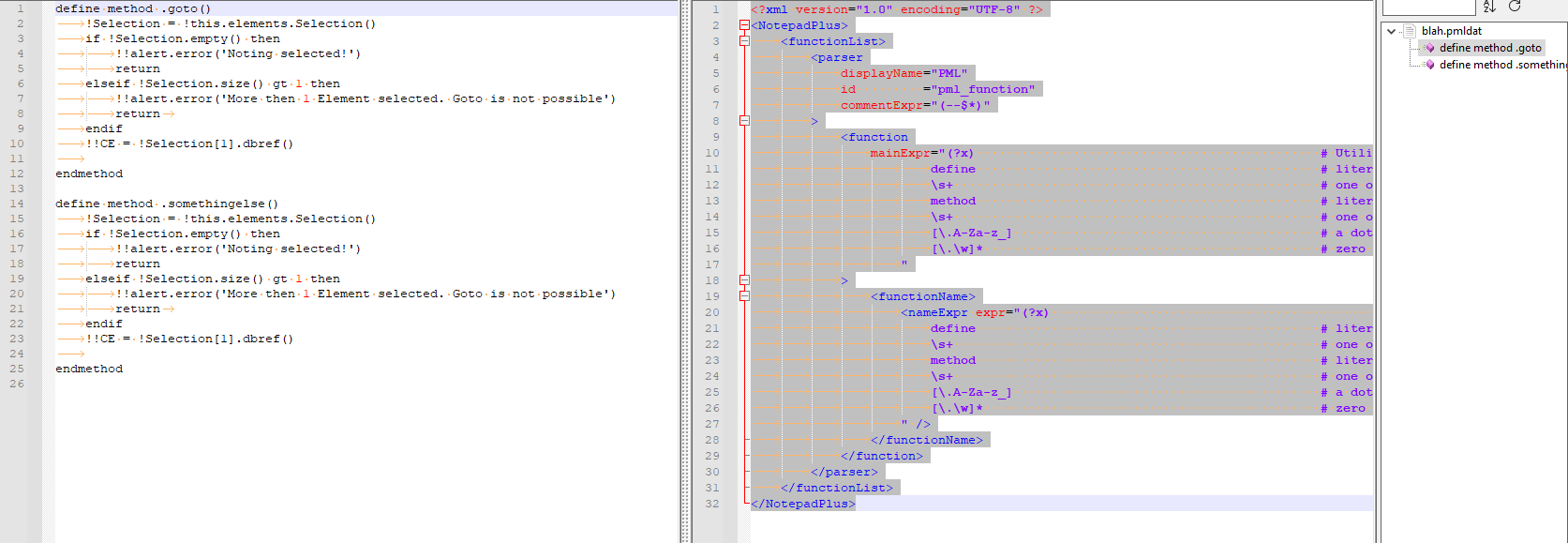
don’t include “define method” in the FunctionList panel
<?xml version="1.0" encoding="UTF-8" ?>
<NotepadPlus>
	<functionList>
		<parser
			displayName="PML"
			id         ="pml_function"
			commentExpr="(--$*)"
		>
			<function
				mainExpr="(?x)                                              # Utilize inline comments (see `RegEx - Pattern Modifiers`)
						define                                              # literal text
						\s+                                                 # one or more spaces
						method                                              # literal text
						\s+                                                 # one or more spaces
						[\.A-Za-z_]                                         # a dot or letter or underscore
						[\.\w]*                                             # zero or more dot or word character (letter, underscore, number)
					"
			>
				<functionName>
					<nameExpr expr="(?x)                                              # Utilize inline comments (see `RegEx - Pattern Modifiers`)
						define                                              # literal text
						\s+                                                 # one or more spaces
						method                                              # literal text
						\s+                                                 # one or more spaces
						\K                                                  # RESEST MATCH: only pattern _after_ here will be in FunctionList
						[\.A-Za-z_]                                         # a dot or letter or underscore
						[\.\w]*                                             # zero or more dot or word character (letter, underscore, number)
					" />
				</functionName>
			</function>
		</parser>
	</functionList>
</NotepadPlus>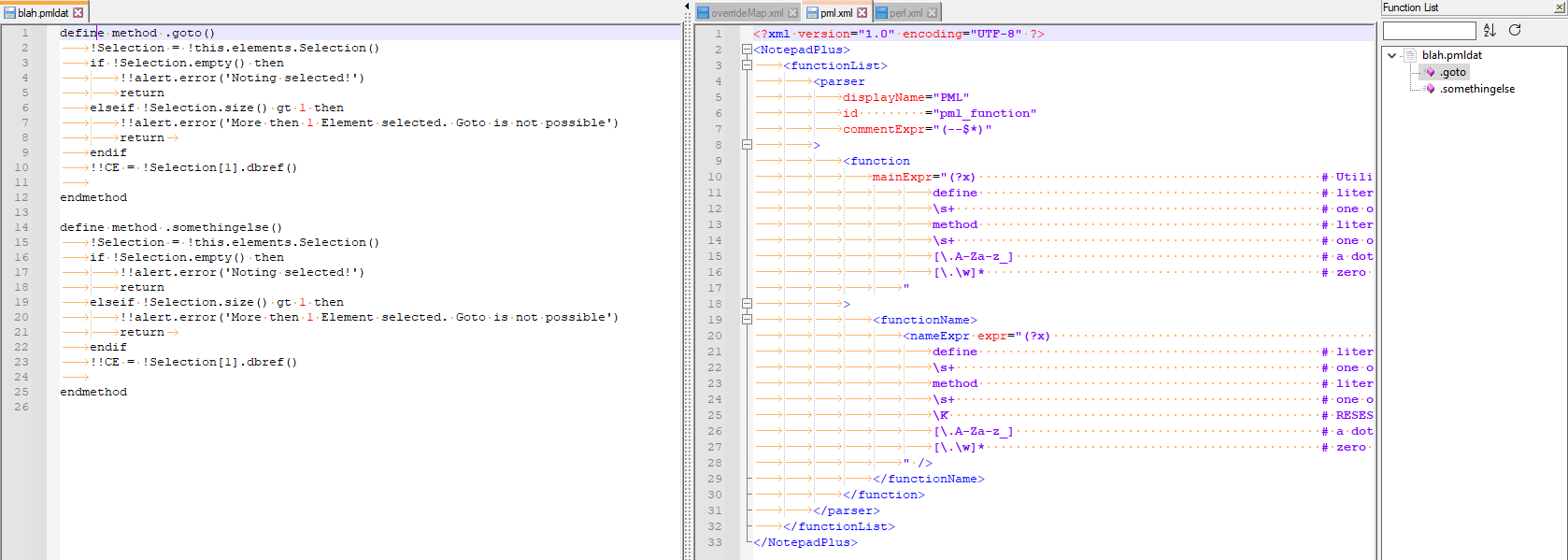
-
Thank you very much.
Wonderfull.
Yes, of course, the <parsers>…</parsers> was the problem… holy shit
Nice weekend
Greetings
Peter Ritzmann



Hello! It looks like you're interested in this conversation, but you don't have an account yet.
Getting fed up of having to scroll through the same posts each visit? When you register for an account, you'll always come back to exactly where you were before, and choose to be notified of new replies (either via email, or push notification). You'll also be able to save bookmarks and upvote posts to show your appreciation to other community members.
With your input, this post could be even better 💗
Register Login