Indentation from copy and paste of json not preserved
-
I was issued a new Dell Latitude laptop for work and NotePad++ is an app we must grab from the IT app publisher. On my old laptop, with the same version of NP++, if I copy a json file and paste it into NP++, all the indentation is preserved. On my new laptop with a new install of NP++ (same version) if I copy and paste a setting, all indentations are collapsed. I have gone through every setting on the ‘old’ install and matched it to the new. What is am I doing wrong. TYIA for any help you can provide me. I am not a ‘tech’ person and at a loss!
-
I have gone through every setting on the ‘old’ install and matched it to the new.
Have you compared the ?-menu’s Debug Info on the two? Maybe there’s a different plugin on the old that you don’t have on the new (or different setting in one of those plugins)
Have you done a detailed check of the Settings > Preferences > Language dialog’s Tab Settings section? Each different language has a different setting. The important ones for JSON are
[Default]andjson
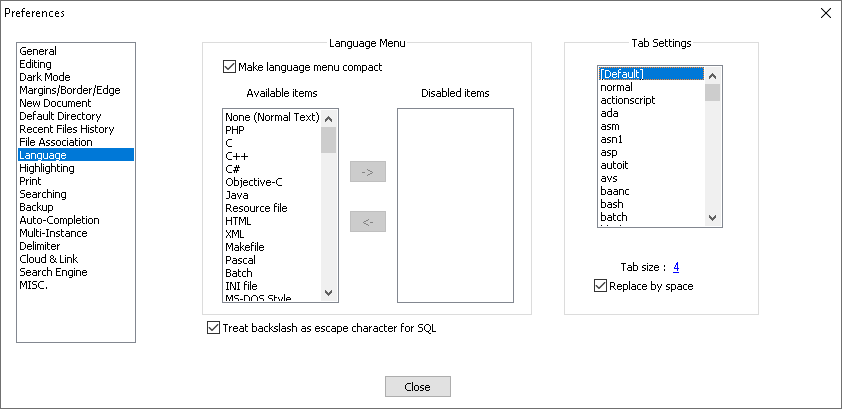
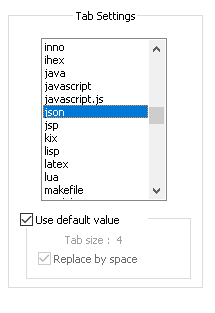
Also, did you select the main menu > Language > J > JSON before pasting? That would affect the tab options while editing.
Though really, a paste should preserve the existing indentation, no matter what type of file it’s pasting into, and no matter what Tab settings are defined. So my best guess is still a plugin.


Hello! It looks like you're interested in this conversation, but you don't have an account yet.
Getting fed up of having to scroll through the same posts each visit? When you register for an account, you'll always come back to exactly where you were before, and choose to be notified of new replies (either via email, or push notification). You'll also be able to save bookmarks and upvote posts to show your appreciation to other community members.
With your input, this post could be even better 💗
Register Login