Need help with regex Chinese numbers
-
Hello there, I’m sorry for my bad at English, but I really need you guys for help.
I have a bunch of novel text have this problem, example like this:
第一章  <-(this mean Chapter 1,章 mean Chapter, 第 not really important)
第八十一章 <-(this mean Chapter 81)
I want to change the construct of text from:
第一章
to
章:一

第八十一章
to
章:八十一
Many thanks.
-
@Bạch-Lão-Bản
may be test something like the following:
Search pattern:(第)([八十一])+(章)Replacement pattern:
\3:\2You will have to add more numbers to the list in the middle of the search pattern.
See https://regexr.com/ or any other regular expression page for detailed information. -
Hello, @bạch-lão-bản, @Stefan-pendl and All,
Not difficult with regular expressions ! Basically, you have this kind of text :
- The
第char, then a range, possibly null, of character(s), then the一章characters
And you expect :
The
章:char, followed with this same range of char(s) and ending with the一char
In regex language, this can be coded as :
SEARCH
(?-s)第(.*)一章REPLACE
章:\1一So :
-
Open the Replace dialog (
Ctrl + H)-
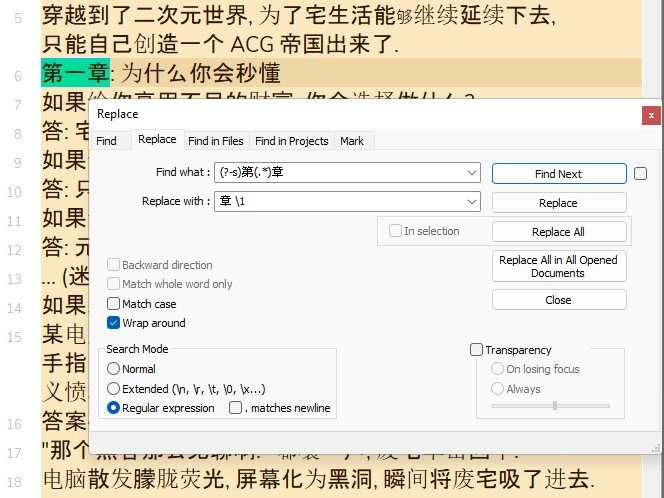
SEARCH
(?-s)第(.*)一章 -
REPLACE
章:\1一 -
Tick the
Wrap aroundoption -
Select the
Regular expressionsearch mode -
Click once the
Replace Allbutton or hit theAlt + Ashortcut
-
-
Close the Replace dialog (
Esc)
Notes :
-
The
(?-s)part forces the regex engine to consider any dot regex symbol (.) as matching a single standard character ( notline-breakones ! ) -
Then, the part
.*represents any, possibly null, range of standard characters, between the第char and the一char. As it is embedded between parentheses, it is stored and can be re_used, either in the Search regex part with the\1syntax or in the Replace regex part with the\1or$1or${1}syntaxes -
The four characters
第,章,:and一are just literal chars to be searched and replaced as it is !
Best Regards,
guy038
- The
-



Hello! It looks like you're interested in this conversation, but you don't have an account yet.
Getting fed up of having to scroll through the same posts each visit? When you register for an account, you'll always come back to exactly where you were before, and choose to be notified of new replies (either via email, or push notification). You'll also be able to save bookmarks and upvote posts to show your appreciation to other community members.
With your input, this post could be even better 💗
Register Login