Mistakenly clicking Close All BUT options
-
Hi
Quite a few times I have want to close a doc but mistakenly clicked on the doc context (right-click) menu “Close All BUT This” option which is adjacent.
This ends up being a real pain as the Recent files list is not long enough to restore all the files (and that’s if I could even recall which ones I had open).
Is there any way of hiding these near opposite bulk actions, or moving them to a nested sub menu?
-
@mr-brunes said in Mistakenly clicking Close All BUT options:
Is there any way of hiding these near opposite bulk actions, or moving them to a nested sub menu?
This is actually quite a good idea.
I’ve never actually executed an unintended one myself, but I could see it happening (and I’ve considered it a few times as I’m heading toward the Close option with the mouse).Why don’t you open an official feature request for it? Instructions for doing so are found HERE.
-
@alan-kilborn Tx for the tip on opening a new request. I couldn’t find an existing one so I’ve filed this:
https://github.com/notepad-plus-plus/notepad-plus-plus/issues/10776 -
@mr-brunes
Just want to point out three other options to close tabs which will most likely prevent you from missleading clicks.- Use close button on each tab. I think this setting is enabled by default.
- Use double click to close document. Double click on tab will close document.
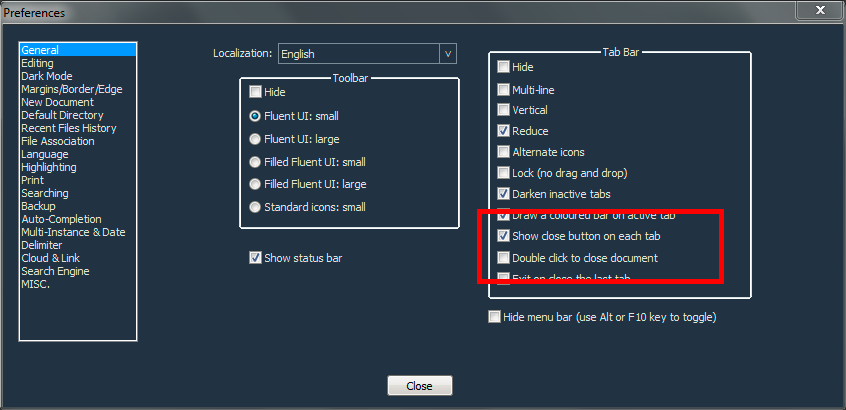
- Use close button in upper right corner to close tabs.

Additionally all of those methods don’t need the right click to open the context menu. Less work.
-
@markusbodensee Tx for the info but I don’t use the tab bar, I just use the Document List as it allows all my doc filenames to be displayed stacked vertically, which tabs do not permit.
-
Tx to whoever for implementing a solution to https://github.com/notepad-plus-plus/notepad-plus-plus/issues/10776 in v8.4.6 (though I didn’t spot it in the readme) i.e. a new contextual “Close Multiple Tabs” nested menu option which moves potentially destructive operations away from an easy mis-click.
:-)



Hello! It looks like you're interested in this conversation, but you don't have an account yet.
Getting fed up of having to scroll through the same posts each visit? When you register for an account, you'll always come back to exactly where you were before, and choose to be notified of new replies (either via email, or push notification). You'll also be able to save bookmarks and upvote posts to show your appreciation to other community members.
With your input, this post could be even better 💗
Register Login