Convenience technique when organizing PythonScripts into folders
-
So being someone that has a lot of Notepad++ Pythonscripts…I need to apply some organizational techniques to keep them, well, organized. What this means basically is that I like to create folders for them, based upon what they do.
I’ve probably taken this to a bit of an extreme(!), but here’s what my
Plugins>PythonScript>Scriptsmenu looks like: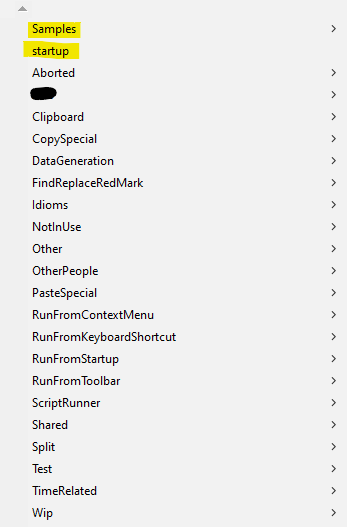
I’ve highlighted in yellow the entries that PythonScript has put there by default; the rest are mine and as you can see, a lot of new folders I’ve created here…(you can tell they are folders by the
>off to the right).I’ve noticed that if I want to use a script from one of these folders in a script that lives in another folder, by default Notepad++ won’t be able to find it, example:
import NotepadGetStatusBarin one script can result in this error at runtime (this is a real-world example from the script I show HERE ):
Now sure, there are ways to avoid this problem by including path information on the import, but, ok, that’s annoying because I have to look up that path, and then what if I move some scripts around later based upon, I don’t know, maybe a better way of categorizing them?
What I’ve done to avoid this is to add a bit of code to my
startup.pyso that one script can “find” another, without the need for any additional specification.The code looks like this:
import os

# add scripts folder tree to the sys.path list
#  (makes it easy to call a script anywhere in the tree by using only the script's base name)
for (root, dirs, files) in os.walk(notepad.getPluginConfigDir() + r'\PythonScript\scripts', topdown=False):
    if root not in sys.path:
        sys.path.append(root)
I’m showing this in the event that it helps someone else streamline their work and organize their scripts better, with minimal pain in the event they call one script from another.
-
I also use the following to add any python libraries to the PythonScript plugin install as well
libDir = r'C:\\Notepad++\\plugins\\PythonScript\\lib' try: sys.path.index(libDir) except ValueError: sys.path.append(libDir) -
While we’re on this general subject, if I add this code in:
for p in sys.path:
    if not os.path.isdir(p):
        print(p)
I see this (but leading paths removed) in the console after Notepad++ starts up:
...\npp.8.1.9.3.portable.x64\plugins\Config\PythonScript\lib
...\npp.8.1.9.3.portable.x64\plugins\PythonScript\lib\lib-tk
...\npp.8.1.9.3.portable.x64\plugins\PythonScript\python27.zip
...\npp.8.1.9.3.portable.x64\DLLs
...\npp.8.1.9.3.portable.x64\lib
...\npp.8.1.9.3.portable.x64\lib\plat-win
...\npp.8.1.9.3.portable.x64\lib\lib-tk
Now, I don’t “install” PythonScript, and I don’t need Tk, so I don’t manually install that, but some of these others seem a bit oddball.
Expecially the
DLLsandlibones, right off of the main N++ folder… -
@alan-kilborn said in Convenience technique when organizing PythonScripts into folders:
but here’s what my Plugins > PythonScript > Scripts menu looks like:
WOW, that’s a lot of scripts! Do you “share” them anywhere - GitHub for example?
Cheers.
-
@michael-vincent said in Convenience technique when organizing PythonScripts into folders:
Do you “share” them anywhere - GitHub for example?
Well, I share the ones that I think have general usage, or maybe something I’ve developed to answer a question here…and I share them, well, here on the Community.
I’ve thought about gists on Github, but haven’t gone there with them as yet.
-
I used to have all of my scripts in a private repo at some svn-based competitor to github that allowed free private repos. I would just check out that repo as my user scripts folder on any machine I’m working on, and automatically get all my scripts wherever I go.
As I started sharing more of my scripts, I played a bit with gists, but didn’t like that i had two copies of some scripts – one in the private repo and one in the gist.
I realized that I didn’t have any proprietary/private scripts (and if I did, I could put them in my system scripts folder instead), so I moved the repo to my github, so I can share any of them.
So it’s not Alan’s collection, but my collection is at https://github.com/pryrt/nppStuff/tree/main/pythonScripts … and the nppCommunity subdirectory is the ones I’ve developed for or snagged from this forum, mostly organized by topic-ID.
-
 A Alan Kilborn referenced this topic on
-
P PeterJones referenced this topic on


Hello! It looks like you're interested in this conversation, but you don't have an account yet.
Getting fed up of having to scroll through the same posts each visit? When you register for an account, you'll always come back to exactly where you were before, and choose to be notified of new replies (either via email, or push notification). You'll also be able to save bookmarks and upvote posts to show your appreciation to other community members.
With your input, this post could be even better 💗
Register Login