FILE Shoot Out Menu is TOO BIG
-
I click on FILE and MENU that shoots out covers my entire screen. Menu says NEW, SAVE, etc. How to remedy? Can not upload picture, says file not supported.
-
My guess is that you’ve got Recent File History in the main File menu, rather than a submenu, and some longer path names. If you go to Settings > Preferences > Recent Files History and checkmark the ☑ In Submenu checkbox, it will move that list of recently-closed files into a submenu instead of the main menu
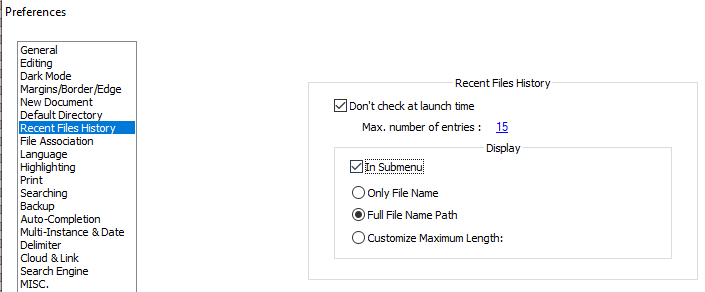
Mine goes from

to
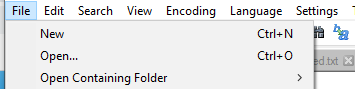
if I check that box.There are also other options in that same location that will affect the width, since “⦿ Only File Name” will be shorter (and thus the menu not as wide) compared to “⦿ Full File Name Path”, even if you leave the History in the main menu rather than in a submenu.
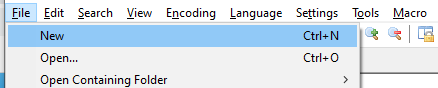
For that same menu, if it’s not In Submenu, but with Only File Name, my menu is only this wide:
-
@jdawg-jdawg said in FILE Shoot Out Menu is TOO BIG:
Can not upload picture, says file not supported.
Not sure what you tried to upload. If you just paste the image in, it works just fine. And I believe either gif or png can be dragged in or using the upload-image button, instead of pasting from the screenshot. But pasting from the screenshot is the easiest.
-
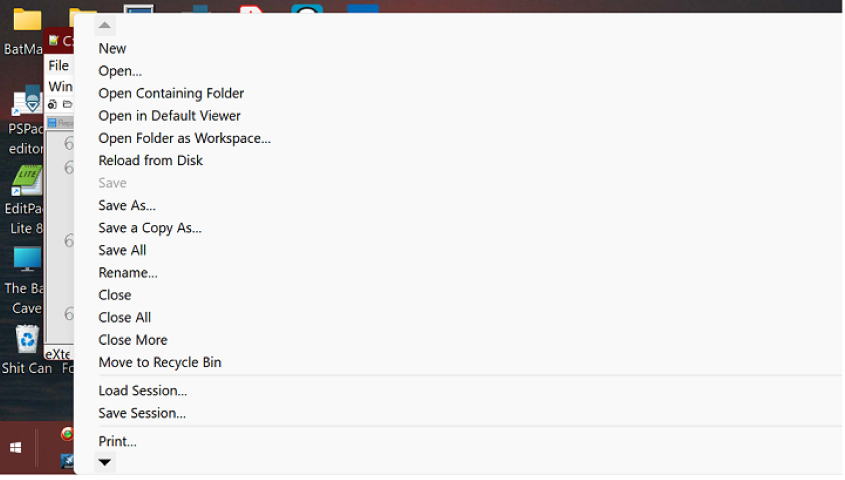
Thank you! You were absolutely CORRECT.
SOLVED.


Hello! It looks like you're interested in this conversation, but you don't have an account yet.
Getting fed up of having to scroll through the same posts each visit? When you register for an account, you'll always come back to exactly where you were before, and choose to be notified of new replies (either via email, or push notification). You'll also be able to save bookmarks and upvote posts to show your appreciation to other community members.
With your input, this post could be even better 💗
Register Login