Column Index of Pipelined Lines
-
Hello,
I have a line like that:
aaa|bbb|ccc|ddd|eee|fffI want it show me the zero based column index of clicked part.
For example:
when i click to bbb , i want to see 1,
when i click to eee, i want to see 4 on the app window.I have very long lines. It would be perfect to see its column index. Thank you.
-
If you are willing to use the PythonScript plugin to achieve this, a script that I call
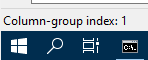
ShowDelimitedColIndexOnStatusBar.pyis shown below:# -*- coding: utf-8 -*- from __future__ import print_function # references: # https://community.notepad-plus-plus.org/topic/23501/column-index-of-pipelined-lines from Npp import * #------------------------------------------------------------------------------- class SDCIOSB(object): def __init__(self): self.debug = True if 0 else False editor.callback(self.updateui_callback, [SCINTILLANOTIFICATION.UPDATEUI]) def updateui_callback(self, args): self.print('UPDATEUI:', args) cp = editor.getCurrentPos() self.sb_output('Column-group index:', len(editor.getTextRange(editor.positionFromLine(editor.lineFromPosition(cp)), cp).split('|'))) # aaa|bbb|ccc|ddd|eee|fff def print(self, *args): if self.debug: #console.show() print('SDCIOSB:', *args) def sb_output(self, *args): # output to N++'s status bar (will be overwritten by N++ e.g. when active tab is changed) notepad.setStatusBar(STATUSBARSECTION.DOCTYPE, ' '.join(map(str, args))) #------------------------------------------------------------------------------- # to run via another file, e.g., startup.py, put these lines (uncommented and unindented) in that file: # import ShowDelimitedColIndexOnStatusBar # sdciosb = ShowDelimitedColIndexOnStatusBar.SDCIOSB() if __name__ == '__main__': SDCIOSB()When the script is active, it will show the information in the Notepad++ status bar:
Basic information about PythonScripting is found HERE.
-
 A Alan Kilborn referenced this topic on
-
@Deniz-Kasar said in Column Index of Pipelined Lines:
when i click to bbb , i want to see 1
Hm, it looks like what I provided would output a 2 in such a circumstance. Simple enough to change the
len(...)expression in the code tolen(...) - 1… -
@Alan-Kilborn
Waov, it is perfectly working. This solution is exactly what i look for. Thank you very much. -
@Alan-Kilborn
Hi Alan, i have one last a simple question.How can i set your script to run on startup? When i close and re-open NP++, your script needs to click to run.
-
A Alan Kilborn referenced this topic on
-
@Deniz-Kasar said in Column Index of Pipelined Lines:
How can i set your script to run on startup?
- see the instructions in the script code starting with
to run via another file… - and also references to
startup scriptHERE
- see the instructions in the script code starting with

Hello! It looks like you're interested in this conversation, but you don't have an account yet.
Getting fed up of having to scroll through the same posts each visit? When you register for an account, you'll always come back to exactly where you were before, and choose to be notified of new replies (either via email, or push notification). You'll also be able to save bookmarks and upvote posts to show your appreciation to other community members.
With your input, this post could be even better 💗
Register Login